We remain fully operational. Our teams are working around the clock to ensure your deliveries continue safely.

قم بتنزيل التطبيق


معلومات عنا
حقوق الطبع والنشر © 2024 Desertcart Holdings Limited
قم بتنزيل التطبيق


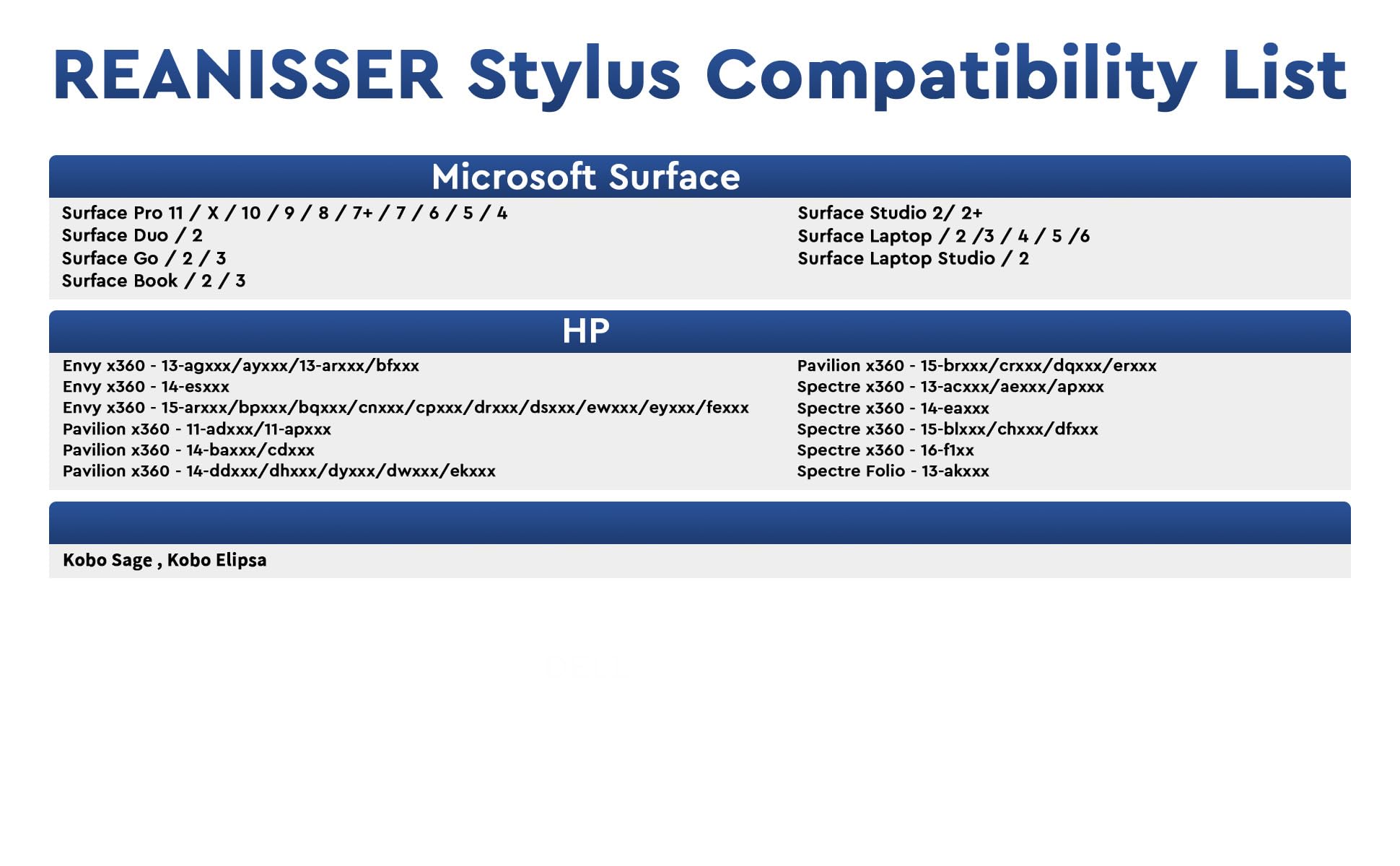

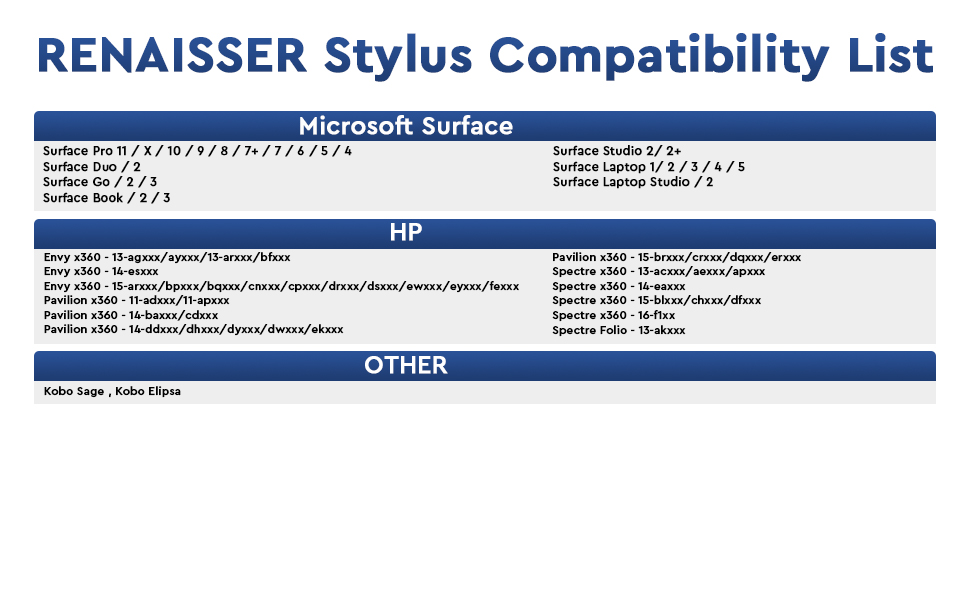
⚡ Elevate your Surface experience—write, draw, and create without limits!
The RENAISSER Raphael 510 Stylus Pen is a premium, ergonomically designed digital pen compatible with a wide range of Microsoft Surface devices and MPP-enabled laptops. Featuring 1024 pressure sensitivity levels, palm rejection, and an eraser button, it delivers precise, lag-free input. Its lightweight aluminum body ensures comfort during extended use, while USB-C fast charging offers up to 100 hours of battery life with smart power management. Designed in Houston and crafted in Taiwan, it combines quality craftsmanship with cutting-edge technology for professionals and creatives seeking a reliable, stylish stylus.


| ASIN | B0D4M7K2L2 |
| Batteries | 1 Lithium Ion batteries required. |
| Best Sellers Rank | #198 in Digital Pens |
| Customer Reviews | 4.0 4.0 out of 5 stars (377) |
| Date First Available | May 20, 2024 |
| Item Weight | 0.494 ounces |
| Item model number | Raphael 510 |
| Manufacturer | RENAISSER |
| Package Dimensions | 7.17 x 2.17 x 0.75 inches |
S**A
Works Great for ASUS Flow X16
Purchased Nov 2024 Functionality: This pen works very well with my laptop which is the ASUS Flow X16 (a laptop that flips to a tablet). This laptop isn't listed, so it'll be helpful to those considering buying it with an ASUS laptop. The Asus computer offers pen settings so you can change pen shortcuts. The button works well, although the pen's sleek slim design does make it hard to find the button when writing. To use the button I release my grip to find the button and press, then return to my grip. If you are an artist or plan to use this for taking notes, I doubt you'll use the button feature as much. The charging port is placed in a good position to charge your pen and use it at the same time. It also doesn't take long before the pen is charged enough to use. Feel: This pen feels slim. I was working with a larger pen stylus before, so the grip was something to adjust to. I would consider the size when purchasing to ensure it's a size you would be comfortable using. An advantage is that it fits in my narrow pencil pouch. Overall, very slick design. Feels like holding a pencil. Personal Experience: I use this pen to take notes for classes on Goodnotes and draw on Krita. The pen works very well for those apps. As previously mentioned, I don't use the button much since I haven't gotten used to it. The button is a good addition, but it doesn't make my experience any better. Overall, I would highly recommend purchasing this pen since it works as intended and is an affordable option.
B**S
As Good As The Orginal
Works really well, very easy to use, no bluetooth required and its very responsive. Its really easy to write and draw with this. And I love the eraser button too! Also came with 2 spare nibs (tips) Its very well made, great packaging and a bargain for the price. Also very magnetic and holds really well to the right side of my Pro X Very pleased with this. I note that it is made in Taiwan. Highly recommended…
S**U
Better than what came with my computer.
I have an hp spectre touch screen laptop that came with the original hp pen. For an entire year I tried using the original for college notes, art, etc. And it was totally dysfunctional. It would split lines, disconnect and the battery didn't last very long. I decided to give this one a shot and let me tell you after owning this one for over a year, it is miles better than the original product. It connected automatically straight out of the box, has an insanely long battery life, charges really fast, and has never given Me calibration issues.
S**O
Good pen
Pros: Pairs to my HP Envy 360 immediately upon turning it on No set up required Lightweight Has a flat side to prevent it from rolling around Light on the side to tell you when it's on off or low battery Rechargeable with a USBC cord (which comes with the pen or you can buy them basically anywhere) Charging port is out of the way so it doesn't press into your hand while writing Sleek-looking Cons: Buttons are at a weird place to access toggle buttons Have to turn on pen each time you use it Feels sort of thin Tip can come out sort of easily. Like it'll never come out on its own but it doesn't take a whole lot of pressure to pull it out. But maybe it's just my weirdly long fingers lol Overall this pen works pretty well. If it were to break I'd consider buying it again if nothing else wowed me.
M**Y
Not very sensitive
While the pen technically works, there are gaps when you are writng and inconsistent lines. It doesn't seem to work with one note commands and you can't change the color, thickness or anything about sketching. All you get is a thin black line. You can go back in later and cut and paste and change the formatting but who's going to do that? Not nearly as quality as an Apple pen that comes native to the iPad. This I am using on a PC but I'm wondering if the native PC pen is more responsive and works better with Windows 11. And also does not fit in the keyboard slot, and it's about an inch too long. Returning this item
V**.
Consistently Draws Lines Without Drawing on Screen
I bought two pens, and both drew lines without touching the screen and had pressure sensitivity levels that would be kept at 90-100% strength, making them useless to draw thin lines using variable pressure and impossible to write legible text. The reason I bought these is because HP doesn't sell replacement pen nibs for the stylus they gave me, however the stylus from HP works perfectly. These issues were experienced on two different laptops. Either drawing on either of my laptops for a second caused these pens to malfunction, the quality control is not good, or the company changed the pen design recently, since no other reviews found these problems. Apart from issues with using the pen, the pen's build quality is very good compared to HP's own MPP 2.0 stylus, as this one is made of aluminum and not crack-prone plastic. It also comes with a preinstalled soft tip and 3 extra hard tips, which makes tapping the screen more comfortable than some other brands. Unlike HP, there are standalone replacement tips for this pen. However, the magnets on the pen designed to hold it to an HP laptop are misaligned, suggesting that this particular model is just a rebranded version of the one made for Surface devices. This shouldn't explain why my two are malfunctioning because a MS Slim Pen, for example, functions perfectly on both the HP and the Surface. Just know that maybe quality control is to blame. In summary: - The build quality is good - Replacement pen tips are available for purchase with a few in the box included - The magnets are misaligned - There's a chance that yours will not work properly
K**E
Solid digital art pen
Top tier digital pen, nice comfortable size. Drawing with this pen is so much better than the surface pen, feels better on the screen. The pen is well made and easy to charge even though I haven't had to charge it much. I do wish it came in other colors but that's not s big deal, the black is fine.
H**N
Der Stift passt rein optisch perfekt zu meinem HP ENVY x 360 und hält durch das magnet auch am Gehäuse. Die Taste zum einschalten ist sehr elegant im Stift eingefügt und läßt sich sehr gut bedienen, aber steht nicht zu weit heraus. Die Reaktion auf dem Touchscreen ist sehr gut und man muss nur ganz leicht aufdrücken um zu tippen oder zu schreiben. Das mitgelieferte USB Kabel ist kurz, aber ausreichend und es sind sogar noch 2 ersatzspitzen dabei. Der Stift liegt zudem sehr gut in der Hand und hat wie ich finde die perfekte Größe. Ich bin völlig zufrieden und kann den Stift wirklich nur empfehlen.
M**A
Bought this as it is compatible with my Kobo! Works great! Charges fast and keeps charge for a LONG TIME! (Over a month). Magnets that connect it to the kobo and great quality!
D**E
Perfetta in tutto
N**W
Una muy buena opción para los Kobo Libra Colour. Es muy senzillo de utilizar y tiene una gran batería. Además se apaga solo si no lo usas, haciendo que dure mucho más su bateria.
A**G
Tut,was er soll. Eindrücklich gute Qualität und preiswert.
ترست بايلوت
منذ شهر
منذ 3 أسابيع