Desertcart purchases this item on your behalf and handles shipping, customs, and support to Israel.
✂️ Cut above the rest—craft smarter, not harder!
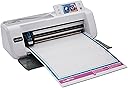
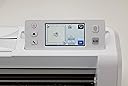
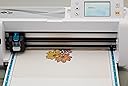
The Brother ScanNCut CM300 is a versatile smart cutting machine featuring an 11.7-inch cutting area and a built-in scanner that eliminates the need for extra software. With a bright color touchscreen and over 600 built-in designs, including quilt patterns and fonts, it empowers creative professionals to scan, customize, and cut a wide range of materials effortlessly. Compatible with iOS and Android, it’s designed for seamless integration into your creative workflow.


| Active Surface Area | 297mm |
| Asin | B0CJFY6NDW |
| Best Sellers Rank | 86,246 in Home & Kitchen (See Top 100 in Home & Kitchen) 13 in Die-Cut Machines |
| Brand | Brother |
| Colour | Off White |
| Country Of Origin | Vietnam |
| Customer Reviews | 4.3 4.3 out of 5 stars (57) 4.3 out of 5 stars |
| Item Dimensions D X W X H | 57.9D x 25.7W x 25.8H centimetres |
| Item Type Name | Paper cutting machine |
| Item Weight | 4.43 Kilograms |
| Manufacturer | Brother |
| Manufacturer Part Number | CM300ZU1 |
| Material | Plastic |
| Model Number | CM300ZU1 |
| Number Of Items | 1 |
| Operation Mode | Manual |
| Print Media | Paper (plain) |
| Unit Count | 1.0 count |
User
A Crafting Essential – Easy to Use and Accurate!
The Brother ScanNCut CM300 has been an absolute game-changer for my crafting projects. The built-in scanner makes it incredibly versatile, allowing me to cut intricate designs and patterns with precision. It’s perfect for card-making, fabric cutting, and custom DIY projects.The machine is user-friendly, with a straightforward interface that even beginners can quickly grasp. The quality of the cuts is excellent, and the variety of materials it can handle is impressive. I also love the portability – it doesn’t take up too much space, and it’s easy to store when not in use.If you’re into crafting and want a reliable, high-quality cutting machine, the ScanNCut CM300 is worth every penny. Highly recommend it for anyone looking to elevate their creative projects! ✂️🎨
User
Great price for a great product
Instructions are good. You tube videos needed so I could fully get to grips with it. But I love it
User
Paper crafting
Excellent product
User
Easy to use
Perfect for what I wanted, stamp, scan and its cuts them out perfectly! And so much more I haven’t explored yet
User
What I think
This is absolutely amazing to use, does the job!
User
Scan n cut cm 300
If there were 1000 stars I’ll give them to this product. Since I started this hobby this is one piece of machinery that I’ve found best. Really versatile, accurate, precise, quick, autonomous… everything for the same price as a stupid cricut that can only work if you pay for the software. I’d recommend it a hundred times. Love it already and I’ve only used it a couple of hours. Brilliant Brother
User
Poor software, and scans have bad outline detection
I've had this for a couple of years, using it on and off experimentally to make more sophisticated greetings cards, but have mostly failed and wasted a lot of material. While I've occasionally had some success, it has mostly been disappointing and I could have done better by hand.Firstly, you should know there is no way to control the CM300 directly from the PC when connected with a USB cable. I believe only the DX model can do that. When connected, all you are presented with is a USB device which you can copy files to, as you would using the memory stick method. These files are in Brother's proprietary format, .FCM. Brother requires you to use 'Canvas Workspace' - an application that forces you to make an account to use. Annoying that I have to accept some EULA and be online to use something I just bought. I see this as anti-consumer behaviour. I don't care about the online library of patterns or any of that, I just want something to control the device and if that existed I would have reviewed this much higher.Anyway, as previously mentioned, the CM300 cannot even receive commands from the PC, so all this application is good for is producing .FCM files with the cut lines that you have to transfer over yourself. But while the app is capable of producing good outlines from masked photos, it's such a pain to get anything to line up on the CM300 if you have a printed design already on the medium and only need to cut around it. I have not really been able to use the app to do what I want so I mostly gave up on this approach to card making. Instead, I use the device standalone to scan in pictures printed on card and direct-cut.Unfortunately, scanning is also terribly awkward. You have to push your card down onto a tack mat and ensure it stays put. This is fine in theory but the unit lacks a tray/feed panel for everything to rest on, so it curves the mat popping the medium (card) off.Even when you're lucky and get this to stick and supposing it stays on, you still have to contend with the rather useless segmentation algorithm in the scanner. I've sent through a lot of pictures and it hasn't produced any outlines, despite having a very high contrast image. You only have a slider to adjust the contrast level and changing this often doesn't help. I have resorted to printing out my images onto card with a thick black outline to improve the contrast.The unit performs better when you just need to cut simple shapes or use the presets. But it's just not very good for anything more sophisticated like cutting out photos with more intricate outlines.Brother, please release a software update that lets us control this machine from the PC (scan and cut).
User
BROTHER cutting mat or cutting corners
The low adhesive cutting mat which comes with this item is a complete waste of time. The low adhesive means nothing actually sticks, so what ever your trying to cut moves about.Other wise this is a great bit of kit for the price.
User
Appareil parfait, tapis à ameliorer
L'appareil en lui meme est genial.facile a prendre en main scan et coupe rapidement parfait. Par contre le tapis est tres rapidement non collant (a partir d'une vingtaine de page ). A 20e le tapis ça fait rapidement cher (surtout que je ne trouve pas de tapis generique pour la cm300)
Trustpilot
1 month ago
2 weeks ago