Desertcart purchases this item on your behalf and handles shipping, customs, and support to Israel.
🔥 Stream smarter, play harder, and never miss out! 🎬
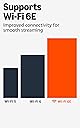
The Amazon Fire TV Stick 4K Max is the most powerful streaming stick from Amazon, featuring a quad-core 2.0GHz processor, Wi-Fi 6E tri-band connectivity, and 16GB storage. It supports 4K Ultra HD with Dolby Vision and Dolby Atmos audio, offers AI-powered Alexa voice search, and enables cloud gaming with Xbox Game Pass. Designed for the ultimate entertainment experience, it delivers faster app starts, personalized content, and seamless control over your smart devices.
| Size | 99 mm x 30 mm x 14 mm (only housing) 108 mm x 30 mm x 14 mm (including the connector) |
| Weight | 43.5 g |
| Processor | Quad-core 2.0GHz |
| GPU | 850MHz |
| Storage | 16GB |
| Wifi | Wi-Fi 6E tri-band: 802.11 a/b/g/n/ac/ax (2.4GHz, 5GHz, and 6GHz) |
| Bluetooth | Bluetooth 5.2 + BLE |
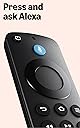
| Voice Support | Yes, with the Alexa Voice Remote Enhanced (included) or free Fire TV app (available for download on Fire OS, Android, and iOS) |
| IR device control with included Alexa Voice Remote Enhanced | The included Alexa Voice Remote Enhanced can control Fire TV Stick 4K Max and certain functions (such as power and volume) on a wide range of compatible IR-enabled devices, including TVs, soundbars and A/V receivers. Note: Certain functions may not be available on some IR-enabled devices. |
| Cloud Storage | Free cloud storage for digital content purchased from Amazon |
| Ports | HDMI 2.1 output with ARC input support, micro USB |
| Audio Support | Dolby Atmos, 7.1 surround sound, 2-channel stereo, and HDMI audio pass through up to 5.1. |
| 4K Support | To watch movies and TV shows in 4K Ultra HD, you need a compatible Ultra HD TV. All services may not be available in 4K/HDR. Certain services are subject to change at any time, may not be available in all areas, or in 4K/HDR, and may require separate subscriptions. Learn more about services. |
| Content formats supported | Video: Dolby Vision, HDR 10, HDR10+, HLG, H.265, H.264, VP9, AV1; Audio: xHE-AAC, AAC-LC, AAC+, eAAC+, AAC-ELD, MP3, AMR-NB, FLAC, PCM/WAV, Vorbis, Dolby AC3, eAC3 (Dolby Digital Plus), Dolby Atmos (EC3_JOC), Dolby AC4, Dolby MAT, Dolby TrueHD pass-through, MPEG-H pass-through, DTS passthrough, DTS-HD passthrough (basic profile); Photo: JPEG, PNG, GIF, BMP |
| Output resolution supported | 2160p, 1080p and 720p up to 60 fps |
| System requirements | High-definition television with available high-speed HDMI input, high-speed internet connection via wifi. Wi-Fi 6E router needed for Wi-Fi 6E support. Auto-Low Latency Mode is included in the HDMI 2.1 standard. |
| TV compatibility | TV must support minimum HDCP requirements for protected content playback. Compatible with 1) 4K UHD TVs with HDMI capable of 2160p at 24/25/30/50/60 Hz and HDCP 2.2 or 2) high-definition TVs with HDMI capable of 1080p or 720p at 50/60 Hz. Learn more about high-definition. |
| Warranty and service | 1-year limited warranty and service included. Optional 1-year, 2-year, and 3-year extended warranty available for U.S. customers sold separately. Use of Fire TV is subject to the terms found here. |
| Content availability | Certain apps and services are subject to change or withdrawal at any time, may not be available in all areas and languages, and may require separate subscriptions. |
| Accessibility features | VoiceView screen reader enables access to the vast majority of Fire TV features for users who are blind or visually impaired. Watch videos and TV shows with closed captioning displayed. Captions are not available for all content. You can also listen to Fire TV with compatible Bluetooth headphones. Learn more about compatibility. |
| Included in the box | Fire TV Stick 4K Max, Alexa Voice Remote Enhanced, power cable and power adapter, HDMI extender cable for Fire TV Stick 4K Max (2nd Gen), 2 AAA batteries, Quick Start Guide |
| Software Security Updates | Learn more about these software security updates. If you already own a Fire TV, visit Manage Your Content and Devices for information specific to your device. |
| Size | 38 mm x 157 mm x 17 mm |
| Weight | 51 g (without batteries) |
| Batteries | 2 AAA (included) |
| Technology | Bluetooth and infrared |
| Compatibility | Fire TV Stick 4K Max (2nd Gen), Fire TV 2-Series, Fire TV 4-Series, Fire TV Omni Series, Fire TV Omni QLED Series, Fire TV Cube (3rd Gen) |
J**I
Fast, Fun, and My Go-To Streaming Device!
This new model of the Amazon Fire TV Stick 4K Max is an amazing streaming device! It is incredibly fast, smooth, and fun to use. It has completely become my primary device for all my streaming needs. I rely on it heavily every day to watch various platforms like Disney+, Amazon Prime Video, Netflix, Shahid, and many others. The performance is top-notch, and the streaming quality is flawless. Easily a 5-star product!
S**T
Unexpectedly impressive performance improvement
Unexpectedly impressive performance improvement over our previous Fire Stick. Navigation between apps and movement through program guides are much faster, and picture quality is much-improved. Well worth the money! Installation was easy-peasy.
P**6
Great device, but may not be for Plex users
For various reasons, I decided it was time to at least try a different streaming device, and I figured a FireTV Stick would be the obvious solution. I wanted a responsive device, and to try to ensure this, I figured I might as well go for the top model of the FireTV Stick, so I ordered the 4K Max. This device does not at all disappoint in that regard! It is very snappy while navigating through the UI and the various streaming apps I utilize, so I'm very pleased with that. It comes with a short HDMI extender, which is a great touch because it makes using a "stick" form device such as this not interfere with being in the way of your other HDMI ports. Make sure you use the power adapter it came with (or a USB adapter capable of outputting 2 Amps) because you will run in to problems quickly if it doesn't detect enough amperage. I rather wish it came with a longer cable, as it is not uncommon these days for a TV to be wall mounted, but that's just my own opinion. Setup is very easily done and has nice guidance every step of the way. Even getting the remote to work with my TV was super easy and included in the first time setup guidance. The remote ended up only being able to control my TV's power and volume, which is not a big deal, and I'm sure most individuals who buy this intend to use it as the main source of media to play on their TV. Streaming from various services is an absolute blast and I've had no issues there. I rather wish there were more big name options for aftermarket remotes, it seems like there are for every other major streaming device, but on the other hand I've never personally heard of anyone's FireTV remote having issues. If you have a non-smart TV or an aging smart TV that is getting laggy, the FireTV Stick will serve you well for years to come, go for it! The FireTV Stick 4K Max also has an option for a service that allows you to play games from your PC on your TV, I am intrigued to try the trial of that at some point just to see how it is. ***For Plex users:**** This is in no way, as far as I can tell, any fault of the device itself. Certain movies will get stuck and after a while make an error pop up, and certain shows will result in the audio playing but the screen being stuck black when the auto play starts the next episode. I have tried everything, and I mean everything. Everything else has never given me this issue. I have gone so far as factory resetting the FireTV Stick, rebuilding my media libraries, cold starting every device on my network, and gone through every single setting in the Plex app. This has resulted in my second issue with the autoplay being seemingly resolved, but again I do not think it is the device itself, or anything on my network, because I have installed what is essentially a media player that can connect to network shares and everything plays with no issue that way. So, yes, it seems to be an issue with the Plex app itself. Unfortunately, it seems forums are full of Plex users experiencing such things on FireTV devices. Again I cannot fault the device or Amazon for this in any way. Unfortunately though it leaves me trying to decide if I should just continue using the player application on my FireTV Stick, which is connected to the only TV I use, and that is mostly what I use when I'm watching anything. If I do that, I have very little reason to run Plex, but I like its layout and I've put a lot of time and effort over the years in to getting it just the way I like it. I can hope that an upcoming update fixes things, I could buy a Plex Pass and see if this improves things, I could switch to Emby and pay their monthly charge, or I could purchase a different streaming device.....it's a tough spot....
E**5
Great tv stick.
I love every Fire product I own, and this is no exception. It’s easy to use and works well. Just plug it in, sign in and it’s good. Highly recommend!
R**E
Instalation is not always a slam dunk!
Setup was pretty straightforward however the cable betweem the Power Module and the device was a bit short. Luckely I had a longer one leftover from the defunct unit we just replaced. The remote paired up with the Streaming unit without any issues. But the eazy peazy install did not happen as it kept asking for my Prime Pin Number. Fortunately I remembered the one I had established before (you may not have this problem if you have not already established a Pin). I was having issues entering the Pin so I ask Alexa for assistance. She tried however nothing She suggested was working. It was asking for a Pin every time I tried to do anything in the Settings, After a number of power resets and a few bad words I was able to go in and turn off the Parental Guidance. Now the unit allowed me to make changes and add our Sound Bar function to the Remote. This unit is definitely faster than the old unit and operates in a similar fashon the the old unit. I did have a problem with some of the Amazon Apps that I did not need. It seems that you cannot remove them from the Task Bar however I was able to rearrange them so that the ones I use, all the time, were up at the head of the line. I am still working to install some of my missing apps and I have not been able to get the Bing Browser to work properly however I am sure I will make it happen eventually. I am convinced that this is a good replacement for our failed Fire Stick, however there are always issues that come up in these Installs and unfortunately Alexa is not totally on top of things. I hope this makes things easier for someone else.
J**W
Good upscaling but you may need to adjust audio settings on tv (updated 07/2026)
3rd and hopefully final update: two says after technical support help the issues serm to be cleared and was most likely due to a ln issue with one or more updates. Firestick itself back to five stars but updates, which had to be installed one at a time by technical support, need to be addressed. 2nd update for 07/2026: Tried to do a factory reset and system froze. Called Amazon customer service. Appthe return window ended months ago. Talked to two very nice and helpful representatives, one in the technical side. We were anle to do a factory reset after and it may or may not have worked. Hulu app in home screen looks different and according to the representative there was a system update a week ago when all this occurred. Too soo to tell but as I have an upgraded Hulu icon and a Spanish Amazon icon (not neede) that were not there previously,it could be the update around 06/26 was corrupted or incomplete. Hopefully it worked but if not I may need a new firestick. In any event I have to give kudos for the help I received today. Updated 07/2026: Changed from five stars to two stars hoping that I have a bad device and a new one will help get it back to five stars again. The firestick had glitches once in a while from day one where it would loose live tv favorites or I would see "no input found" on the screen but it would eventually be recognized by the tv. The last week however was worse than ever. I had to restart each day, I tried different ports, tried connecting through ethernet and wifi. Sometimes it would connect,sometimes not. Sometimes rebooting the wifi would help. I have no issues with other devices. Now it is freezing when I put on a streaming service. When it works it works well and it is up to date. I even tried with the HDMI extender to no avail. According to the Amazon app I have until the end of the year to return it but when I try it doesn't give the option. I will have to call when I can to try to get a replacement. End of 07/2026 update. I purchased the firestick 4k max to upgrade a 2022 4k Fire tv mainly because I wasn't sure how much longer the system support would be and to upscale content. With regards to upscale;and I'm not sure if I can mention names but here you go: I watched season 1 of American Gods" on Prime Video and it looked great. To watch season 2 & 3, I had to watch through Tubi, which does not stream in 4K or 1080. At first it didn't seem like there was much upscaling but afyer a few minutes (not sure how many) it improved dramatically (and I like what both streamers have to offer). The only downside, and of course the internet had many solutions, some of which did nothing. My soundbar with dolby dts-x, while perfectly compatible with my fire tv was having audio drop out issues with the firestick. The problem appears as resolved by going to the fire tv audio settings and change it to "pass through" while leaving the firestick on "best available". All in all, I'm pleased with the firestick and purchasing on sale during the black Friday sales was definitely a plus.
E**O
Incredibly fast, crystal-clear 4K, and the AI search is a game-changer!
I am thoroughly impressed with the new Fire TV Stick 4K Max! The performance upgrade is immediately noticeable, apps launch instantly, and navigating through menus is fluid with absolutely zero lag. Thanks to the Wi-Fi 6E support, streaming 4K Ultra HD content is flawless, smooth, and buffers instantly without any drops in quality. The new AI-powered search is an awesome feature that makes finding exactly what you want to watch incredibly easy and intuitive, especially when pairing it with Alexa. I also love the massive selection of free and live TV options available right out of the box. It’s easily the best streaming device on the market today. Highly recommend!
K**N
Perfect upgrade
I am an older woman and it took less than 15 minutes to hook up. Remote and sound bar paired without doing anything. I could already speak with Alexa from the remote. Nice clear pictures and sound. It updated my older tv to run better and faster. It did take some time to find and set up my apps, then reopen and log in to each. Now everything in in one place when I turn the tv on. Love it!! Update- I ordered a second one for my son on 6-24 didn't receive until 7-16!
Trustpilot
2 days ago
1 week ago