


Desertcart purchases this item on your behalf and handles shipping, customs, and support to Israel.
⚡ Dual-Power Docking, Double the Productivity!
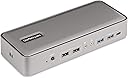
The StarTech Dual-Host USB-C KVM Dock is a powerhouse workstation hub designed for professionals juggling two laptops. It supports dual 4K 60Hz DisplayPort monitors, charges both laptops simultaneously with up to 90W USB-C Power Delivery, and offers extensive connectivity including a 5-port USB hub, Gigabit Ethernet with MAC pass-through, and audio ports. Compatible across Windows, macOS, ChromeOS, and Linux, it’s engineered to boost productivity and streamline multi-device workflows with a simple toggle switch.


| ASIN | B0C3MWLCYS |
| Best Sellers Rank | #5,841 in Computers & Accessories ( See Top 100 in Computers & Accessories ) #452 in Laptop Docking Stations |
| Brand | StarTech.com |
| Color | Black |
| Compatible Devices | Apple MacBook Air M1/M2/M3/M4, Apple MacBook Pro 13 M1/M2/M3, Apple MacBook Pro 14 M1 Pro/M2 Pro/M3 Pro, Apple MacBook Pro 16 M1 Pro/M2 Pro/M1 Max/M2 Max/M3 Pro, Apple MacBook Pro 15 2019/2018/2017/2016, Apple MacBook Pro 13 2020 Intel/M1, Apple MacBook Pro 13 2021 M1 Pro/M1 Max, Apple MacBook Air 2022 M2, Apple MacBook Pro 14 2021 M1 Pro/M1 Max, Apple MacBook Pro 16 2021 M1 Pro/M1 Max, HP Spectre x360 13-aw0000/13-df0000/13-af0000/13-ap0000/13-ba0000/14-ea0000/14-df0000/14-cd0000/14-bc0000/14-bd0000/15-df0000/15-eb0000/15-bl0000/15-ds0000/15-ch0000, HP Elite Dragonfly G2 2B5G1AV/2B5G2AV/2B5G3AV, HP Elite Dragonfly G3 3B5G1AV/3B5G2AV, HP EliteBook 830 G7 Intel/AMD, HP EliteBook 830 G8 Intel/AMD, HP EliteBook 840 G7 Intel/AMD, HP EliteBook 840 G8 Intel/AMD, HP EliteBook 850 G7 Intel/AMD, HP EliteBook 850 G8 Intel/AMD, HP Envy 13-ba0000/13-df0000/13-ap0000/14-eb0000/14-df0000/15-df0000/15-cd0000/15-bc0000, HP Envy x360 13-bd0000/13-dq0000/13-cb0000/14-bd0000/14-ce000 Compatible Devices Apple MacBook Air M1/M2/M3/M4, Apple MacBook Pro 13 M1/M2/M3, Apple MacBook Pro 14 M1 Pro/M2 Pro/M3 Pro, Apple MacBook Pro 16 M1 Pro/M2 Pro/M1 Max/M2 Max/M3 Pro, Apple MacBook Pro 15 2019/2018/2017/2016, Apple MacBook Pro 13 2020 Intel/M1, Apple MacBook Pro 13 2021 M1 Pro/M1 Max, Apple MacBook Air 2022 M2, Apple MacBook Pro 14 2021 M1 Pro/M1 Max, Apple MacBook Pro 16 2021 M1 Pro/M1 Max, HP Spectre x360 13-aw0000/13-df0000/13-af0000/13-ap0000/13-ba0000/14-ea0000/14-df0000/14-cd0000/14-bc0000/14-bd0000/15-df0000/15-eb0000/15-bl0000/15-ds0000/15-ch0000, HP Elite Dragonfly G2 2B5G1AV/2B5G2AV/2B5G3AV, HP Elite Dragonfly G3 3B5G1AV/3B5G2AV, HP EliteBook 830 G7 Intel/AMD, HP EliteBook 830 G8 Intel/AMD, HP EliteBook 840 G7 Intel/AMD, HP EliteBook 840 G8 Intel/AMD, HP EliteBook 850 G7 Intel/AMD, HP EliteBook 850 G8 Intel/AMD, HP Envy 13-ba0000/13-df0000/13-ap0000/14-eb0000/14-df0000/15-df0000/15-cd0000/15-bc0000, HP Envy x360 13-bd0000/13-dq0000/13-cb0000/14-bd0000/14-ce000 See more |
| Customer Reviews | 3.7 out of 5 stars 87 Reviews |
| Global Trade Identification Number | 00065030897242 |
| Hardware Interface | 3.5mm Audio, DisplayPort , Ethernet, USB 2.0 Type A, USB Type C |
| Input Voltage | 100 volts_of_alternating_current |
| Item Dimensions L x W x H | 8.8"L x 3.5"W x 1.6"H |
| Item Highlight | Charges two laptops, with a 5-port USB hub, 10Gbps USB-A and USB-C, Gigabit Ethernet, audio and MAC pass-through |
| Item Weight | 14.24 ounces |
| Item Width | 3.5 inches |
| Manufacturer | StarTech.com |
| Mfr Part Number | 129N-USBC-KVM-DOCK |
| Model Number | 129N-USBC-KVM-DOCK |
| Number of Items | 1 |
| Number of Packs | 1 |
| Number of Ports | 14 |
| Product Dimensions | 8.8"L x 3.5"W x 1.6"H |
| Total USB Ports | 7 |
| Total Usb Ports | 7 |
| UPC | 065030897242 |
| Unit Count | 1 Count |
| Warranty Description | 3-Year |
| Wattage | 90 |
E**C
Works w/ M1 & M5, 2 monitors with DisplayLink drivers (Get them direct from Synoptics, not StarTech)
I am tech consult that has clients in the most regular industry Healthcare and Finance. That being said I have two Macs (M1 & M5) that are locked down on being able to install Drivers so I gave up hope bc to extend an M1 and you have to have DisplayLink drivers. Lo and behold I was browsing the approved self service apps and DisplayLink was there. So I started looking for a KVM dock that use DisplayLink only. I found this one but when I went to install the directions sent me to their website to install the drivers and I was like OHHHH NOOOO. I just packed it up to send back and started looking again. Then I was sent while on my search to StarTech direct website and notice it saying it was DisplayLink drivers and I was like hmmm let me try it. So went directly to the DisplayLink (Synoptics) website and download it as allowed AND IT WORKED. I say this because if regulated industries with PII & PHI let you install DisplayLink, it's safe. So I would not go to the StartTech link to get the drivers just go direct to and download it and then it works. It charges both Macs, and switches my webcam over two. I hade already invested in LogiTech+ compatible keyboard and mouse (bc its software was approved & you can switch bluetooth up to 3 comps with a button) so I can't speak to how it works with those but I am sure it would work fine.
Z**K
Works w Macbook and PC w dual monitors with extended desktop on both
Of the 4 different dual-display KVM's that I tried , this is the easiest and most dependable. BEST SOLUTION FOR MAC. . #1 Support DIsplayLink on Mac. This is required on mac for extended desktop support. #2 ONE BUTTON PUSH to switch between computers. My setup is a 14" Macbook Pro M1 and PC Tower Ryzen 5950X/AsRock-Taichi MB/GIgabyte Titan-Ridge TB3 PCI card/RTX 3080/etc #3 Supports Huion 24" HDMI (w DVI adaptor) and its USB Pen Display input. #4 Quick recovery of display when MacBook is disconnected and then reconnected. Or when the KVM is switched off. Comparing the StarTech to the others, aside from VisionTech, all come in plain brown boxes with minimal packaging. Ordered lowest to highest price: A: VisionTek VT2900 - Nearly half the price of the others. Light weight and cheaply made feeling, Thin plastic. No support of DIsplaylink on Mac. Extended display only on PC, Mac is mirroring only. Has slower USB ports only, 1x DP 1x HDMI. B: Startech 129N-USBC-KVM-Dock - Lacking the extra HDMI port, but switching takes only 1 button push vs 2 on the others. Glowing front light is not overly bright. Plastic case, that feels solid, comparable to Targus, much better than VisionTech. Most reliable display recovery from disconnects.2x DP All other ports same between B,C,D. BEST SOLUTION FOR MAC. C: IOGEAR GUD3CDHTAA - Full metal housing, feels study and heavy weight. Has HDMI port for 3 monitor support. Macbook disconnect recovery was slower and not as reliable as the Startech, often needing to be reset. 2 button pushes (due to the HDMI port) made it confusing what PC was active. Glowing front blue LED is way too bright, and I needed to cover it. 2xDP 1xHDMI All other ports same between B,C,D. D: Targus DOCK750UsZ - Plastic case, that feels slightly more solid than Startech.. Has LED indicators on the mode switch that help reduce the confusion on 2 button presses to switch. Includes usb cables that have screws to secure them to the device. Manual provides some trouble shooting tips, something the others all lack. 2xDP 1xHDMI All other ports same between B,C,D. These are much more pricey than other KVM solutions but use far fewer cables, and offer better hub support
A**R
This works great and installed seamlessly.
My only problem with this is when you switch between computers, the non-active computer collapses everything down to one screen. You have to sort this out when you switch back. Otherwise I am extremely satisfied and impressed with this device. It does exactly what I needed. Added after 4 months. I no longer think the monitors on the non active computer collapsing onto one screen is a problem. As a matter of fact, I think is is a plus. You are not stuck with your non active screens on the non active computer hanging out in space. Yes you have to move them back to the second and third screens when you switch back, but I can listen to late night zoom meetings on my work computer while working on something else on my home computer. This really is a great device. I have now been using this 5 months. I have had problems a couple of times. It has always been the cables. You might want to consider buying some backup cables and make sure they are rated for your video speeds and computer power requrements.
C**3
Too unreliable and too expensive
Great when it works, but is unreliable and frustrating and not worth the significant cost. Using this with a Dell 16 Pro Max and an HP Envy 15 with Thunderbolt 4, both running Windows 11. The video feed will not infrequently drop out, or freeze up. When coming back to the computer after some time after the display has gone to sleep, I often have to power cycle the StarTech switch off and back on again to get the video feed back, sometimes multiple times. I also find that it seems to sometimes get confused with both computers plugged in, and I get more reliable performance with just one computer hooked up at a time, which of course negates the entire point of this device. I'm going to go back to a more standard HDMI + USB switch and just live with two cables from each computer instead of one. Finally, in more nit-picky design considerations, the LED on the front is by far the brightest thing on my desk. It does not need to be that bright. Second, it would be nice to have some sort of confirmation for which machine the switch is currently displaying, or which machine it is *attempting* to display, as I will see the keyboard active, but there will be no video, and I'm not sure which machine it's trying to get the video going for.
M**N
Almost a great dual laptop device
My original configuration consisted of an HP Laptop connected to an HP docking station (USB-C G5) and a Lenovo laptop connected to a Lenovo docking station (40AF0135US). Both docking stations had dual Display Ports and both docking stations connected to a Startech.com KVM (SV231DPDDUA2) Connected the KVM was a pair of LG Ultrawide Monitors, Logi Webcam (C922x Pro) , Logi Unifying receiver for a wireless keyboard and mouse, and a Jabra 410 Speaker. I will also note that since the KVM did not have an ethernet port, I had cat5 cables running to both docs. My objective in purchasing the Startech 129N-USBC-KVM-DOCK 129N was to replace both docking stations with a single device greatly cutting down on the amount of cables I had to use. PRO’s: Where the 129N shines is in its style, singe USB-C connectivity to both laptops, dual display ports and keyboard switching (shift shift quickly). Both monitors ran at a clean 2569x1080. A single Ethernet cable was also nice. This device will also charge the active laptop at 90w and the inactive laptop at 45w and I never had a laptop go dead. CON’s: When I first connected the 129N to the laptops, both laptops displayed a CDROM drive. Startech tech support which is amazing did not know why this was happening and said I needed to send in some logs which I did not have time to do so I just hid the CDROM in device manager. The next issues was my logi webcam was sporadically fuzzy on calls using either the USB 2.0 or USB-A ports. Startech said some Logi webcams were buggy with their products and in absence of a Hardware Compatibility List (HAL) I purchased a Microsoft LifeCam Studio and had the same issue. The next issue I faced was with the Logi Craft Keyboard I purchased in 2019. If the Keyboard was withing 24 inches of the unifying receiver which had line of site the keyboard would work fine. If I moved it 27 inches out sometimes the keyboard would not respond and the signal light on the keyboard would flash. Its worth mentioning that the ethernet port on the 129N works great but it only supplies connectivity to the active computer so the offline computer will lose wired connectivity. Occasionally the 192N would not wake up one of the laptops and I would have to open the lid and close it. This never happened in my original configuration noted above. Conclusion: This a great device if you have two laptop, two monitors, and display port technology. I’m not sure how this would work with a desktop computer utilizing a high end graphics card because the video ports on the GPU would not be used.
D**E
Useful for limited switching only
This is a good device but the lag switching and initially displaying is bothersome. It is useful as a switch but only for very infrequent system switches.
J**P
FINALLY! Someone got it RIGHT@!
I'd been looking forever for some way to connect my Windows 10 and Windows 11 PCs (both with Thunderbolt ports, to enable a single cable for both power and data) to two monitors, external microphone, webcam, speakers and other USB drives. After I pre-ordered it, I'ld been waiting patiently for nearly a week until just today, it finally arrived. All I can say is WOW... FINALLY! It comes with a single power supply that simultaneously provides 90 watts to the active laptop and 45 watts to the standby PC, keeping both charged at all times with no issues. Again to reiterate... ONE power supply powering the switch AND both laptops, and only ONE cable to each PC... THAT'S IT. (Besides the obvious cables to all the peripherals.) Switching can be done either with the button on the front of the KVM or; if you install the Startech.com Link software, via a hotkey (double pressing the left shift button twice in rapid succession.) AND; although slightly buggy (I've already spoken to their tech support over this) you have SIMULTANIOUS mouse and keyboard control over both computers, merely by moving the mouse over to one side or the other. (But the hiccup in my case is that it doesn't ever seem to want to leave the Windows 10 machine, whether that machine happens to be the active or standby machine.) Other than that minute item, everything works PERFECT and exactly as you would expect it to. Again... FINALLY and THANK YOU STARTECH!
J**N
Read the instructions! Great product!
For work I use a dell laptop (windows 11) and for personal I use an M2 Macbook Pro. I was looking for a USB-C Dock that could also serve as a KVM switch between these two laptops. When I first connected the dock to the mac, the displays didn't work right. But after downloading the software (per the instructions), everything works great! Make sure you download and install the software on any computer that you're going to use this with!
J**.
Works fine but long lead time and poor shipment protection.
My setup is two laptops, dual screen via DP, mouse, keyboard and other USB peripherals via USB 3.0 hub. So far it works fine for me. No issues during setup and with switching. Used an Avocent KVM switch and two Dell docking stations before which resulted in a clutter of cables and extra chargers. One of my laptops has no USB Type C but I connected this one with and C to A adapter. Only drawback that it does not charge via this connection and requires its own charger. The box is compact. There are USB connectors on the back; only in the front panel. Note some USB cameras may not work via the switch (or hub) but this is usually clearly stated in the respective manuals. I was not so pleased with the packaging and stuffing inside the Amazon box. There was hardly any protection (stuffing) inside to prevent the StarTech box from moving. Ideally the front panel should have a 1️⃣ - 2️⃣ indication LED to indicate which of the two laptops is active. Notability it almost took two months after ordering before the switch was shipped. Luckily I was not in a hurry.
M**Y
Meets the need very well
Switching personal and work laptops to use the same 2 monitors a wireless mouse/keyboard. Windows 11. Had to download drivers for HP laptop. This seems to be the sweet spot for this device. Video performance is perfectly acceptable for office applications.
J**N
Doesn't work properly on Intel Mac
Intel Mac says the usb device is drawing too much power. Newer silicon Macs works perfect. Remember you have to install display link. There is no way to change double Shift key combination hotkey which switches computers to some other key combination. There is a bright white LED pointing at your face so I hid it with a tape.
N**V
Works, but unreliable
Bought it to easily change between Macbook Air and work laptop (Windows), connected to two monitors, keyboard, and a mouse. Pros: - It works! Both monitors are picked up by macOS, which is fantastic - One cable connection to laptops for both peripherals and power delivery is very convenient - Having some extra USB-A and USB-C, as well as headphone jack, is neat Cons: - Switching between PC/Mac is not instant, takes 10-15 seconds to fully switch - When switching to Mac, monitors are offline until you press any key on the keyboard. I got used to it, but it's still annoying - On Mac, there are often minor display artifacts, specially in the parts of UI that involve some sort of semi-transparency (for example, when hovering over icons in the dock). Occasionally, the monitors flicker, i.e. go dark for a second. These are minor annoyances though, nothing serious - A few times dock just randomly stopped working for no apparent reason - every connected peripheral went offline, power delivery stopped. Unplugging dock's power chord and plugging it back helps, but having everything shut down in the middle of work or game session is VERY frustrating - On several occasions, keyboard/mouse straight up refused to connect to Mac (while monitors surprisingly worked), but connect without issues to Windows laptop - Also, often switching between PC/Mac just doesn't work. Turning off/on the dock usually helps, but sometimes you need to let it cool off for a while. I have this dock for about 3 months, and as the time goes, the number of issues keeps increasing, and now it's almost daily. At this point it feels like it'll just give up on me, which is certainly not I'd expect from a $400+ (CAD) product. If you're looking for a dual-monitor KVM solution for your Mac - this thing will give you ample amounts of frustration in everyday use, so I suggest looking elsewhere. On the other hand, if you have two Windows machines, it might work just fine, but for this price you can find better and more reliable alternatives anyway.
Trustpilot
2 weeks ago
2 months ago