🎯 Master your workspace with ELECOM HUGE — precision, power, and comfort in one bold move!
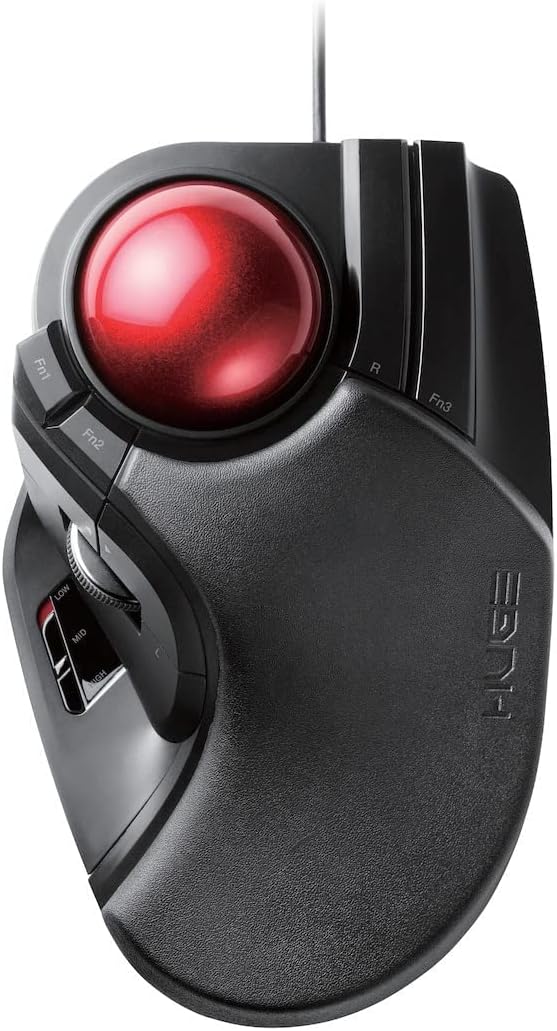
The ELECOM HUGE Trackball Mouse is a wired, finger-operated input device featuring a large 52mm red ball for precise cursor control, 8 programmable buttons including scroll wheel tilt for horizontal scrolling, and adjustable DPI settings (500/1000/1500) to suit any task. Compatible with Windows 8 and above, as well as macOS 10.12+, it offers ergonomic palm rest support and durable artificial ruby ball bearings for smooth, low-maintenance operation. Ideal for professionals and gamers seeking accuracy and comfort in a unique trackball design.


| ASIN | B07353DBP9 |
| Batteries | 2 AA batteries required. |
| Best Sellers Rank | #21 in Computer Trackballs |
| Brand | ELECOM |
| Color | Black & Red |
| Computer Memory Type | DRAM |
| Customer Reviews | 4.2 4.2 out of 5 stars (2,025) |
| Date First Available | July 16, 2017 |
| Hardware Platform | PC; Mac |
| Is Discontinued By Manufacturer | No |
| Item Dimensions LxWxH | 7.16 x 4.52 x 2.25 inches |
| Item Weight | 9.4 ounces |
| Item model number | M-HT1URBK |
| Manufacturer | ELECOM |
| Operating System | Mac OS X 10.2 Jaguar, Windows 10, Windows 7, Windows 8.1, Windows XP |
| Power Source | Corded Electric |
| Product Dimensions | 7.16 x 4.52 x 2.25 inches |
| Series | M-HT1URBK |
| Voltage | 1.5 Volts |
N**L
Finally! Thank You, Thank You, Thank You!
Update (7/13/2023): I purchased an alternative that seemed close in 'stature' to this mouse because I wanted Bluetooth connectivity, as mentioned earlier for my notebook(s) in case I travel. In general I wanted to just use one mouse. The idea is I use it on my PC (using usb dongle) and then BT elsewhere. Anyway, I got a Nulea, which is nice but it still doesn't hold a flame to this mouse. The back of the Nulea is almost slippery compared to the HUGE and is not as wide, thus, it just doesn't feel as comfortable. My hand sort of just wants to slide off the surface, which makes the material they popped on the HUGE pretty thoughtful. Update (5/10/2023): This has remained my absolute favorite mouse. Wear and tear is so very low even though I use it daily. All I can hope for now is that they make an almost identical updated version, but wireless AND Bluetooth and maybe even a plug-in for a wire so I can buy one to use with my notebook(s), basically a Deft Pro version of this mouse. Again, I personally love and highly recommend this device. This is THE PERFECT finger trackball mouse for bigger hands (and even perhaps, for any hands). Initial Review: I'm one of the unfortunate few index trackball addicts. I cannot use a regular mouse for very long and I certainly can't use a regular mouse for any sort of gaming. That being said, what started me on this terrible journey was a Logitech Marble Trackman - that trusty trackball that's still around. Shortly after succumbing to the trackball, I moved on from that to a Logitech Cordless Trackman Optical, this is where things went wrong. It was for me, the perfect device. A trackball mouse that just seemed to fit perfectly in my right hand. It had a few extra buttons that came in handy for games. My first lasted 2 years and the second lasted roughly the same except just before this one died Logitech decided to discontinue the product - oh, %^#t. I went through phases of tech grief, which are sort of similar to regular grief. I denied that the product was discontinued and convinced myself that the product was cycling, which is when they sometimes discontinue the product and re-release it in a few months with different colors or a different name. This did not happen. I then became quite angry, which I know is quite silly but hey, it happened - because I felt betrayed by the company. How can you, as a company, release 1001 different models of the same mouse but just 1 very, very, very basic model to cater to index finger trackball users? I then entered the bargaining phase, which is where the tech part of this comes in. I took to their forum, Twitter, Facebook, anywhere I figured I could nudge the company into getting the idea that we (index finger mouse users) exist, enough so to at least bring another model to market. I came pretty close to publicly begging. After months and not a peep from the company, I became sad - depressed isn't the word I'd use, again, this is not real grief, just tech grief. I felt sad because I felt really uncomfortable and out of place using a regular mouse and nothing else was working for me. I tried several from various companies like Kensington and the thumb trackball from Logitech (which I cannot use, whatsoever). Finally came acceptance. A slap in the face recently is that the company introduced a new thumb trackball, as if their M570 weren't enough, they released the sleek MX Ergo Plus - Ouch. I bought a new Logitech Trackball, the basic one, you know and that was that for some time. Enter Elecom, a foreign company that doesn't seem to be on the radar yet. One day I decided to do another search for trackball mice and I discovered the Deft or EX-G series, whatever they call it. I bought it and it turned out to be a great cordless Trackball, however, the ball never quite felt right and the shape was just off enough to make it, not quite a gamer mouse for me, though I could use it for everyday PCing, etc. Finally, finally, I get what I want/need. They've released a larger version that is, perfect, for what it's worth. I can't really explain how great it feels so I'll say this. I wrote those previous anecdotes for a reason, so you could/can identify with me. If you've ever used that darn Logitech Cordless Optical Trackman OR the Microsoft Trackball Explorer, which is very similar in feel, then this is it, folks, this is the trackball for you. At first, it feels a bit large, too big in fact - but give it a few, just like the Trackball addiction sneaking up on us, the device eventually becomes just right. I don't quite remember how my hand was when I used the previous devices but I think the most jarring difference is that you won't have to contort your ring finger to right-click, as the buttons lay right under your hand in a naturally open position. The top of the device is large and there's soft padding so you literally just lay your hand down on top of it, it's very comfortable. There are some extra buttons that I haven't figured out how to use since I haven't read the manual (3 function buttons) but you get the staple of an advanced Trackball otherwise, you get a clickable scroll wheel in addition to 2 clickable buttons (forward/backward for browsers) just above it. All of these tend to work universally and are easily bindable in games. The left button is under the scroll wheel in a really great position, IMHO, as my thumb sits right there. The 3rd function button lies beside the right clicker. There's a switch on the device that seems to increase trackball speed manually vs. through software. So far, it's a fantastic device. I got the corded version and am seriously considering buying 2 or 3 more and just putting them away, just in case. I'm giving it some time to see what if anything happens to the device after months of use. Thank you Elecom and Thank you seller and Amazon! Just came back to say that after many months, the mouse still works perfectly. I own 2 now. 1 for my main system and another for my work system. I'm going to buy 2 more as I mentioned before to put away, just in case Elecom decides to call it quits on production. I also have my eye on the Bluetooth model that I will likely use with my mobile devices - I'll see. The HUGE is so great, I'm not sure I want to change the formula.
J**Y
I have a good feeling about it, but the hand rest will need some mod/hack
I have recurring problems with RSI from my mouse usage at work. It got worse recently so I decided to invest first in a vertical mouse, but I didn't feel it made that much of a difference. I did some online research and quickly turned my attention to index finger driven trackballs (not thumb), particularly the Kensingtons which looked promissing. After some more review reading I discovered this beast. I was surprised that the package arrived a couple of days early (US to EU shipping). A few notes to the software. I googled "elecom huge driver" and quickly found the ELECOM Mouse Assistant. Even though I downloaded with the english language link and the installer was in english, the context menu was still in japanese :-D By trial and error I opened the settings app and found the dropdown for changing the language (right-click the icon in the tray, choose the 3rd menu item, the dropdown is in the bottom left corner of the window). Other than that the software seems to work fine. Now the unit itself. (disclaimer: I have tried a few other trackballs shortly, but this is the first one I own) I tried all 3 sensitivity settings and all of them are OK. I have yet to decide which one I'll keep using. Trackball size is nice and I think it rolls pretty smoothly (from the reviews I expected worse). I think the accuracy is pretty good as is, but precisely hitting small buttons (closing browser windows, etc.) is kinda hard for me (maybe I will just get used to it). Some reviewers said they (had to) replaced the artificial ruby balls on which the ball rolls. I was convinced that I will do that too, but now that I've tried it I think I'll just use it for a few days and see how it goes. Maybe I'll just end up doing it anyway just to see if it can be even better. Like I said I still need to get used to the trackball experience. Button positioning. I find that so far it's kinda hard for me to roll the ball nicely and left-click without "interrupting my flow" with the ball. I will see how that goes. All the buttons are sort of where your fingers already are, but it takes some getting used to and feeling out the positions so you won't have to look. I'll probably map middle click to some other unused button cause side-clicking the wheel feels a little impractical. Hand rest. I read positive and negative reviews on this and I must say that I don't really like it as it is. Not sure if it is designed for smaller asian hands or something (do they have smaller hands?). When I put my hand on it so that I can comfortably reach the buttons and the scrollwheel, my hand is forced to point a little upwards and that feels uncomfortable. When I however move it forward to lean my wrist a little higher (which feels better), I can no longer comfortably reach the buttons and wheel. I think I'll have to diy some tiny pillow/padding/thing so that my hand can rest on the "hump" in the middle and not my lower palm/wrist which makes my RSI symptoms worse. I will experiment with that. Overall I am excited and I hope I can further improve the experience and find the best way to use this...and get rid of my RSI symptoms... Update: I replaced the artificial ruby balls with ceramic ones (2.5mm) as suggested by other users and I have to say the ball does roll a little smoother. The wired version has one screw hidden approx. in the center under the black sticker so you have to cut through to get to it. Other than that it's rather easy. After a few days my accuracy with the trackball has already improved. I even tried gaming with it and the results are not terrible.
A**T
Commandée en remplacement de ma trackball Microsoft Explorer, cette trackball s’avère excellente. Très bonne expérience générale à l’utilisation. Seul défaut la molette qui ne tourne pas impeccablement mais bloque légèrement à la fin d’un tour complet! À voire dans le temps si cela va s’aggraver… En résumé très bon choix mais je ne crois pas qu’elle m’apportera la même satisfaction que la reine des trackball qu’elle remplace. 15 ans de bon et loyaux services qui seront difficile à égaler.
L**S
Es un mouse súper versátil, de muy buena fabricación, cómodo para la mano y fácil de configurar. Estoy muy contento con él. Le doy uso diario, sobre todo para edición de sonido. Necesitaba una herramienta sólida que aguantara constante "clickeo" y respondiera bien a las altas exigencias de la edición profesional. La única pega que pudiera ponerle es que la rueda de scroll me queda un poco baja para el pulgar. Para manos pequeñas seguramente vaya genial.
A**P
in sintesi ho deciso di passare alla trackball per evitare problemi alla mano che iniziano a farsi sentire! optando per questa tipologia( sfera in alto) primo impatto niente male per le funzioni comuni(muoversi ,navigare, posta) già dopo un paio di ore avevo una buona padronanza. (Consiglio di giocare a qualche game per prenderci la mano!). Nel mio caso, dopo averci preso la mano per usarlo con programmi tipo grafica o giochi (notavo qualche imprecisione ) ho deciso, rinunciando alla garanzia (strano per i giapponesi fare questi errori) di modificarlo, sostituendo le sfere originali(su cui si muove la palla) con quelle ceramiche, (perchè le sfere originali da 2,5mm forse non erano perfettamente rotonde); optando per le sfere ceramiche 2.5mm di grado g5 !. Dopo la modifica, il mouse ha cambiato proprio il "pelo" (come si usa dire) diventano una periferica top!. Nell' uso ho notato che i dolori alla mano sul lungo periodo sono andati scemando molto! al momento confermo le 5 stelle (dopo modifica, per uso su cad e programmi che richiedono una certa precisione) ; senza modifica avrei dato 4 stelle. pro: -Platiche ok non danno la sensazione di essere cheap ,di bell' effetto la similpelle dove si poggia tutta la mano(circa 18 cm dall' medio fino all' inizio del polso). -Posizione della mano risulta rilassata (e su internet si possono trovare supporti da stampare in 3d per aumentare in caso l'inclinazione). -Buona la disposizione dei tasti principali; che sono ben disposti e facilmente raggiungibili. -Molto comodo il pulsante di selezione dei dpi(con led a segnali luminosi che si illumina dagli spazi aperti della rotella (che risulta essere abbastanza silenziosa), -La sfera è immensa 52 mm facilmente manovrabile (per avere più precisione io uso indice è medio)! contro: -per usarlo con games o programmi come cad o photoshop ecc, c'è la possibilità che si devono sostituire le sfere originali con quelle da 2,5mm con le ceramiche da 2.5mm -la modifica(relativamente semplice) comporta però la perdita della garanzia! quindi fatela solo per uso con programmi che richiedono una certa precisione di puntamento software: software decente con possibilità di personalizzare il mouse con diversi profili. Essendo il mouse senza memoria interna, si deve avere in funzione il software in background per averlo personalizzato. e qui mi sembra che sia da migliorare! nel fatto che essendo "vincolato a tenerlo attivo) sarebbe bello che il software riconoscesse i programmi in uso, è in automatico caricasse il profilo in automatico (altri software, lo fanno) invece ogni volta prima di utilizzare un profilo per un determinato programma lo si deve selezionare. pps per la elecom.... sarebbe bello se potete mettere sul mercato almeno la sfera trakball di ricambio, visto che è la parte che con l'uso può rovinarsi di piu ! è per i meno smanettoni, ma anche per i clienti che non vogliono rinunciare alla garanzia, sarebbe bello se selezionaste accuratamente alla fonte le sfere di precisione! per ultimo migliorare il software.
J**A
1日中PCで仕事をしているのですが、右肘を痛めて一時期大きく動かすと痛みを伴う様になり、タイミングよくセールで格安だったので購入しました。 20年ほど前にケンジントンの大玉トラックボールを使っていたので操作は違和感なく出来ました。 仕事の性質上、微妙な位置移動を要するのですが親指だけタイプのものより人差し指と中指で操作するので細やかなカーソル移動ができます。 またクリックボタンも押しやすい位置にあり数も多いので割り当て機能を使ってショートカット代わりにして重宝しています。 手を置いた感じもクッションの効果もあり本体を包み込む様に置けるので馴染む感じで長時間使用でも苦になりません。 肘を痛めた事で急遽購入したものですが、快適さに慣れてしまった事もあって肘が治った後も引き続き使用しています。
M**C
I love this mouse... of sorts. It's a great size and very comfortable to rest your palm (Very addictive). Took some time to get used to the whole trackball concept but it does wonders for my wrist tendonitis. Realised that by using the pointer and middle fingers to control the trackball allows me to control speed and accuracy without having to adjust the DPI switch. This is my first trackball, probably won't be my last, but it's a great introduction. Two thumbs up!
ترست بايلوت
منذ أسبوعين
منذ يوم واحد