Buy anything from 5,000+ international stores. One checkout price. No surprise fees. Join 2M+ shoppers on Desertcart.
Desertcart purchases this item on your behalf and handles shipping, customs, and support to Israel.
🔐 Elevate your door game with the smartest lock on the block!
The ULTRALOQ U-Bolt Pro is a cutting-edge, ANSI Grade 1 certified smart deadbolt featuring 7-in-1 keyless entry options including 360° AI fingerprint ID, smartphone control via built-in WiFi (no hub required), and a door sensor for smart auto-lock/unlock. Designed for commercial-level durability with IP65 weatherproofing, it offers seamless remote access management, voice assistant compatibility, and easy DIY installation backed by a lifetime mechanical warranty.


| ASIN | B0BT937TRF |
| Additional Features | Built-in WiFi, Commercial Level of Security and Durability, 360° AI Fingerprint ID, Smartphone Control From Anywhere, Simple Installation with No Drilling Required |
| Best Sellers Rank | #236,738 in Tools & Home Improvement ( See Top 100 in Tools & Home Improvement ) #724 in Deadbolts |
| Brand | ULTRALOQ |
| Brand Name | ULTRALOQ |
| Color | Black with Satin Nickel |
| Connectivity Protocol | Bluetooth, Wi-Fi |
| Control Method | Voice |
| Controller Type | Amazon Alexa, Google Assistant, IFTTT, SmartThings, iOS |
| Customer Reviews | 3.7 out of 5 stars 1,250 Reviews |
| Finish Types | Brushed |
| Global Trade Identification Number | 00850045725426 |
| Included Components | ULTRALOQ Smart Wi-Fi Lock with Built-in Wi-Fi, Door Sensor, Fingerprint Scanner and Hidden Key Hole, Mounting Hardware, Backup Key, AA Alkaline Batteries, User Guide |
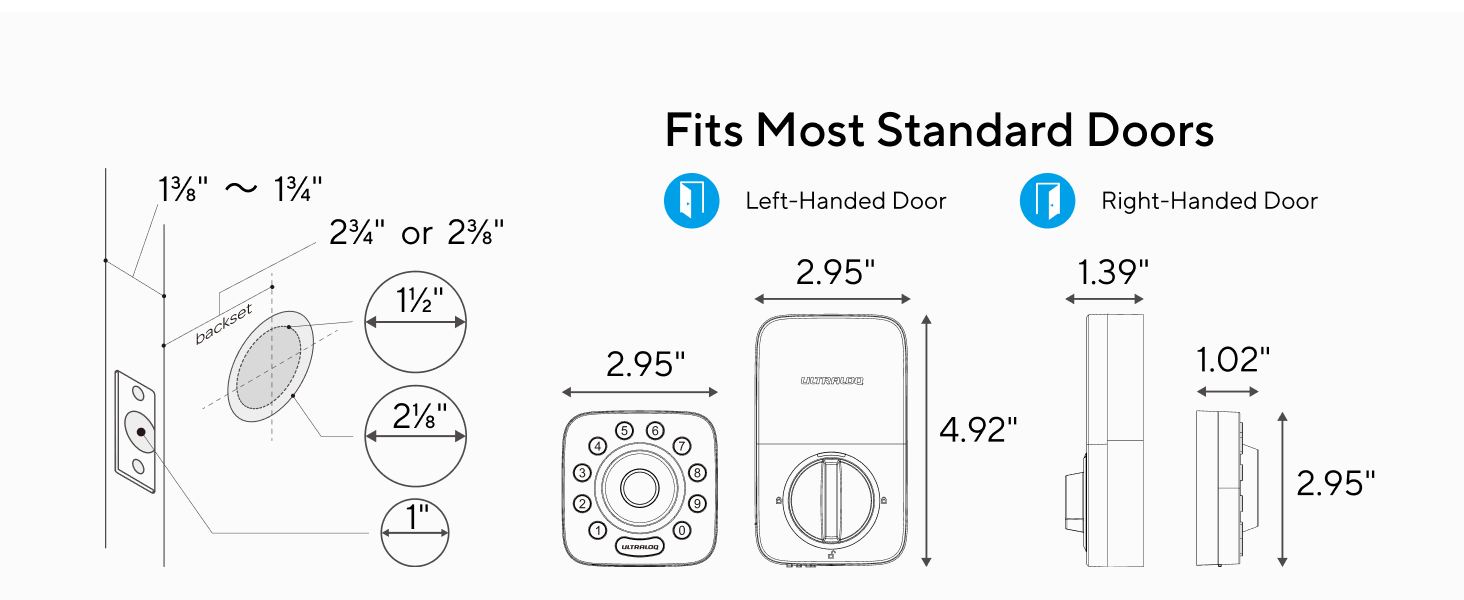
| Item Dimensions | 2.95 x 2.95 x 1.2 inches |
| Item Type Name | Built-in WiFi Smart Deadbolt |
| Item Weight | 3 Pounds |
| Item dimensions L x W x H | 2.95 x 2.95 x 1.2 inches |
| Lock Type | Keypad |
| Manufacturer | ULTRALOQ |
| Manufacturer Part Number | UUL-U-BOLT-PRO-WIFi |
| Manufacturer Warranty Description | Plus lifetime mechanical warranty and 18 months electronic warranty. |
| Material | Zinc |
| Material Type | Zinc |
| Model Name | U-BOLT-PRO-WiFi |
| Model Number | U-BOLT-PRO-WiFi |
| Number of Pieces | 1 |
| Recommended Uses For Product | Front door, Home / Office, Mommercial, Residential |
| Shape | Square |
| Smart Home Compatibility | Smart Home Compatible |
| Style Name | Popular |
| UPC | 850045725426 |
| Unit Count | 1.0 Count |
D**L
Ultraloq makes a solid lock, their customer service is outstanding!
I’ve been using these locks on my rental property for the past few years. Recently I have even upgraded my house with them. All in all, I have 2 units of the UL1 (combined handle/deadbolt), 1 unit U-bolt Pro (fingerprint deadbolt model), and 2 units U-bolt Pro with build in WiFi. For a total of 5 units! These locks also integrate with Alexa fairly nicely, you can set them on a routine to Auto-lock at specific times or by using a voice command activated prompt (custom Alexa command) or direct interaction (Alexa lock the front door). For security reasons, it will not allow you to Auto Unlock using the Routines, which is inconvenient at times, but also understandable. The good the bad and the ugly. The good, on all the units, the mechanics of the locks seems outstanding, they feel nice and sturdy. The buttons and convenience of the units makes for a wonderful experience. When you have a problem, I have had a few, the customer service takes care of the issues in a reasonable and timely manner. The bad, now we get to the problems I’ve had. I’ve had a handle door latch break, the inner mechanism of the handle, so you cannot open the door by pushing down on the handle. Sounds simple enough, just pull up on the handle to open the door, while waiting for repair parts. However, on the UL-1 pulling up also engages the deadbolt. So kind of difficult on the timing. But as I said, the customer service sent out a new one very quickly. I’ve also had a clutch go out in the same unit, again, very quickly I had a replacement sent, and I am happy with it. I’ve also had the a deadbolt that I ordered come with a defective clutch that would fail if given time. When the deadbolt is locked electronically, the clutch doesn’t disengage, you can hear the sound difference, then when you open manually from the inside, it’s hard to turn and you can hear the motor whirl. Sometimes when you use a unit that is connected to WiFi using a Bridge, it is very slow to connect, or doesn’t connect at all, kid of annoying, but overall not to interruptive to the experience. Sometimes on the deadbolts, it takes a couple attempts with your fingertips to get the sensor to notice you are trying to get a response. The ugly, out of the 5 units I own, being an owner for about the last 5 years, I have have had 3 or 4 warranty claims. I still give an overall experience of 5 stars as the outstanding customer service and quick resolutions and great follow up communication by the manufacturer makes up for the folly. Both myself and my wife have been locked out by the deadbolt not responding to our touch, or turning a color but then not actually responding to it. So make sure you have your manufacturer recommended spare key box outside the house somewhere. Final thought, I love the product, I love the service when something does happen. I have not had an out of warranty claim on their electronics. But for the price, I just wish their warranty on the “electronics” part of the unit was for more than a year. It would be good peace of mind.
C**T
Planned Obsolescence After Warranty Expires
I had been a big supporter and proponent of the ULTRALOQ U-Bolt series. I bought my first one in 2020 and another in 2021 for our other home. I also purchased a third in 2022 for my office. I was in early adopter and even join U-tec's beta team. The locks performed wonderfully and exceeded all of my expectations. Never had any issues. Even the high demand/usage doors held up well...batteries rarely needed changing. So why the 1 star review? Two words: PLANNED OBSOLESCENCE Just like how Apple got in trouble for the same practice on their older iPhone's (purposely degrading performance to encourage users to buy new equipment) U-tec has done the same. Check their community forums where people are saying "my fingerprint reader stopped working - and I am out of the warranty period!" and see the hundreds of people experiencing this issue. U-tec support says they can't do anything as it's outside the warranty period but as a good gesture, offer you a 30% discount coupon towards the purchase of their new model from them directly. In 2022 the first model I bought failed. The keypad still worked and the app functions/wifi functions still worked, but the fingerprint reader would not engage/turn on. It didn't give a red circle like a bad read - it was just dead. I reset everything, changed batteries, reinstalled the app...and support gave me a 30% coupon for my trouble. Nothing they could do as this was outside warranty period now (by approximately 60 days). I wrote this off as a hardware issue and just revered to the keypad. Then in 2023, the second model I bought failed. Same exact issue. I contacted support and did all the resets mentioned above. They said there was nothing I could do as I was now 30'ish days outside of the warranty period. They offered me the same 30% discount on a new one purchased directly from them. Something felt off... and after reading the community forums on U-tec's website and seeing the hundreds of other posts, I knew something was off. How did I know? Well, this is where U-Tec made their mistake. I can go into the app to either add or modify a user. When I try to add fingerprints to that user profile, the lock comes to life! It lights up. The circle turns green! It then prompts me to scan the finger. I do and it responds on the lock and the device. I perform all 6 finger print scans and then the fingerprints are added or updated in the app! I thought I fixed my lock... but no. As soon as adding the fingerprint process was complete, the reader went back to it's responsive state. I was able to repeat this process on BOTH locks that had failed. They blatantly lied when they said it was a hardware issue because the hardware still works. They just seemingly make the keypad unresponsive after a certain period out of warranty. I am waiting for this to happen with my third one soon as it is recently out of warranty. Both of my other ones failed somewhere in the 30-60 day range. Others report the same on the forums. It is embedded in the firmware updates somewhere. People were able to previously install OLD versions of the firmware but U-tec removed them from the website when they found out. They even removed them from the beta community who had access to the file repository. When people installed the OLD firmware, their fingerprint scanner suddenly started working again. Can't make this stuff up. I love the lock. I dislike the shady company practices. Sadly, planned obsolescence is not illegal in the United States, as there are no official laws prohibiting it. However, there have been successful class-action lawsuits against companies accused of planned obsolescence - like Apple. Simply Google the U-tec fingerprint issue and see what people (actual customers posting support tickets) are saying. It's unreal.
T**I
Excellent locks
Have purchased 4 of these locks for my house. I am very happy with them. Thumbprint and keypad access is convenient. The app is user friendly. Troubleshooting issues are straight forward. I have recommended these locks to many who have come over and seen how convenient they are. Addition... I had a lock whose thumbprint quit functioning. I contacted U-Tec support via email and they happily and expeditiously assisted me with getting it fixed. They ended up shipping out a new part that solved the problem after installation.
C**W
Decent lock *edit battery life now good
So it's April 27, 2023 and I just received the lock in the mail today and installed it. Read the instructions all the way through and then go on youtube and search the name of this lock to watch the video installation instructions. Before you buy this lock make sure your door is compatible, watch the youtube video or look at the description to make sure you're not buying something that won't work. My install was a little tougher, I removed my old door knob/strike plate and installed this but the deadbolt wouldn't extend all the way into the door frame. It's critical that there is no friction and everything is smooth for any smart locks you buy. If not, the internal motor will struggle to lock the deadbolt causing failures and poor battery life. So I had to bust out the drill and widen the hole in my door frame to get it to fit perfectly without any obstruction. Once the deadbolt locked and was buttery smooth in closing I finished the install. I downloaded the app onto my Note 9 Android phone and set it up and connected the lock to WiFi. I added everyone in my household that will be using it, fingerprint and code. No issues with the app so far, it added everyone in and all our codes/fingerprints are working. I setup the door sensor as well that came with this, it's like a magnet and you screw/stick it onto the doorframe and it allows the lock to know if the door is opened or closed. That seemed to work fine after testing it and I set it up to lock the door automatically after the door has been closed for 5 minutes. I also bought the special lithium double A batteries that Ultraloq sells for their locks that is suppose to give it longer battery life. So far everything is working and I'm happy with it. My only concerns are some of the people on here that left reviews that mentioned their lock dying after a year or two once it's out of warranty so hopefully nothing happens to mine. Also, the fact that WiFi is built into the lock makes me wonder just how fast it's going to chew through batteries. WiFi can guzzle through battery power, the smart locks I've installed/used in the past did not have WiFi and were just basic electronic code locks that lasted 6 months to 1 year on batteries. If this thing only lasts 3 months or so before the batteries have to be replaced, I'll be disappointed. I did see an option in the app to turn off WiFi if you want and it does say it will double your battery life if you do disable it. I like being able to access the lock remotely on my phone so I'll leave WiFi on for now but we'll see how long the batteries go for. If I have any issues I'll come back to update this review. If the battery life turns out to be terrible I'll update this as well. I'm hoping for at least 4 to 5 months of battery life hopefully. *****Edit Update July 27th 2023***** So I bought and installed this lock on April 27th and it's now July 27th and the lock went completely dead today. I had to replace the batteries and now it's working again. I'm using the expensive Lithium batteries that Ultraloq sells as well for their locks. So in 3 months the batteries went dead and I provided perfect conditions for this lock to work. My WiFi router is 10 feet away from my front door so the signal is strong to this lock and I'm using the Ultraloq Lithium batteries as mentioned. So 3 months of battery life is disappointing to me, I was hoping 4 to 6 months at least. I was concerned about the built in WiFi draining the batteries and that concern seems warranted now. I might end up turning off the WiFi setting through the app to preserve battery life but for now I'm leaving it on. I changed my rating from 5 stars to 3 stars for the battery life performance. Everything else on the lock is still working fine including the fingerprint scanner/locking mechanism. *******Edit Update April 3 2024******(***( Changing review to 4 stars the battery life has been much better now. There was an update recently so maybe that made a difference. My last set of lithium batteries lasted 8 months before they died yesterday which is fine for me. We'll see how long this next pair last. Using the energizer Lithium batteries.
C**M
A solid product that lives up to the hype, mostly.
I've owned an ULTRALOQ U-Bolt Pro Smart Lock with Door Sensor for about five (5) months now, and then about a month and a half ago, I purchased a second one (the same model). So clearly I'm a satisfied customer. This review will cover my experiences with both locks. I put the first one purchased on the front door of my home and intended to put the second on my side garage door. That plan went awry when I was unable to consistently get the "new" lock to connect to my home wifi. As part of my troubleshooting, I moved the "old" lock to the garage side door and installed the new lock on my front door. When I did that, the new lock connected without any issues, while the old lock (which had never had a wifi problem) connected sporadically. So clearly my wifi was the issue. I left the locks as installed. I will say that the Ultraloq customer service was quick to respond when I thought that the issue was one with the lock itself. They continued to follow up with me as I went through my troubleshooting efforts and offered to replace the lock if I thought that was the issue. As stated, the oldest lock is now about five (5) months old. I've had to replace the batteries once in those five months, about 3 weeks ago. I'm not sure if the wifi issue will cause the batteries to die earlier, but I suspect that might be the case. The app (I'll talk about it later) gives you plenty of notice that the batteries need to be replaced. It is recommended that regular AA alkaline batteries be used rather than rechargeable batteries or lithium batteries due to the rapid fail time once they start to die. In the event your batteries completely die, you can use a 5-volt USB source to power the lock to allow you to open it, or you can simply use a key. Installing the locks is fairly straightforward. All you will need to use will likely be a Philips screwdriver. That was the case with both of my locks. Something to keep in mind is that if your existing deadbolt doesn't close "cleanly", that is, if you need to pull/push the door to engage the deadbolt, then you'll have to do some work to remedy that for ANY automatic deadbolt to work properly. At my home, the front door was not an issue while the garage side door was. All I needed to do for the side door was clean out the material inside the strike plate some, and the deadbolt engaged freely. You might need to do the same and/or relocate your existing strike plate if you have an issue. The instructions included with the Ultraloq are clear and concise, and walk you through the installation process. Be sure to follow them in order to complete the steps in the correct sequence…it does matter when the batteries are installed, when the app is launched, etc. Please be aware that as with most IOT (internet of things) Smart Home devices, the Ultraloq requires a 2.4 GHz network connection, NOT a 5 GHz network. If you have a network that cannot be separated, then you may have some challenges connecting the Ultraloq to your wifi. Once the lock is installed and connected through the app you can then begin to configure it. I’m not going to try to explain all of that <smile>. For me, the biggest selling point of the Ultraloq was the number of methods you can use to unlock the device. They are: 1. Via a physical key – the entire face of the lock can pivot down revealing the key slot. Obviously, that’s not the preferred method, but it’s nice to have that option if needed. A note about the keys…they’re big and probably not the kind you want to carry around. I had copies made at my local Lowe’s. From discussion on the Ultraloq support forums, it seems that some of the locks have Schlage key styles while others are Kwikset key styles. Both of my locks were the Schlage style and the copies worked fine. Something that my OCD self would desire would be the ability to have both of my locks keyed alike, but alas… 2. Via the keypad – there is a round numerical keypad on the front of the lock. The lock can store user codes for up to 50 users. Your code can be as short as four (4) digits and as long as eight (8) digits. The lock allows you to enter a “vague” user code of up to sixteen (16) digits as long as YOUR USER CODE is contained within the string. This is an anti-peep measure. Once you enter the code and press the ULTRALOQ button, the unit will unlock. This has worked flawlessly for me. 3. Via the fingerprint reader – this is likely why you’re looking at this model, and for the most part, it works well. Each user can register up to two (2) fingerprints. Note that registering a fingerprint involves multiple scans of the finger. In my use, the lock ALWAYS recognizes the fingerprint of my wife. Me…not always…probably about 75% of the time. I’ve registered and re-registered my fingerprints and typically it will work great for a couple of weeks then I’ll start having some issues. In the lock’s defense, my fingerprints (particularly on my thumbs) are very faint. 4. Via the smartphone app – this works well. Just press the button in the app, and voila, your door locks/unlocks. 5. Via smart-home devices – my home uses Amazon Echo devices and this works flawlessly as long as there is a wifi connection to your lock. So in my case, the front door always works and sometimes the garage side door works (see above). I simply say “Alexa, lock/unlock the front door”. If I am locking the door, nothing else is needed. If I am unlocking the door, then I have to say a 4-digit code to confirm that “itsa me Mario”, just kidding. You can also include engaging the lock in your routines. For example, I have a nightly shut-down routine that tells both doors to lock. Of course, you need to enable the Ultraloq skill for any of this to work. 6. Via geo-fencing – this quite honestly has been very hit-or-miss for me. Sometimes I’ll come home and the lock will unlock…sometimes it won’t. I don’t personally feel this is a big issue, but if you do, it might be a deal-breaker. To lock the device, you can use many of the methods above or you can engage it manually from inside or by pressing the ULTRALOQ button from the outside. The locks I purchased were the ones with the door sensor. This is a small unit that mounts beside the interior lock piece that helps the device determine if the door is open or closed. Once configured, both of mine have worked flawlessly. This allows you to check the status of your lock remotely using the app. The U-tec app is fairly straightforward. It allows you to manage multiple (or single) locks, add users, see the usage logs (lock/unlock), etc. It’s pretty easy to use. Something that I saw either in a review or on the support forum was a suggestion to put a piece of white electrical tape on the raised section of the inside lock knob. This makes it easier to see the lock status in a dark room, from a distance, etc. when glancing at the lock. I’ve done this with both of my locks and it helps. So, would I buy it again? Yes, I would. In fact, I’m planning on purchasing the lever version of this lock to complete the exterior locks on my home.
S**E
A very smart, consistent lock
I recently purchased 2 of these locks and 1 of the lever style. I am very happy with all three. These locks replaced smart locks made by a very glitchy and inconsistent competitor lock. The U-TEC Ultraloq Wifi Pros are excellent in ease of installation (I installed all 3 myself), app use and navigation, and consistently doing what it is designed to do. The design looks nice as well. I love that I can use either my fingerprint or a code to open my door, but the best feature is the Auto Unlock feature which recognizes when I have left my home and when I return. The lock unlocks as I approach my door which makes getting inside easy when my hands are full. The lock can be set to immediately lock when leaving and entering which is nice when certain family members can be forgetful to lock the doors. I like that I can assign unique lock codes to various people who need to enter my home and I can see on the app who is coming and going and when. I can also use the app to see if my doors are locked or not and use the app to lock or unlock even when I’m away from home. I did have to deal with U-Tec’s customer service because one of the locks was defective. Although customer service and troubleshooting is done mostly through email (which I didn’t love because that is a slow and inefficient format), the customer service rep I dealt with was helpful and once I went through some troubleshooting, they sent me a new replacement lock very quickly. I highly recommend this brand and lock.
E**K
Built to break
I live in a multi family house I own. The front / exterior door has a ubolt pro wifi. My apartment inside door also has one. The unit that is 100% inside has lasted and worked perfectly. No complaints. The unit on the exterior building door broke in the first winter season with some kind of electrical problem. I got warranty replacement. The replacement failed identically a year later. Batteries only last a month on the exterior unit. I am super unimpressed overall and I believe there is some kind of temperature induced humidity causing condensation that is causing the issue but it also seems like overall there is a build quality problem.
G**F
Good smart lock when it works, great customer service when it doesn't
Purchased/installed: May 2023 Pros: Physical installation of the Ultraloq U-bolt Pro WiFi was easy. Settings/features setup through the app was relatively easy. The only difficulty I ran into was the fingerprint reader not working during setup, but it was user error. I had forgotten to update the firmware first. Once I updated the firmware, the fingerprint setup was a breeze. The auto-lock feature is nice, especially when you have kids who often forget to lock the door when they are the last one out of the house. Cons: Auto-unlock feature did not work well for my situation. It would not recognize my phone in time and I would just be standing at the door waiting for it to unlock. It was faster for me to just to free up one hand and unlock the door. Thumbprint reader can be finnicky, as it would take multiple (3+) attempts to unlock the door. ***UPDATE - new firmware seems to have improved the reader. My kids still have some issues with the reader, but who knows what's on their hands Battery life is no-where near 3-6 months. I have to replace the batteries every 4-6 weeks. The brand of AA, non-rechargeable alkaline batteries does not make a difference. ***Update September 2023*** Ultraloq customer service reached out to me concerning the short battery life. The CS rep (Sally) was professional and stayed in contact throughout, responding to my emails within 24 hours. They think the issue might be due to a faulty interior assembly, so a new one was sent out under warranty (no charge whatsoever). Received the replacement assembly. Installation was easy since I remembered to update the firmware first this time around. We'll see if the batteries last longer. ***Update January 2026*** Lock started to not stay connected to WiFi. The lock could function with fingerprint and passcodes, but I could not do anything remotely through the app (unless I was within bluetooth range, which defeats the whole remote functionality). After resetting it a few times with no success (it would connect to WiFi during setup but disconnect within a day), I contacted customer service. They honored their lifetime mechanical warranty and replaced the housing (not the lock or keypad, but the main housing that has battery) for free and without any hassle. It connected to my WiFi and has not disconnected yet. I think that there are better options these days for smart locks, even from U-tec/Ultraloq/Xthings, but I do appreciate the company's great customer service.
D**M
Great Lock!
Works real well. I bought 2 nos..one for front another for back.
A**Y
Easy of use
Best smart lock that I have used. Work perfect in canadian weather condition from 30 degre to -30. Had a little issue with a parts on the lock after a year and the customer service is super quick and helpfull the send me the replacement part quickly!
J**P
Excelente cerradura
El producto es de lo mejor Tuve un problema y dejó de funcionar el wifi en la cerradura Finalmente me cambiaron sin costo la misma y estoy muy contenta con ella Tiene muchas funcionalidades desde la app y en al interacción con la misma Su soporte técnico es de lo mejor una vez que los contactas, ya que te dan muy buen seguimiento De hecho podría decir que están al nivel de servicio de Apple Gracias por tan buenos productos
N**.
Great product and service
The lock was easy to install and the app is simple too. I thought I had a problem with updating the firmware, but all I did was take out a battery and put it back in and that got the update working. The customer service was there to help straight away even though it was a simple fix.
S**P
great product
simple to set up, works with no issues
Trustpilot
1 month ago
1 week ago