
قم بتنزيل التطبيق


معلومات عنا
حقوق الطبع والنشر © 2024 Desertcart Holdings Limited
قم بتنزيل التطبيق


🚀 Scan smarter, not harder — your portable productivity powerhouse!
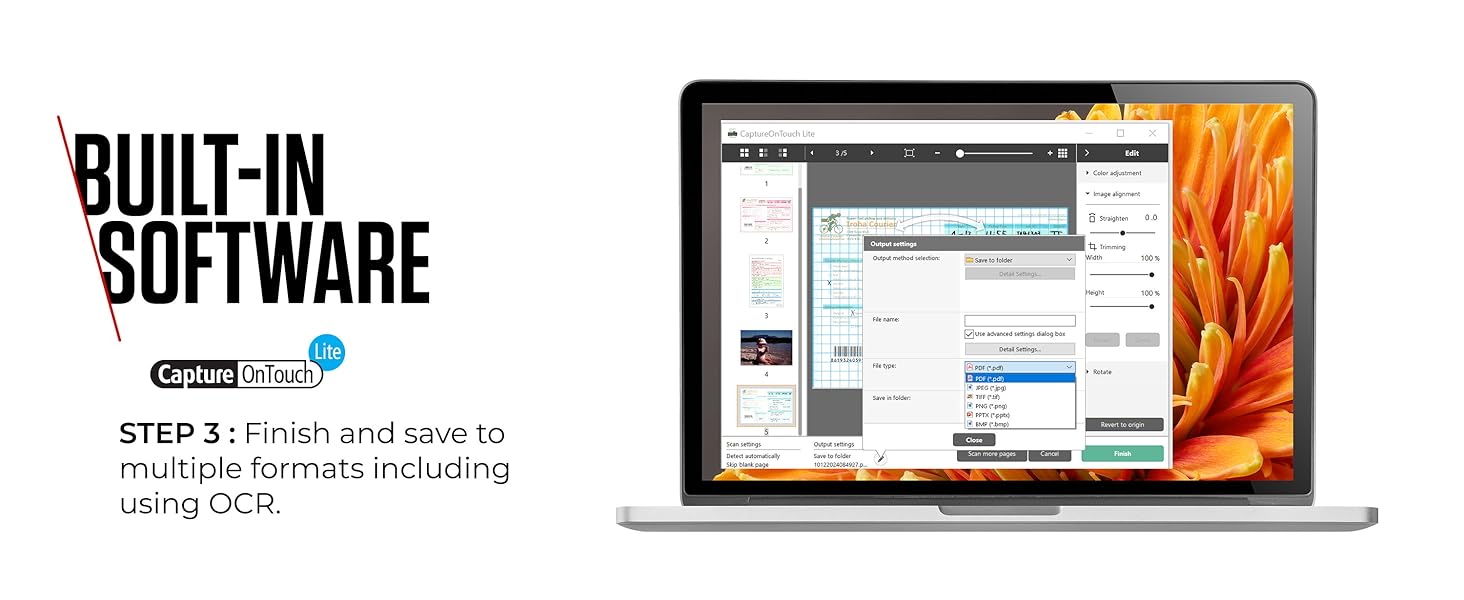
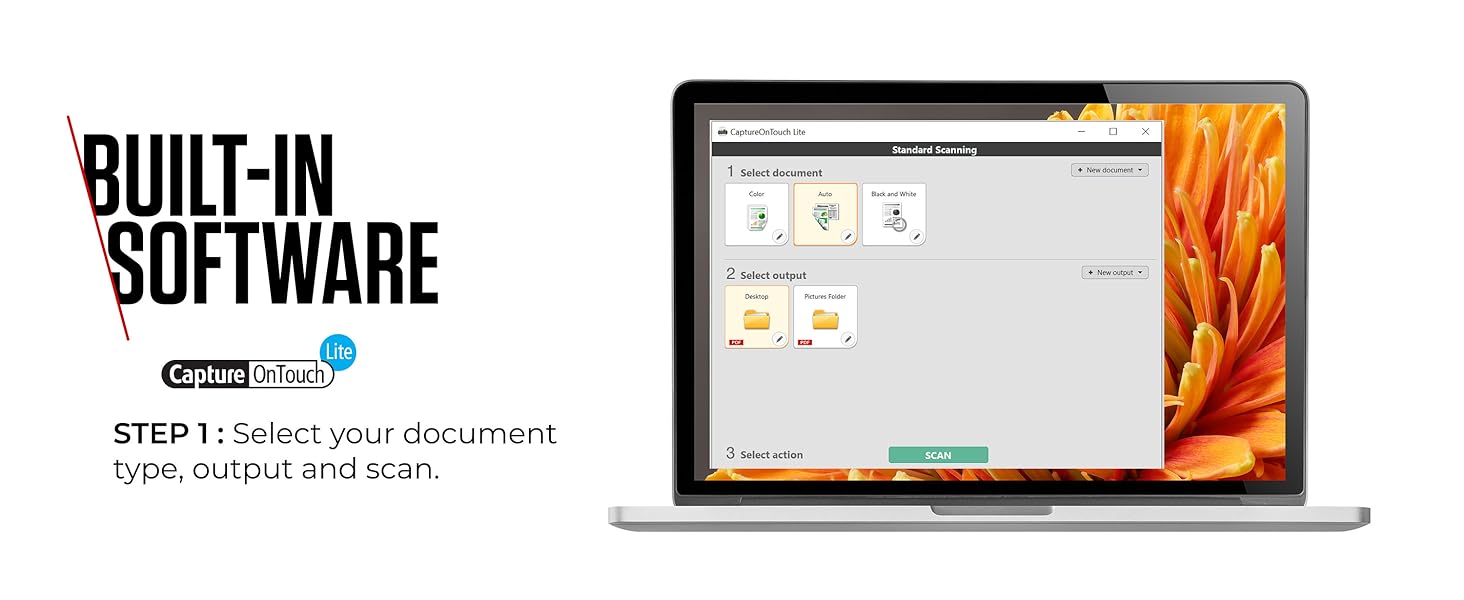
The Canon imageFORMULA P-208II is a compact, USB-powered portable scanner designed for professionals who demand speed and convenience. With double-sided scanning at 8 pages per minute, a 10-sheet automatic feeder, and driverless CaptureOnTouch Lite software, it delivers high-quality scans from A4 documents to receipts effortlessly. Weighing just 600g, it’s perfect for mobile use, requiring only a USB connection—no extra chargers or software downloads needed.






| ASIN | B00SOL9SFU |
| Batteries | 1 AAAA batteries required. |
| Best Sellers Rank | 22,582 in Computers & Accessories ( See Top 100 in Computers & Accessories ) 19 in Document Scanners |
| Brand | Canon |
| Colour | Black |
| Computer Memory Type | DDR3 SDRAM |
| Connectivity Type | no |
| Customer Reviews | 4.1 4.1 out of 5 stars (1,770) |
| Date First Available | 16 Dec. 2014 |
| Form Factor | small |
| Graphics Card Interface | Integrated |
| Graphics Coprocessor | Intel |
| Guaranteed software updates until | unknown |
| Hard Drive Interface | USB |
| Item Weight | 600 g |
| Item model number | 2421C01 |
| Lithium Battery Packaging | Batteries contained in equipment |
| Lithium Battery Weight | 44.5 Grams |
| Manufacturer | Canon |
| Number Of Lithium Ion Cells | 4 |
| Number of USB 2.0 Ports | 1 |
| Operating System | none^none |
| Power Source | USB |
| Processor Brand | intel |
| Processor Count | 1 |
| Product Dimensions | 31.25 x 8.95 x 4 cm; 600 g |
| Resolution | 600 |
| Screen Resolution | 600 |
| Series | P-208II |
| Voltage | 28 Volts |
| Wattage | 10 watts |
| Wireless Type | Bluetooth |
N**N
Good things do come in small packages!
This is such a good little portable scanner. In a world of CamScanner and similar, sometimes people can think "what's the point of something like this", but actually it's such an amazing device, I wanted to go into a little more detail about it. PROS 1. It's lightweight and very portable (more about that below) 2. It scans as well as other more expensive high quality scanners 3. It can scan duplex (double sided) 4. It can scan more than one document at once (believe it or not, it has like a small sheet feeder) CONS 1. It's not a high speed scanner like in an office (but it's not slow either). USES (as promised) 1. We used it in the office to scan everything from A4 to little petrol receipts 2. I use it when going to help relatives with scanning important documents - here is the even better part - within the scanner is a small disk drive which will get found when you plug it in to a USB port of someone's computer. On the drive is software and the drivers to run the scanner, so no need to take discs, download software, search for drivers, take a separate USB etc, it's all within the scanner. 3. It's robust, and because it's so simple to use (one button operation) it's easy for anyone.....however, the software allows you to configure so many options, so when the button is pressed, you are getting exactly what you want and how you want it. I would have given it 5 stars on "Easy to Use", except it took a little while to realise about the scanner having the internal drive with everything you need on it - once you figure that part out, it's 5 stars across the board. This is definitely worth the money, and highly recommended.
C**A
Brilliant scanner and good price
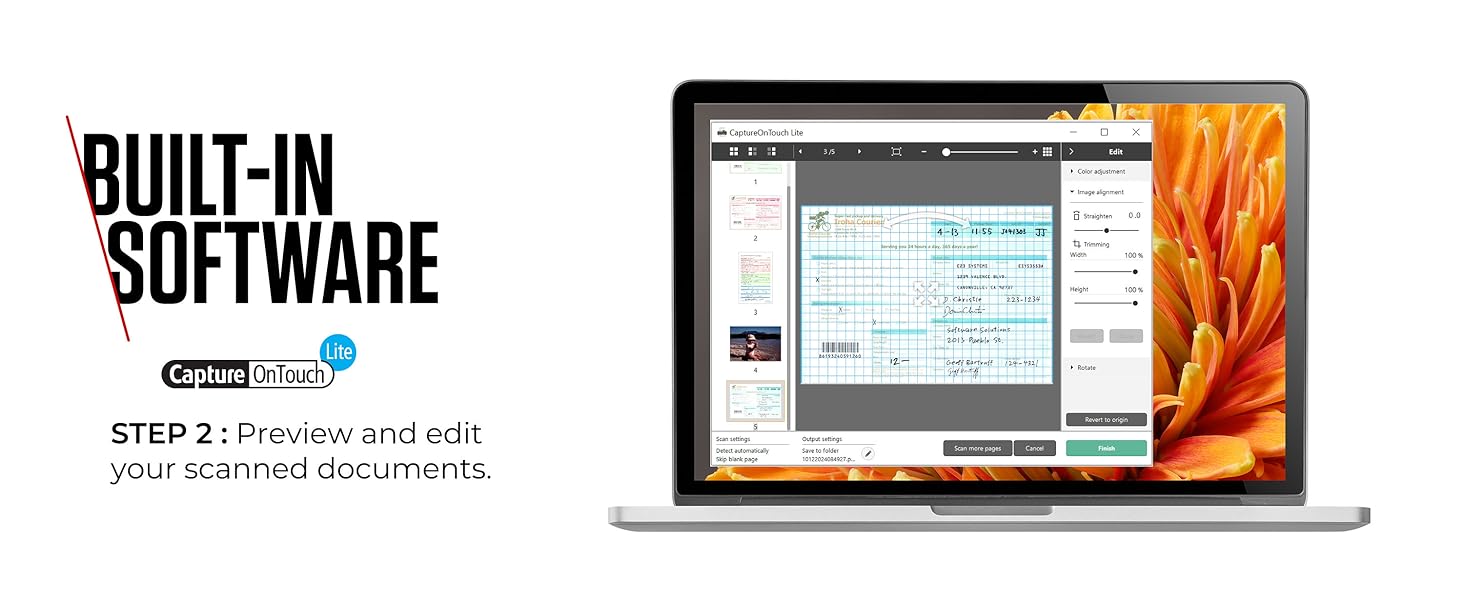
I unpacked and commenced setting it up today. It took 5 mins. But I posted a community question saying I had Windows 10, it scanned but wouldn't save the photos. One response said it was a waste of money. Well, I'd like to report that my own stupidity was the reason. I wasn't fully following the instructions. Once I'd got over the teething problems, I scanned about 150 photos in no time. Easy to pop into files so I'm hoping to complete 7 boxes of photos onto my PC in about another 4 days of scanning. It is so quick at scanning. And senses if a document is double sided so scans back and front just by popping the document in. I could scan multiples of photos - just feed them through one after the other. It's quiet, efficient and has capability of altering the clarity, brightness etc of images. Also you can rotate the images. I would thoroughly recommend it for sorting all your photos. We have a scanner within our printer but this little one just connects right next to my laptop without me having to leave my desk. Added advantage is because it only needs to connect with my PC I can use it anywhere. A brilliant buy and I would thoroughly recommend it.
P**1
Easy to use
Biggest concern was the software to run the device would be slow, for me if the device slower then using a mobile app ( taking picture converting to pdf and emailing to myself) then the product would be a fail. To my relief its great. Out the box it has some paper work (quick start guide, instructionmanul and cd). I use the device one 2 pcs running windows 10, a personal pc and my work laptop. I installed the driver and software on my personal pc but not on my work laptop as it doesnt have a cd rom plus i dont have the permission as an administrator to run. Luckily the product works right out the box no need to actually install the cd. You plug the device after windows does its thing it work. In your windows (10) explorer the device will appear as though it a seperate device, click the icon and your into user interfa e its pretty simple and self explanatory. The scan quality is good, the character regocnition work good depending on the source scanned and overall the scanning is quite quick. Ive probably scanned over 250 a4/letter paper and it picked up by the feeder with very few snags. Ive only scanned paper that are no fold or only a few folds, the most paper ive fed the device in one go was 10 and it picked each sheet with no snags or picking up 2 sheet instead of one. It much quicker then using a mobile app as especially if your scanning double sided. The default software you get to choose the scan quality whether its colour greyscale etc, whether you scan in simplex duplex or skip a page so pretty does all i need it to, the scanner (or maybe windows) remeber the setting you last scanned on so remeber to change if you scanning requirement change. A minor gripe but not really a major issue is it usesold mini usb in on the device with pc end usb 2.0, wish it used a type-c or even mico usb as the the older wires are now not as readily avaible so try not to loose the wire. If you scan infrequently but when a bunch at a time and are using apps on a phone this (for me at least) is a time efficient option i wouldnt recommend if your job require daily bulk scanning as there a quicker options out there. Overall happy with the device.
P**R
one of the best scanner i ever used
in my tech life i used so many different scanner, but this one is my favourite: * it's compact * easy to use * and good value for money definitely i live in a small house where i don't have enough space so i was looking for a compact scanner without all the drama of connecting to mains and having massive desk. So after a intense research i decided to buy this one and i am writing this review after a prolonged use and i can suggest anyone is looking for a portable scanner this one is one of the best. pro: * lots of scanning option EX: receipt, bank card, even odd shaped paper. NO PROBLEM * no power cord required. LIFE SAVING * Duplex enabled (front and rear scanning at the same time) Con: * because is very compact you have to be very careful with cleaning
N**D
Ottimo prodotto ad un prezzo sicuramente accessibile se rapportato a quello degli scanner piani (più economici) e a quello dei compatti verticali da tavolo (molto più costosi). Funziona benissimo, l'ho acquistato ormai da più di un mese e usato numerose volte. Il prodotto è solido, ben costruito e semplice da usare; utilissimo proprio in quelle situazioni di lavoro fuori ufficio o per salvare spazio sulla scrivania. Fornito di custodia morbida (forse un po troppo), può essere riposto tranquillamente nella borsa del portatile e trasportato facilmente. Funziona semplicemente collegando il cavo USB ad una porta del PC o Mac (io lo uso su un MacBook Pro), addirittura ha un tasto switch sul retro che ti permette di farlo riconoscere come periferica di scansione standard, senza la necessità di scaricare ed installare i driver dal sito quando usato sul pc di altre persone. L'installazione standard con software e driver è semplice e funzionale, ti permette di creare dei presets in base a risoluzione, colore, b/n ecc, esportando in qualsiasi formato anche pdf multipagina. Io lo uso principalmente per documenti di testo a colori e b/n ma ho avuto ottimi risultati con immagini e foto alta risoluzione. Le pagine vengono riconosciute da un sensore ottico che fa scendere un fermo meccanico che blocca le pagine al momento dell'inserimento, questo impedisce che la pagina scappi via all'ultimo momento prima di essere scansionata. In definitiva ottimo prodotto che svolge pienamente le funzioni per cui è stato progettato. Consigliato
T**A
Bestelling geplaatst via Amazon, maar product nooit ontvangen. Direct contact opgenomen met zowel verkoper als DHL. Verkoper bood alleen een printformulier aan, wat ik niet kon gebruiken, en er werd geen digitaal alternatief aangeboden. Vervolgens een A-tot-Z-garantieclaim ingediend, die tot twee keer toe onterecht werd afgewezen. Op verzoek van Amazon aangifte gedaan bij de politie en bewijs hiervan overlegd. Ondanks alle stappen die ik heb genomen, geen terugbetaling ontvangen en extra kosten moeten maken door het product elders opnieuw te kopen. Teleurgesteld in de afhandeling en de service, dit is niet wat ik gewend ben van Amazon.
A**O
Muy buen scanner. Rapido, facil de usar gracias a un software intuitivo. Que reconozca las hojas en blanco y el sentido del texto es genial y muy práctico.
E**.
ottimo prodotto semplice da installare, configurare e da usare ! fronte retro automatico con un unico passaggio, molto veloce per me semplicemente fantastico
V**E
Le produit donne un très bon résultat. J'ai mis 4 **** parce que à la livraison les vitres du scanner étaient sans doute avec de la poussière et donnait des lignes blanches sur les photos scannées. Il faut les nettoyer avec un produit genre lunettes ou écran et les lignes disparaissent. La qualité des photos scannées est saisissante de qualité.
ترست بايلوت
منذ 3 أسابيع
منذ 3 أسابيع