


⚡ Power your productivity with one sleek dock — because multitasking deserves no compromises!
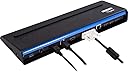
The Targus USB 3.0 SuperSpeed Universal Dual Display Video Docking Station is a versatile, high-performance hub designed for professionals who demand seamless multi-device connectivity. Supporting dual external monitors up to 2048x1152 resolution, it features a robust 90W power delivery system with multiple laptop tips, six USB ports including USB 3.0, and a durable metal chassis for heat dissipation and ergonomic support. Compatible across PC, MacBook, and Android devices, it simplifies your workspace with a single USB-A connection, backed by a 3-year warranty for dependable use in office or hot-desk environments.
| ASIN | B008M7ONLK |
| Best Sellers Rank | 119,485 in Computers & Accessories ( See Top 100 in Computers & Accessories ) 881 in Docking Stations |
| Box Contents | 1x Targus USB 3.0 SuperSpeed Dual Video Docking Station |
| Brand Name | Targus |
| Colour | Black |
| Compatible Devices | Laptops |
| Customer Reviews | 4.0 4.0 out of 5 stars (186) |
| Global Trade Identification Number | 05051794008418 |
| Hardware Interface | USB 3.0 |
| Input Voltage | 19.5 Volts |
| Item Dimensions L x W x H | 20L x 38.1W x 48H centimetres |
| Item Weight | 620 Grams |
| Manufacturer | Targus |
| Number of Ports | 6 |
| Product Warranty | Limited 3-Year Warranty |
| Total HDMI Port | 2 |
| Total USB Ports | 4 |
| Unit Count | 1.0 count |
| Wattage | 90 watts |
A**0
first impressions
Well packaged and nicely presented, after having two other docks fail in the last year i went for this as a 'known brand'. I hope it lives up to this! When i first got it the USB C charging port didn't work, Amazon support helped troubleshoot and after cleaning the port out it came back to life. The metal case should hopefully help dissipate the heat. will report back in a few weeks. edit: Over a year later and i'm back looking at another one, not because the first one failed but because its worked so well i am looking at another one for the office as well!
G**L
It works well with HP ENVY 360 laptops
I use a lot of peripherals and am used to having a docking station. The Targus ACP71EUZA has a good selection of USB2 and USB3 connectors, so keyboard, USB2 storage and mouse can sit alongside fast USB3 backup/photo/video drives. Also it helps having a power feed (wide selection of plugs included) , so that only one mains connection is needed. I also like that you can use it as a support for the laptop, making use of the keyboard and screen a bit more ergonomic while putting less strain on the plugs and cables compared to a vertical device. The biggest benefit for me has been that when using a Type C connecting port replicator (my solution prior to buying the Targus) my mouse became unstable, in that it would "click" just by hovering over a screen button or text in Word. Odd I know, but I researched this and could not find a solution - it was frustrating and dangerous. Since installing the Targus that problem has gone away, along with the associated stress. I can only assume it was voltage related due to the power drain for running the replicator (HP please note!!!). The main disadvantage (for some users) may be the absence of a Type C socket. It doesn't bother me, I don't have such peripherals and if I did I'd use the laptop socket. Also, I question Targus' quality control since at first the HDMI socket didn't work (I use an outboard display screen with an HDMI plug). This was not a drive issue, despite using Windows 10, I still downloaded the display driver (see page 4 of the accompanying "manual"), but my external display didn't work. I followed the Amazon complaint/replacement procedure and a new Targus ACP71EUZA was delivered the next day. I plugged in and all was good. I am very happy with this device and given the relatively low price (compared to others) I'd say it was excellent value.
C**E
Perfect for my needs and very reasonably priced
I have a Lenovo laptop which only powers one external monitor. This docking station was favourably reviewed on an IT website and Targus confirmed it was compatible with my laptop. Easy to use, and does exactly what it describes. I can power 2 external monitors (in addition to the laptop's display) and the docking station powers the laptop as it has many adapters and plenty of extra USB ports. An excellent buy.
I**K
Looks good, performs poorly
I have a Sony Vaio Ultrabook (SVT13) running Windows 8. The laptop comes with 2 USB ports one of which is USB 3.0. It also comes with both VGA and HDMI ports. I am regularly using it in a dual Monitor setup (either through VGA or HDMI, can't use both at the same time) and it works flawlessly. The reason that I purchased the Targus USB 3.0 was to have a dedicated docking station with power so I don't have to unplug 3 or 4 cables every time I want to take my laptop with me. It also meant that I could keep my charger in the laptop's bag all the time. Well the charging part of the docking station works fine and is really convenient. It's all the other features that fail. The video output is good but is definitely less sharp than when using the native ports. Also there is a slight drop in the performance of the laptop when driving 3 screens in total (the laptop's plus 2 more from the docking station) but not that bad actually. Still one can definitely get used to it and work more or less unobstructed. It is the USB functionality of the dock that fails miserably. I don't know how they managed to do that but almost everything that I connected on the dock's ports failed to work as it should. This was especially apparent with wireless mouses/keyboards where the lag was awful. To make it worse, when I was connecting the wireless dongle to one of the USB 2.0 ports of the dock it was very slow and would randomly disconnect after 10-15 minutes. When connecting it to one of the 2 USB 3.0 ports the mouse and keyboard stayed connected but they were still remarkably slow (especially the mouse). I had the same problems with audio interfaces and even external HDDs. At the end I could only trust the USB 3.0 ports of the dock but I still had random problems. Combine that with a couple of BSOD I got while using the product plus a scary bug that was causing the laptop to halt forever when booting if the dock was connected and you can see why I gave it 1 star. I have already repacked the hardware and will return it back to Amazon promptly.
J**K
good unit for the workshop
This will make life easier for my laptop repairs, I am disappointed that it appears to be an older model - circa 2013/14. The handbook doesn't mention compatibility with windows 10 though of course it is, and there are no display port connections, although there is nothing to stop me using adaptors for this purpose. USB 3 is available. A robust unit with different power connections which will suit most laptops. There are more up to date models available at a similar price. JC
N**D
Questa docking station funziona davvero bene, ho provato con differenti dispositivi e non ha mai dato problemi dando la possibilità di collegare fino a 2 monitor esterni. Gli adattatori poi funzionano correttamente anche con dispositivi usciti successivamente a questo.
A**S
It's about time that someone gave a review to this product. Because it's one of a kind product at the moment. It'll be in English, so sorry to the German speakers: Entschuldigung aber ich kann nicht sehr gut Deutsch schreiben. Like I already said, this device is one of a kind. Not exaggerated, it's the best docking station that is available right now. Why? Because of its about the best universal docking experience you can get now, due to its unique universal charging feature! - A little background: Previously we were using DELL proprietary docking stations (E-port) that are only compatible with Latitude business laptops, but they limited us only to these machines. These docking stations also started failing after less than two years of use. Parts broke off and electronic parts just gave up. I wanted to look for another brand to replace our DELL machines. But mixing them would cause a problem with docking, that's where these came as a solution! - The drivers and performance: The only quite of a negative experience that I had was that you need the Displaylink drivers to get them to work properly. That's not necessarily bad, but it's just an extra effort before being able to use them. For our computers, it's easy to get it installed with a GPO or by other means, but that means that external people can't just plug and play to use them, so it becomes useless for them, if they don't visit us too often and think installing these drivers is okay. The quality of the Windows driver is top notch. Even though the development of the Linux and Mac version are behind, I hope that the experience will be of the same quality. I haven't tested it thoroughly yet though. I tested a Macbook before and it did work properly at first sight. Another - although again, not too big of an issue - negative issue is that every docking station need to be installed before being able to use it. After the first installation, one can use it easily by just plug and play. That was the same with the DELL E-port docking stations so I guess that's always the case. It was quite an issue in the beginning because the installation to quite a long time, but that ended up being the Windows driver searching tool as the cause of the problem, because it was always searching in Windows update for drivers, even though the newest and working Displaylink drivers were installed on every machine. Very inefficient of Windows! But what can you expect of Windows... It's the case with a lot of things, where you ask yourself, is this even developed by a human being because it lacks all logic! Disabling the Windows update driver searching feature solved the long waiting time. I have to say that our IT partner, who handles our most important and complex IT stuff didn't recommend USB docking stations, because they only have one road (BUS) where everything must pass through, so in other words: the Ethernet connectivity, the graphics, the sound, etc. all have to pass through the - theoretically - 5Gbps USB 3.0 cable (or less bandwidth if you use USB 2.0, but I wouldn't recommend that). That's generally not an issue unless you have a high performing workstation laptop which you use for heavy graphics designing or video production, because we didn't experience any lag with anything. Take into account that Ethernet only performs up to 1Gbps speed, the "normal" graphics of your laptop less than that and other stuff like sound also need less bandwidth than that. Like I said, USB 3.0 has a bandwidth of 5 Gbps. These are all theoretical and they never get up to that speed because of overhead and other things, but still it's more than plenty for all of these, for normal use. If you plug in USB 3.0 devices in the docking station (like a high performing USB 3.0 drive or stick) and you need all the performance it can offer for fast transfers, then I don't recommend you to plug them in your docking station. Just plug them in a free USB 3 port in your laptop for the best transfer performance. Because of course, due to everything going through one USB 3.0 cable to your laptop, you won't be able to benefit from the maximum performance of that port in your docking device. - Chargers, customer support and warranty: There is a main charging cable where you attach the right plugs onto, so you can plug it in your DELL, Lenovo, HP and other brands of laptops. This works wonderful! Just open the container, get the right plug, attach it and use it! I was a bit scared that they would get lost after some time, so I asked the customer service for some extras. They sent us plenty (because we have a lot of these docking stations) without any effort! And for free, even though I stated that I was willing to pay for it! That was a really nice experience. I have to say though, it took me quite some messages for them to handle my request completely, because my support request was made out of several (I think two) subrequests and they only handled only a part at a time and ignored the other. But in the end everything turned out well. Plus, another amazing thing that's unique about these is that Targus offers 3 year warranty on them! That's what I call standing behind your protect, because I saw that every other docking station on the market only offers up to two year warranty. This makes buying these even more worth it! - Docking: The docking works with USB 3.0 and is backwards compatible with USB 2.0. In most cases this worked wonderfully. There were a few issues in the beginning, but I can't say that the docking station was the cause of every of them. In the end everything got a solution and that's what counts. For example, I had to replace the DVI to HDMI cables with just pure HDMI cables (and had to buy them extra because they don't include HDMI cables). Maybe there was an issue with using these converting cables with these docking stations, because they were working with the DELL E-port docks before. The pure DVI cables also work perfectly. - Some negative points: They really should have left out the I 0 power button. You have to put it on I to give it power, which activates a blue LED, and put it on 0 after use. That's quite an effort having to do it every time and it results in many people forgetting to do that, which makes it use electricity needlessly. The power adapter also has a blue LED that shows that it has power. To me, that's completely unnecessary, so it would have been better if they didn't have that. Even though it's very little, it's still needless use of electricity. ----------------------------- In short: ----------------------------- The good: - Performance - Universal power plugs - Windows drivers - Plenty of ports - 3 year warranty The bad: - Unnecessary power switch on the docking station - Next to a EU cable, a UK power cable comes with every device, this resulted in a lot of electronic garbage The risky: - No included spares for the power plugs, but the customer service can help you with that The unknown: - Linux and Mac driver quality - Actual warranty service I hope that they will create a new version of these with USB 3.1 (type c) for even faster performance, for devices that support it.
H**R
I was expecting basic cables to hook up to laptop - but this was listed as a used one so I was happy it worked when I figured out how to connect thanks to YouTube video. Quick shipment was appreciated.
V**T
Station raccordé sur un portable lenovo (windows10pro) en USB3 sur 2 écrans full HD (1080p), donc 3 écrans avec celui du portable. Clavier, souris, réseaux, clef USB 256 go USB3 également raccordé sur la station d'accueil. Et l'alimentation intégré utilisé pour brancher électriquement le portable lenovo quand il est raccordé à la station. Tous ce petit monde cohabite bien, tous fonctionne une fois les drivers installées. J'enlève d'ailleurs 1 étoiles parce qu'on devrait arriver avec windows 10 à faire du matériel plug and play !!! C'est juste de l'affichage, du réseau et un hub usb3 au niveau des drivers, donc normalement rien d'impossible en plug and play. On a installé cette station d'accueil pour un client pour un portable n'ayant pas de port USB-C, donc obligation de trouver une station USB3 et on voulait une alimentation incluse pour éviter d'avoir à mettre une seconde alimentation (moins de câble et une alimentation en moins à caser). Aucun soucis pour l'installation une fois les bons drivers récupérer sur le web, ça fonctionne maintenant depuis 2 mois sans aucun soucis. Le portable est débranchée chaque soir et rebranché chaque matin. Pour environ 100€ HT, le prix est correct mais pourrait être un peu moins cher à mes yeux. Du coup 4 étoiles en rapport qualité-prix, 3 étoiles pour la facilité d'installation à cause du besoin de driver. Pour la solidité ça à l'air costaud, donc 4 étoiles, et normalement le support Targus est pas mauvais.
L**L
El aparato funciona a la perfección... con windows. Con linux a día de hoy (julio 2014) no existen drivers para la salida de video, por lo que no puedes conectar monitores. El sonido y la toma de red funcionan perfectamente con linux
ترست بايلوت
منذ 3 أسابيع
منذ شهر