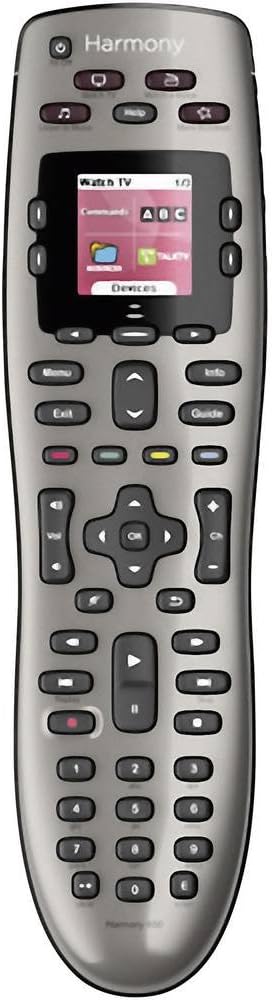
🎯 Master your media kingdom with Harmony 650 — one remote to rule them all!
The Logitech Harmony 650 is a universal remote control designed to replace up to five remotes, featuring a colour smart display with intuitive icons and backlit buttons. It supports over 6000 brands and 225,000 devices, ensuring broad compatibility. Setup is streamlined via guided online software for Windows and Mac, and one-click activity buttons simplify multi-device control. Powered by AA batteries, it offers a premium, clutter-free entertainment experience tailored for the modern connected home.


| ASIN | B00IRUS6K6 |
| Battery Types | 2 x AA or 2 x AAA batteries |
| Best Sellers Rank | 43,127 in Remote Controls (Electronics & Photo) |
| Brand Name | Logitech |
| Button Quantity | 22 |
| Colour | Grey |
| Compatible Devices | Audio/Video Receiver, DVD/Blu-ray Player, Set Top Box, Television |
| Compatible Television Models | Roku 43R4A5R, Roku 50R4A5R, Roku 55R4A5R, Roku 55R6A5R, Roku 55R8B5, Roku 65R4A5R, Roku 65R6A5R, Roku 65R8B5, Roku 75R4A5R, Roku 75R6A5R, Roku 75R8B5, Samsung GQ65Q800TGTXZG, Samsung QE50QN94AATXXU, Samsung QE55LS01TAUXZG, Samsung QE55LS03AAUXXC, Samsung QE55LS03BGUXXU, Samsung QE55LS03RAUXZG, Samsung QE55LS03TAUXXC, Samsung QE55QN700ATXXU, Samsung QE55QN700BTXXU, Samsung QE55QN85AATXXC, Samsung Q… |
| Controller Type | Button Control |
| Customer Reviews | 4.2 4.2 out of 5 stars (5,520) |
| Global Trade Identification Number | 05099206051560 |
| Item Weight | 0.18 Kilograms |
| Manufacturer | Logitech |
| Manufacturer Part Number | 2229250 |
| Maximum Number of Supported Devices | 8 |
| Maximum Range | 10 Metres |
| Model Name | Harmony 650 |
| Model Number | 915-000229 |
| Network Connectivity Technology | IR Wireless |
| Number of Batteries | 2 AA batteries required. |
| Product Features | Learnable |
C**S
Get your remotes under control
I could have built a wall out of the number of remote controls I used to have beside my side of the sofa. It was getting out of hand and I’d been considering the Logitech Harmony range for some time but baulked at the cost when it’s at full price. However, around Black Friday last year I finally buckled and ended up going nuts with building an Alexa-equipped smart home, with the Harmony front and centre. I bought it to do three things; Do away with multiple remotes, allow my TV to be controlled by Alexa and to provide a shortcut to operating multiple devices together. My review is based therefore not just on the Harmony but its integration with Alexa. It’s a slick piece of kit, well built and a premium product. The bundle I got was for the remote control, the hub and a couple of “IR blasters” which help pick up reluctant devices. It also has a docking station for charging. Battery life is supposed to be very good, however I park it in the docking station every night as the dock is on the table next to my chair and it’s easy to locate one-handed in the dark. As far as getting started is concerned I’m not going to claim it’s the most straight-forward thing in the world to set up, but if you have a bit of technical nous it’s intuitive enough. There’s a good App that you’ll need to download to get the most out of the Harmony, from which you can detect and set up your devices to be controlled. You can also get creative and set up Activities, allowing you to control multiple devices with a single command. Where things get really good though is if you have Amazon’s Alexa in your house. You’ll need to activate the necessary Skill in the Alexa App, but once done you can control your devices by voice as if you were using the physical remote. Set up correctly you can accomplish multiple tasks very easily. For example, I say “Alexa, watch a film” and the TV, Blu-ray player and soundbar all come on. You could add to that with additional smart sockets/lights and have lights dim should you so wish. Get as creative as you want with your devices. We also say “Alexa, goodnight” and all of the AV equipment turns off with a cheery “Goodnight” back from Alexa. Voice control is very good, if not infallible. I’d say 9 times out of 10 our voice commands work correctly, and on the 10th occasion repeating the instruction will work. Our most commonly used commands, other than turn on and off, is “Alexa, turn on BBC1, ITV, Dave, Challenge TV etc” or “Alexa Pause the TV/resume”. Currently, the Harmony has replaced remotes controlling most of my devices in the living room. It controls my LG TV, BT Youview box, Blu-ray/DVD player, Apple TV, Xbox and soundbar. It is not able to control the Sony PS4 because Sony won’t allow third party access to the console. I’ve got the Harmony remote configured to cover the vast majority of commands I normally use. Sometimes it takes a bit of concentration to flick between the remotes on the Harmony’s touchscreen, or to remember which of the user-defined shortcut buttons do what, but that’s not a criticism of the remote. The Harmony has enough power and intelligence to do what you need it to do. My wife does keep a couple of the original remotes on her side of the sofa though, which are useful to have as a standby. In summary, we’ve been using the Logitech Harmony remote and hub for about 9 months now and it has performed exceptionally well in that time. It syncs well with Alexa and voice commands are better than I expected. It’s a lot of money at full price, but it’s on offer regularly enough to become reasonable value. I say that the value of a gadget is in whether you use it regularly, and this is used daily. If you’re into your tech then it’s definitely a good one.
P**E
The only one you will need... maybe UPDATED - with a solution?
This is the third Harmony remote I have used. I had a 1000, which the software became obsolete so couldn't update it. Then moved to a non-rechargeable version that I only used to turn my devices on/off and set them to the correct outputs as that was too slow to be used to operate items as there was a big delay between pressing a button and the command going out. I'm happy to say that the Elite doesn't suffer from this problem so can be used for everyday control of the whole set-up (TV, AV Amp, TiVo, Amazon Fire and BluRay player). My set up started fairly easily, as I just transferred the settings from the old remote and hey presto, the remote controlled all my devices and switched them to the correct setting. I just needed to add the Firestick which is a Bluetooth device which this remote can control, unlike the older versions. So full points there. What this remote does well, is starting all the devices you need and setting them up to operate the activity you want. That means it will set the AV amp to say Video 1, set the TV to HDMI 1, and turn on the media source (DVD, Bluray, Media stick etc.) in one button push. It's great if you have a home cinema setup with HiFi type separates. It feels good in the hand and appears well made. It's rechageable and the battery is easily replaceable when it gets old. The only downside, as with all the Harmony remotes I have used is the software. It's a bit clunky and always seems to have at least one annoying aspect that makes you tear your hair out. (I'm on my third, so very little hair left). This one is annoying in that the hub, that needs to be in close proximity to the TV, needs to be in range of the remote when an update is being done, even if you just want to modify a single button on the remote. Like many, I suspect your PC isn't in with your main TV, so I have to pull out the furniture and unplug the hub, move it to the PC to alter a button option on the hand set. Surely it could have updated the handset then updated the hub later, it just goes to show how little forethought goes into the Harmony software and how, in practice, it will be used. However, overall it's a great little device, will replace all you remotes and will work. Especially great as this was a Flash sale item from Amazon. UPDATE 1 - Hmm... the hub crashed for no apparent reason during watching which renders the remote useless. I am hoping this is not a sign of things to come. On the plus side, you can transfer all the IR commands to the handset and use it like an ordinary remote. If this continues, I'll update this review. Afterthought... maybe people expect this for an expensive item, but, the packaging seemed a little excessive. Open the box and find a box! Open the box to find another box with inserts and extra spaces underneath. Oh, and the main box was in a fitted plastic bag. Looses a Star... The Hub requires a regular re-boot and now one of my wifi access points seems to be a problem, which it never has been. I needed to re-boot the wifi router which the hub was connected to for it all to work. I'll monitor and update this review if I discover where the problem is. Update 2 - It has continued to reboot itself and I am unsure why. The router has been stable and not a problem to any other devices so I am ruling out a router problem. If you do get this problem, you can set the actual remote to send out IR codes instead. That gets around most of the problems but the remote can't control bluetooth devices (i.e. Amazon Firestick) so that solution reduces the functionality. On the plus side, you can set this up from the remote itself via the settings option on the remote and don't have to go back to the desktop software. UPDATE 3 - Eh? So it turns out the Harmony needs "something" that only a new and expensive wifi access point will give it. I had Harmony connected to a TP-Link WAP. This WAP has worked successfully for every other device for many years, but not I'm afraid with the Harmony. I have now upgraded the WAP to a Netgear Nighthawk and all the "tantrums" have ceased. It does seem odd that iPhones, Android phones and tablets, Blu-Ray and Amp all connected to the old WAP without issue. So if your Harmony is playing up, it may be the WAP or wireless on your router that is causing the problem.
P**A
Jest ok działa
G**A
L’expérience acquise au fil des années par Logitech Harmony avec paramétrage par logiciel PC est bien visible sur celle-ci (je possède 2 télécommandes harmony 525 et 555 dont certaines touches étaient de mauvaise qualité mais aussi de part leur conception). Tout a été repensé pour trouver le meilleur compromis entre des touches toutes rétro éclairées, dures et tactiles (paramétrables à souhait, tant au niveau du texte que de commandes à rajouter dans une activité) que l’on peut dérouler comme sur un Smartphone pour une taille d’écran correct avec adjonction possible d’une image de son choix en fond d’écran, donnant un côté plus sympathique. La prise en main est très bonne, elle est munie d’une coque d’aspect à peine granuleux pour éviter de glisser sur une surface lisse. L’emboitement de celle-ci est parfaitement ajusté sur son socle très discret. L’ensemble est du plus bel effet sur un meuble pendant sa recharge. La qualité des touches à l’air d’être bien là. Le logiciel PC, après un temps d’adaptation est bien réalisé, facile d’utilisation . Les activités à régler sont intuitives après avoir rentré tout ses appareils (bien mieux que sur le logiciel utilisé pour mes anciennes harmony). Les mises à jour sont assez rapides avec un suivi du déroulement. Ensuite, vient le test du bon fonctionnement de la télécommande afin de valider si tous les processus se déroulent bien. Si ce n’est pas le cas, la touche aide vous permet de corriger automatiquement certains appareils, notamment en rajoutant jusqu’à 2 déports infrarouges, inclus dans la livraison. Dans mon cas, le hub se trouve dans un meuble spécial audio-vidéo semi-fermé, celui-ci reçoit les ordres de la télécommande et les renvoient aux appareils en Wifi, Bluetooth et infrarouge avec également une autre possibilité que la télécommande envoie directement le signal infrarouge sur l’appareil . En cas de problème de commandes non résolues automatiquement par le hub et la télécommande, vous pouvez accéder dans le menu paramètres au réglage manuel de l’assignation de la télécommande et du hub . En parcourant l’ensemble du logiciel, vous allez découvrir énormément de réglages, d’ajustage comme la sensibilité des touches, le temps de réponse, mettre ses chaines TV favorites que dans une activité (dommage) et bien d’autres possibilités pour votre plus grand bonheur. La télécommande est aussi complète, s’allume, dès qu’on la prend dans la main (très utile le soir) et s’éteint au bout de quelques secondes lors d’inactivité. Deux touches tactiles de chaque côté en bas de l’écran, pour lancer une activité ou un dispositif. Quand vous lancez une activité et que vous avez, par exemple, oublier de mettre une commande de TV dans celle-ci, vous appuyez sur devices, vous choisissez votre tv, utilisez la touche dure ou tactile souhaitée de celui-ci et vous rebasculez sur activités, votre activité en cours qui est en blanc, réapparait, un appui tactile et vous revenez dans celle-ci, très simple et pratique. Vous pouvez aussi faire fonctionner vos équipement sur tablettes et Smartphones, en ce qui me concerne sous Android 7.0 : Asus 10 pouces dernière génération et Samsung J5 (en téléchargeant l’application my harmony dans le Google store). C’est un vrai plaisir d’utilisation, notamment sur la tablette 10 pouces où vous voyez, verticalement, toutes les activités sur votre gauche et vos appareils sur votre droite. Comme dis plus haut, vous pouvez aller chercher une commande d’un dispositif et revenir dans votre activité en cours. Vraiment, une belle réussite, grâce à un excellent travail de la division recherche et développement Harmony de Logitech, secondée par un support technique téléphonique gratuit, compétent, à l’écoute de nos problèmes ainsi que des remarques que nous pouvons leur faire pour l’amélioration de leur produit (pour ma part, je les ai appelé 2 fois : lors de la mise en route, création d’un nouveau compte, association du hub avec livebox et ensuite pour un réglage sur la tablette avec remarque sur les chaines favorites pour une seule activité). Cet ensemble m'a été proposé par Amazon à un prix raisonnable, fin novembre 2017. A conseiller vivement. NB : N’oublions pas que pour fabriquer un très bon produit quel qu’il soit, il faut une très bonne équipe qu’il faut payer à leur juste travail, dans tous les domaines : Services Recherche et Développement avec des années d’études, Fabrication, SAV et Réseaux de ventes, sans être sûr d’en tirer les bénéfices attendus. Le prix n’étant que la conséquence de la demande du marché, qu’il faut intégrer dans son analyse, pour générer des milliers voire des millions de ventes du produit concerné, avant de rentabiliser tous les investissements.
A**I
Prima di comprare quest'oggetto ho letto le recensioni, specialmente quelle meno positive e stavo quasi per rinunciare all'acquisto. In particolare la funzione di auto-apprendimento, che considero essenziale per aggiungere comandi non previsti dalle configurazioni "predefinite" da alcuni veniva riferito come non disponibile, a differenza di quanto lascia intuire il sito Logitech. Per fortuna alla fine ho deciso di rischiare (visto che la cifra non è irrisoria) e, per fortuna, ora sono qui a smentire la maggior parte delle critiche negative. Il telecomando fa esattamente quello che promette, è versatile, pratico, funzionale, semplice da programmare e, soprattutto, completamente personalizzabile in ogni aspetto. Naturalmente compreso l'apprendimento di qualsiasi comando eventualmente non presente, funzione assolutamente presente ed anche di semplice utilizzo (basta puntare il vecchio telecomando verso l'hub quando richiesto e premere il tasto da apprendere). Quelli che si lamentano che "c'è solo l'inglese".... per favore, siamo nel 2017! A parte che tutte le voci possono essere rinominate a piacere. Ma davvero preferiamo le traduzioni fatte con Google? La possibilità di programmare da PC, da smartphone o anche dallo stesso telecomando rende la personalizzazione molto agevole e chi si lamenta dei pochi secondi di attesa per la sincronizzazione dei dispositivi, evidentemente non ha avuto a che fare con un PC appena un po' datato, recentemente, altrimenti avrebbe sviluppato un minimo di pazienza nei confronti delle "attese". Ho letto addirittura di chi diceva di rimpiangere il suo vecchio Philips Prestigo e si lamentava della imprecisione del touch display di Logitech. Trasecolo! Io ho lanciato dalla finestra il mio Prestigo perché non ne potevo più di non riuscire mai a premere un comando solo per volta o a fare acrobazie spingendo a più non posso per far accettare un comando al touch meno responsivo che abbia mai visto. Al confronto il telecomando Logitech è una vera meraviglia! Nessun paragone possibile! Unico vantaggio del Prestigo - se vogliamo - era che, essendo lui stesso a produrre gli impulsi ad infrarossi, potevi portarlo ovunque (anche in altri locali) per pilotare dispositivi distanti. Questo qui non è possibile perché è l'hub a pilotare e non lo puoi portare in giro. Nel caso dovresti comprare uno o più hub supplementari. Però, almeno, con l'Harmony non hai la necessità di tenere costantemente il telecomando puntato verso i dispositivi da pilotare e questo è molto comodo. Ho letto che qualcuno si lamenta della latenza dei comandi, pur sapendo che sono liberamente modificabili. Si tratta semplicemente di una necessità per chi ha televisori (come il mio) che dopo il "power on" hanno bisogno di diversi secondi prima di essere pronti ad accettare ulteriori comandi. Se non ci fossero queste latenze non sarebbe possibile programmare sequenze di azioni perché i comandi caduti nella fase di latenza non avrebbero esito. "Sì ma non si può scendere sotto i 500 millisecondi! Inaccettabile!!" Non possiamo aspettare neanche mezzo secondo per comando? Ma non siate ridicoli! In conclusione l'unico punto negativo su cui concordo è che il prezzo è effettivamente un po' elevato per la tipologia di articolo ma, dopo un ragionevole periodo di prova, posso dire di essere completamente soddisfatto e che lo ricomprerei ad occhi chiusi. Forse si sente un po' la mancanza di un manuale che aiuti a comprendere tutte le funzionalità del software in modo organico (non mi piace l'idea di dover scorrere necessariamente la lista delle FAQ sul sito Logitech per capire le varie funzionalità, un manuale fatto come si deve, anche elettronico, sarebbe preferibile). A parte queste minime pecche confermo il mio giudizio: funziona e anche molto bene. Consigliatissimo EDIT: ho scoperto che è possibile istruire il software ad utilizzare il telecomando per pilotare i dispositivi emettendo lui stesso i segnali infrarossi invece dell'hub (anzi, per ogni dispositivo si può indicare da quale emettitore debba essere pilotato scegliendo tra l'hub, gli estensori di segnale, oppure il telecomando stesso). Quindi anche l'unica mia perplessità (vedi sopra) viene a cadere perché posso portare il telecomando in ogni stanza della casa e pilotare veramente qualsiasi cosa. Ancora meglio di quanto pensassi! Aggiornamento 1 dicembre 2017: Con l'ultimo aggiornamento del software è stata aggiunta anche la lingua italiana, ora non ci sono più motivi per lamentarsi!
M**.
Ich habe die Fernbedienung im Angebot geschossen. Sie kam 59,90. Ich hatte ursprünglich überlegt mir die Logitech Harmony Elite zuzulegen. Doch auch in den Angeboten kam diese noch 259€ was mir für eine Fernbedienung definitiv zu teuer ist. Ich habe mich für die Harmony 650 entschieden, da sie meinen Ansprüchen gerecht wird. Ich wollte möglich eine Fernbedienung haben, um so viele Geräte anzusteuern, wie es geht. Aktuell bediene ich mit der Fernbedienung meinen Soundbar von Samsung, einen Samsung TV und den MediaReciever 400 von der Telekom. Ich muss sagen die Konfiguration über den Laptop funktioniert sehr gut und verständlich. Jeder Laie könnte die Fernbedienung programmieren. Nachdem ich Sie dann einige Stunden ausprobiert habe, ist mir aufgefallen, dass viele Tasten hinterlegt waren, welche ich nicht benötige, demnach habe ich die Fernbedienung wieder angeschlossen und die unnützen Tasten im Bildschirm raus geworfen. Es besteht sogar die Möglichkeit Bilder für Sender zu hinterlegen. So sieht man auf der Fernbedienung zum Beispiel das Senderlogo und drückt den dafür vorgesehenen Knopf (kein Touchbedienfeld) und schon landet man bei dem Sender. Sprich man muss sich auch nicht mehr die Kanäle merken. Finde ich persönlich eine super Sache. Woran ich mich gewöhnen musste, sind die Untermenüs. der rot hinterlegte Bildschirm bedeutet, dass ich mich in einer Aktion befindet, so kann ich gewissen Steuerungen von der Soundbar und vom TV oder Reciever vornehmen, wenn ich mich aber in Netflix oder Amazon Prime Video befindet muss ich in das Untermenü der TV- Bedienung gehen, damit ich die Option erhalte in den Mediazentren zu navigieren. Dies war in der Aktionsoberfläche der Fernbedienung nicht möglich. Anich ist die Fernbedienung auch sehr groß, gut es ist ein älteres Modell und man hat dann reichlich viele Knöpfe aber sie ersetzt auch alle anderen Fernbedienungen so gibt es pro und contra Aspekte zu der Größe. Ich finde die Aktionstasten einfach klasse, ich habe dadurch die Möglichkeit die hinterlegten Geräte (in der Software eingestellt) mit einem Kopf anzuschalten! Einfach klasse. Man muss nie wieder jedes einzelne Gerät mit einer extra Fernbedienung anmachen. Einfach einen Knopf auf der Logitech gedrückt und es geht beispielsweise der TV an die Anlage und der Reciever. Und direkt die richtigen HDMI Eingänge werden angewählt. Das spart immens Zeit. Was man mit der Bedienung nicht ansteuern kann ist die Playstation und Sonosboxen. Da Sonosboxen über Funk angesprochen werden müssen und es sich hierbei um eine Infrarotfernbedienung handelt, ist dies leider nicht möglich. Bei der Playstation soll es über Umwege angeblich funktionieren. Es ist an sich nicht möglich, da sich Sony sperrt. Das liegt nicht an der Fernbedienung. Das Infrarotsiginal ist sehr gut. Man kann die Fernbedienung auch unter der Decke benutzen, wenn man sich mal wieder richtig schön eingemummelt hat. Definitiv 5*
L**E
Este mando permite unificar varios mandos de dispositivos multimedia (no valen aires acondicicionados ni luces como otros harmony) de manera que se puede controlar la TV, receptores AV, satélite, bluray y algunas tvbox con el mismo mando. Es recomendable antes de comprar el producto bajar la aplicación myharmony y comprobar que los dispositivos que uno desea controlar con este mando están en la base de datos de logitech. Aunque no lo estuvieren el mando tiene en la parte inferior un receptor infrarojo que sirve para que el harmony lea la señal de otro mando y la imite, aprendiendo así el código que utiliza ese otro mando no listado por logitech. Es necesario programar el mando primero conectándolo por microUSB (cable incluído) al pc y mediante la citada aplicación, que es bastante fácil, intuitiva y compleja. Con ella se pueden añadir los dispositivos que uno tenga y cambiar las funciones de los botones a nuestra conveniencia. A partir de aquí, el funcionamiento: Esencialmente sólo puedes controlar un aparato a la vez. Seleccionas en la pantalla por ejemplo smart TV, y los botones del mando actuarán sobre la televisión (o con los comandos por defecto del software o con los que tú hayas puesto). Si en cambio en la pantalla eliges bluray, los botones pasarán a controlar el reproductor bluray. No se puede que unos botones controlen la TV y otros el reproductor simultáneamente. Pasar entre dispositivos no es excesivamente fácil, pero con todo es mil veces mejor que tener 7 mandos sobre la mesilla como tenía. Los botones inferiores son numéricos y se añaden 2 (+ y E) que se pueden programar a conveniéncia. Encima tenemos los de controlar archivos de vídeo (play, stop, etc), mute y return, la cruz de cursor, volumen y cambio de canal. A continuación están los de colores, que es lo que yo uso para programar los accesos directos que más uso. De esa manera se pueden acceder a comandos que ni el mando de la TV lleva como poner directamente el HDMI2 en vez de pulsar "fuente" y seleccionar el HDMI2. Encima de los colores están los botones menú, info, guide, éxit y dos botones arriba/abajo que se pueden programar a voluntad. Los botones por encima de estos controlan la pantallita y permiten elegir dispositivo. Así mismo permiten seleccionar comandos de ese dispositivo que no se tengan asociados a ningún botón. No hay tecla para "3d", pero por defecto en los comandos de ese dispositivo que se muestran en pantalla (que nos permite ver 4 comandos en cada página) podremos seleccionar 3D, smart hub, o lo que queramos, dado que también es programable. Por otro lado tenemos las actividades. Las actividades con "macros". Programas una secuencia en la que con una pulsación se encenderá, por ejemplo, la TV, el receptor AV, el TV box, la TV se pondrá en el HDMI1 y el receptor AV en el canal del TV box. Todo esto pasa a lo largo de unos segundos. Tú pulsas el botón de esa actividad, dejas el harmony sobre la mesa y en un momento se activará todo lo que antes hubieses hecho con tres mandos diferentes. Así mismo, cuando estamos en modo actividad, el botón de apagado apaga todos los dispositivos que él ha conectado, por lo que sólo necesitas una pulsación y no tres. Si estás en modo dispositivo individual, deberás apagar cada aparato individualmente. Por otra parte decir que se pueden programar actividades tales como encender la TV en un canal concreto y añadir una imagen del logo de ese canal para que se muestre en la pantalla. Podrían tener una base de datos con logos de canales de todo el mundo, pero bueno. El mando viene con dos pilas duracell aunque yo puse unas recargables de la misma marca. Tengo el mando sólo dos semanas y por supuesto no hay rastro de que se vayan a gastar. Esto sucede sobretodo porque el mando se autoapaga a los segundos de dejar de usarlo y se enciende cuando lo levantas del sitio (una función fantástica) para ahorrar energía. La pantalla no tiene una definición ni un ángulo de visión estupendos, pero tampoco hace falta. La letra es bastante grande por lo que nadie debería tener problemas para leer el texto. A nivel de comodidad no está mal aunque es un poco largo y no se pueden alcanzar todos los botones con el pulgar. Pesa los suyo y la pulsación, aunque se nota el click, no es pesada. Como contras, decir que hay señales IR que este mando no comprende. Por ejemplo yo tengo un tvbox de marca wetek y aunque está listado en el myharmony, los comandos no hacen nada ni se puede enseñar al mando a leerlos. Creo que sucede porque es uno de esos mandos emparejado por señal de radio para mover el ratón. Ese tipo de mandos no son imitables con el harmony 500 (aunque se supone que el del nvidia shield sí lo es...). Por otro lado decir que tampoco tiene bluetooth para manejar ps3/4. Otro problema es ponerse de acuerdo con el resto de usuarios de la casa en qué botones hacen qué cosa y enseñarles cómo funciona el mando. Yo estoy todavía en proceso de acostumbrarme al mando, pero aunque tardo aún bastante en conectar todo, me gusta mucho lo conveniente que es usar sólo un mando.
ترست بايلوت
منذ أسبوع
منذ شهرين