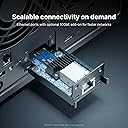
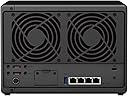
What can I say, we all know why we consider Synology. They are basically the "Apple" of the NAS space. Positives: -User friendly interface -Robust options for safety nets (notice how I said how it's not a backup) -A large userbase with many helpful resources to guide through some of the few nuances. -Optional NVME SSD expansion for caching -Optional RAM upgrade -Optional 2x 5 Bay enclosure (should only be used as it's own, separate volume) for a total of 15 drives of storage. I love the features of BTRFS and SHR1, which are flexible "safety nets" that help protect you from losing all of your data from either a ransomware/crypto attack (BTRFS Snapshots), or a failed drive (SHR1 providing parity data). The advantage of SHR1 vs other RAID configurations is that you are not bound to replacing ALL drives in order to acquire more space. You can simply replace 2 drives with larger capacity drives, to start progressing into more space. These swaps into higher capacity must be done one at a time if using SHR1. Look into Synology RAID calculator if you need more info on how SHR works. Many of the integrations the Synology DSM software brings to the user are also nice (but could be improved on still, such as their Cloud sync application). Negatives: -I wish it had natively faster than 1gb ethernet connections, but it has the option for a 10gb expansion NIC. -If you are looking for a Plex server, this isn't the one you want, because there isn't integrated graphics. I believe the best one right now from Synology is the DS920+ but I have no intention of going this route so I did limited research on it. Do I recommend Synology? Absolutely Do I recommend this unit? If it suits your needs, absolutely. There are many options, which cater to different users/needs, so take your time and do your homework. I honestly couldn't be happier so far. If you want to learn more about this unit, I recommend a couple of channels on YT, which I watched for a couple of months leading up to my purchase. SpaceRex and NAScompares Good luck! --------------------------------------------------------------------------------- Just to elaborate on some of the features I am using as it pertains to my specific use case, this is not really part of the review, but more so for people interested in knowing how I use my Synology and why. System specs: i9-9900k 5ghz OC 32GB DDR4 3200 RAM RTX 2070 SUPER 8GB 1x M.2 NVME 2TB 2x SSD 2TB DS1522+ with 5x 8TB HGST Ultrastar He8, using BTRFS and a LUN (2TB allocated) I am using it to sync my Photography company's Dropbox files, create Lr catalog files from the files, and then store our active (not yet approved) client files. The Cloud Sync isn't as flexible as the Dropbox application in terms of visibility of "Only online" files. Your files can only be syncd as "Available offline" or in other words, stored locally. You do have 3 options of syncing, one way sync (either way) and two way sync. I didn't like being unable to view my "Only online" files and then choosing to sync them through my windows file explorer like I would have liked. This made me instead create a LUN through DSM, which created a drive that appears as local on my windows file explorer, so that I could set it as a target location for the Dropbox desktop application. My workflow is as follows: -Once dropbox is placed on a LUN, I syncd our entire photography file system to the LUN in Online Only mode. This took a while, since there were about 1.6 million files for just our photos. -I select which clients I want to sync that need to be built into a catalog, and download the files to the Synology LUN -Once they are downloaded, I copy these locally stored files to my M.2 NVME local storage (May not be necessary once I upgrade the Synology to have the 10Gb NIC), import the images to my master catalog file on Lightroom Classic, and build them into a seperate Catalog with Smart Previews. -I assign the catalog + smart previews to an editor by simply copying the zipped smart previews and catalog to the Dropbox folder assigned to the editor. -The editor then begins their edits to the catalog directly from their folder which syncs to me, and if they are not currently working on it with Lightroom running (which I know when they are clocked in or not), I can open the catalog and see their progress or make corrections if they are needing to be made, the next time they clock in, they see the changes I made to it. -Once the catalog is done I pull it from the syncd folder, open my master catalog file, import from another catalog (the one that was just turned in), and then export as JPEG. -Once this is done, I then move all of the RAW image files, off my M.2 NVME drive, to a home folder (accessible on Windows explorer using SMB share) on the Synology, then set the Dropbox files that they originated from, back to Online Only status. -In my master catalog file, I relocate the missing folder that was just moved from my local storage, to the Synology home folder (which is still viewable from Lr), and now I have access to all those RAW files in Lr still, without the need to keep them on my M.2 NVME local drive. -If during review from one of my admins, certain images are needing to be replaced due to a poor cull, I can still pull up the catalog, make the necessary changes, and export as a JPEG while the RAW exist on the Synology SMB Share folder. That is where I am at now. This is where I want go next in due time, and it highlights just a couple features that the Synology offers to improve my workflow efficiency, and save money. Once I upgrade the Synology with the Expansion slot for 10Gb ethernet, and add a PCI NIC for at least 5Gb (maybe I'll also go 10Gb there too), I may not even need to move anything onto my local NVME, since I will be able to access everything from the Synology at a fast enough speed that I'll be bottle necked by my CPU rather than the disk read/write. This will need to be tested once I acquire those 2 pieces of hardware. Another improvement I can make, is instead of syncing my editors catalog files and smart previews through Dropbox, I could do it through Synology Drive, which is their version of Dropbox. What's the advantage? My editors will not require a Dropbox account to be able to use the Dropbox application sync feature. I could save some of them a monthly subscription (or save ourselves that money for the veteran editors on our team), by just using my NAS as the cloud provider for the editors. I have not gone this route yet because I have not yet had the time to research the best way to open my Synology up to the internet in that way. This is one of the few things that (from my understanding) Synology seems to be doing the best with in comparison to other NAS solutions, but it's a risk that I am not willing to take without educating myself fully on the best approach. Who knows what other optimizations I will discover as I use the Synology more.