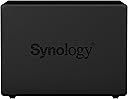
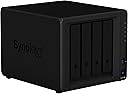
🚀 Elevate your data game with Synology DS918+ — where speed meets security and scalability!
The Synology DiskStation DS918+ is a high-performance 4-bay NAS designed for SMBs and tech-savvy pros. Powered by a quad-core Intel Celeron CPU with AES-NI encryption, it supports up to 56TB raw storage expandable to 9 drives, dual 1GbE LAN for network resilience, and advanced BTRFS snapshots for superior data protection. Ideal for 4K media transcoding and reliable 24/7 operation, it’s a future-ready storage powerhouse trusted by thousands.


| ASIN | B075N1Z9LT |
| Best Sellers Rank | #434 in Network Attached Storage (NAS) Enclosures |
| Brand | Synology |
| Built-In Media | AC power adapter x 1, Accessory pack x 1, DS918+ main unit x 1, Quick Installation Guide x 1, RJ-45 LAN cable x 2 |
| Color | Black |
| Compatible Devices | 3.5" SATA HDD 2.5" SATA HDD 2.5" SATA SSD |
| Customer Reviews | 4.7 out of 5 stars 2,605 Reviews |
| Enclosure Material | Metal |
| Global Trade Identification Number | 00846504002597 |
| Is Assembly Required | No |
| Item Type Name | Synology DS918+ NAS Disk Station, Diskless, 4-bay; 4GB DDR3L |
| Item Weight | 5.03 Pounds |
| Manufacturer | Synology America Corp |
| Material | Metal |
| Mfr Part Number | DS918+ |
| Model Number | DS918+ |
| Mounting Type | Rack Mount |
| Size | 4-bay; 4GB DDR3L |
| UPC | 846504002597 |
| Warranty Description | 3 year |
T**T
I'm a Big Fan
My review of the DS918+ on Amazon. I'm a big fan of Synology. Every 2-3 years, I buy a newer one, and sell the old one on Ebay. I've had the 1-bay DS109, the 2-bay DS211, the DS713+ and a few others in between, that I returned when I realized that the cheaper NAS sometimes don't cut it. Most recently, I traded up from the DS716+ii to this new DS918+. I am very impressed. In the old days, like 2005-2010, consumer NAS was starting to become a thing, but they were barely fast enough. They made them with cheaper slower chips and barely any RAM. My first NAS was a D-link DNS-323 in 2007! It could barely push 1 MB/sec doing rsync. It was seriously slow, even crippled. But it's shared storage! Cheap, easy, reliable, and is low-power so you can run it 24x7. Synology has taken that idea, and pushed it to amazing new heights. With NAS, I learned that it's all about the CPU: you need a decent chip to push data through gigabit Ethernet at full speed. And these days, NAS is all about being a general-purpose server, especially for Multimedia, and that means you need a fast chip and plenty of RAM. The first time I tried to run a media server on the Synology DS411j, I realized that tiny cheap CPU could not cut it, and 128MB of memory was simply not enough. So sent it back, and get the DS411. Even that was barely adequate, and I realized I had to drop the $ on the "plus" series Synology NAS. With the dual-core Intel chip at 2.13Ghz and 1GB of RAM in the DS713+ I had finally found the right one. With the DS918+, I moved up to 4-bay nas on RAID-5, giving 18TB and 1-disk redundancy. A big feature of these new NAS is having two M.2 slots for SSD cache. This is not for everyone - because the first access is slower, and caching will slowly improve things over time, so it works well with certain types of data-access, but for sequential or random type of access that doesn't hit the cache as much, and Gigabit limits, don't be fooled into thinking an SSD cache will make a NAS perform like your C-drive. The great thing about nas is reliability. My DS713+ and DS716+ ran 24x7 year after year, and i never had a single problem with it. Can't say that about Windows. Yes, you can build a DIY NAS, with Windoze-server or Linux, but it's a lot of work to set it up, and reliability depends on your admin skills. And I doubt you can build it for less than a Synology, unless you're using recycled hardware. Synology hardware is reliable, and the softare has amazing features, that are updated all the time, and just get better. Don't worry, Synology has your back. I tended to avoid doing updates to the DSM. I had problems on several occasions, so I rarely took updates, and things just worked. Sometimes, after an update, the network stack gets messed up, and things get weird. Usually, it's necessary to reinstall the DSM (data is preserved) to get around these issues. Within a few years, I hope my next Synology NAS features Thunderbolt conectivity. They are just starting to appear with the DS1817t, and QNap already has them. Thunderbolt runs at 40 Gigabit! They are now starting to figure out how to build a NAS that also allows several users to access it at way faster speeds than Gigabit or even 10 Gigabit ethernet - but still making it a multi-user enterprise server - with Thunderbolt over an Ethernet type protocol. NAS is not for everyone. I'm a computer geek, and you need some computergeekery skills to really embrace and love NAS. But it's here to stay, and I'm so pleased with the great work Synology is doing to bring NAS to more and more users. Ultimately, everyone really needs NAS, even if it's just Dropbox over the internet. The more we become reliant on our computers, the more we need Enterprise shared storage that's reliable and backed-up. Synology can take us all down that road.
J**E
Great Entry-Level NAS
I’m not really a networking hardware guy – nothing much beyond a simple Windows home domain/network. As one’s digital life can be long, one day I woke up and realized that the recycled workstation from a decade ago, currently serving as my file/backup server, had more USB external storage drives attached to it than the iconic A Christmas Story power outlet. My subsequent research led me to the Synology DS918+ NAS as my answer. In full disclosure, I did not have expectations on using the NAS as much more than a NAS – I didn’t want it for a media server, NVR, SQL server, web host, etc. – just a NAS. Also, coming from a Windows environment, and after reading up on NAS’, I also decided to go with NAS-grade HHDs, maxed out the ram, and added 2 GB SSD Cache for performance. After pricing NAS HHDs, I went with 4x8TB drives. First off, setup was a breeze. I opted for a hunt and peck approach to learning the environment. Only took about 15 minutes to get comfortable with the whole thing. From there, only about a day of really playing around to understand how to get it to talk to my Windows Domain Controller, create/use shares in a similar way to Windows Server Shares, and then 36 hours to migrate my data over, have the NAS get that data organized, and otherwise really get started. I did find that getting Windows Computer accounts access to the NAS shares took a bit longer and wasn’t clear, but once resolved, no issues. I’m around 3 months into constant use with it, and although 99% positive, I have a few minor grumbles. The cons are around some of the things that others have cited: like having to pay for access to exFAT devices you plug in, and (if I were to go that direction) pay for more than 2 IP cameras I already own. These things just come down to money grubbing and are otherwise sad. There is also a few backup utilities you can add for free, but all significantly lack in granularity and options and make other, external solutions better. That said, the NAS is quiet, responsive, no hiccups or outages, quick with the I/O, self-maintaining, etc. What I am even more happy about is the ability to use BTRFS as the file system (in conjunction with a RAID5 configuration). Wow – that file system is incredibly more space efficient than NTFS; my resultant 12.7TB storage capacity manages to store everything I had in 40% of the space it took on NTFS. This is a great entry NAS.
P**R
Easy Setup, Reliable Personal Cloud Storage
When I became A+ certified, my eyes were opened to new areas of technology like networking. While studying, I purchased this Synology NAS so I could build my own home server and create personal cloud storage without paying ongoing subscription fees. This is a 2-bay NAS that uses NAS hard drives designed for continuous operation in network storage systems. Installing the drives was simple, and Synology provides a step-by-step setup process that guides you through formatting the drives and selecting the RAID configuration you want to use for data storage and redundancy. Once connected to my router via Ethernet, the NAS becomes part of your home network and acts as centralized network storage. Computers on the network can connect through the wireless router and access the files wirelessly. I like being able to save files in one location so every computer in the house can access the same data without transferring files between machines. The unit itself is lightweight and reliable. I upgraded the RAM to improve system performance and also added a battery backup to protect the NAS during power interruptions. It works very well as backup storage and for managing files across multiple computers on my network. With a basic understanding of networking, this NAS is simple to configure and has been very dependable over the years. If you want a reliable home server or backup storage solution for your home network, I would recommend it.
A**O
Awesome Product!!!
This is 99% the perfect solution. Im coming from a custom UNRAID setup, that i left for various reasons, wont get into detail. Here are the pros of this unit: 1. SIMPLE To Use and setup! 2. Setup your own cloud to sync folders/photos (i canceled iCloud 2TB monthly service) 3. The CPU you might think its slow, but it keeps up with my 8Core UNRAI Setup in regards to what i need it to do. (PLEX, Dockers, CloudServices etc). 4. It is 100x more reliable with time-machine backup from apple devices, UNRAID would work for 1-2 weeks, then id have to re-mount, re-tinker to get it to work again. 5. Speeds for transfering data to and from are the same, and is dependant on my 1GBE setup. I spend weeks trying to get 10GBE working with UNRAID i gave up on it. So for extra fast storage i run an Akitio Tunderbolt3 Raid Station which is amazing!!. 6. Finder works amazing with this synology, files are listed 100x faster than it would with UNRAID. 7. You get what you pay for, your not paying for the hardware here, your paying for the software people!!! You get a complete ecosystem of apps for all the major platforms. Cons: 1. the nvme m.2 cache can only be attached to your disk volume. And DSM(The OS) decides what goes on cache. Its not predictable or guranteed stuff you always access will allways be read from SSD. MY Plex Artwork the 1st time i launch the webrowser for the day pulls the artwork from disk to cache, then the rest of the day artwork loads instantly, then the next day the first time i launch plex web portal again it has to pull artwork from disk to cache. (By the way this isnt a complete bottleneck, its still acceptable from a use perspective, its just not instant like i had it on UNRAID where artwork/database lived on SSD. I talked to tech support and they took my request to allow users to create a volume on cache pool so i can run my PLEX(App/Database/Artwork/Dockers/Etc) 100% from SSD. Overall i give this product 100% for the fact that it just works, and works GOOOOOD!!!
D**K
Excellent NAS for home users
After buying a DS712+ in 2012, I decided to get another in 2017 to set up at my mother's house as a backup solution and perhaps a portal to get to her LAN and help fix things at her house. The Diskstation as you may already know, is sold at a premium to the parts themselves due to 1) the compact form factor for home and SMB users, and more importantly, the customized interface built on top of Linux, known as DSM. While I run a FreeNAS server at my house, I wanted the convenience and stability of not having to manage the backup system at my mother's. The DSM software from Synology is worth the premium in that regard. The support for letting you venture outside of Synology's ecosystem has improved since the earlier days of DSM. You can set up Virtual Machines to run inside the Diskstation, and there's actually documentation about using SSH and support for logging in as a regular admin user if you want to interact with it that way. The SMB transfer speeds seem decent enough on a 1 GB interface, on the order of 95 MB/s when I transferred a large file. Writing to the Diskstation over NFS mount I got about 60 MB/s. The VPN server feature seems easy to set up and worked fine within my LAN. Some features of DSM are more marketing than robust solutions, though... The one thing I've noticed in the first week is the meager speed on rsync of 5 MB/s on a gigabit LAN. This won't be a bottleneck on syncing my NAS to the Diskstation in another state, but with ISPs upgrading their bandwidth, it could become a limitation in the future. For the price of this box, I could get faster performance using Linux on commodity hardware, but it wouldn't have the ease of use, nor the compact form factor that Synology has put together here. Will update with any new observations I have after more time using it remotely.
R**.
I'm Rarely Impressed With Technology....This Is Impressive!
I've worked in the in the IT field for 20+ years and seen a lot of technology that claims to be a "personal cloud" replacement. The ones I have tired, like the now retired Transporter Sync, were OK but never as good as actual cloud based services. The Synology DS918+ is the closest I have seen. I use the DS Video (don't even need to use PLEX), DS Audio, DS Photo, and Could Sync programs they provide for free. They are amazing. Easy security certificate setup. The reason I gave this 5 instead of 4 stars is that I was having issues with syncing large files from the NAS outside of my network. This was a know issue and in the matter of a couple weeks, they released an update to the station fixing the issue. They keep up with their updates and continually improve their product. Good Job Synology! Microsoft OneNote: I use my NAS to sync my OneNote notebooks. It does a pretty good job. If you are familir with trying to sync OneNote on a private cloud, it can be tricky as to not overvirte sections you have open on multiple computers. You still need to be aware this with the Synology, however, it has a great file versioning system and when ther is a confilct, it will create a confilit page that that OneNote shows right in the notebook and easy to compare and copy your modified data over. It is not perfect but this is an issue with OneNote, not Synology. It has to do with Microsoft's file locking system which, so far, is only availblie if you use Microsoft's online cloud to sync. Synology's Note Station: I also use Synology's Note Station (similar to Evernote) app on my phone, laptop and desktop. I really like their To Do/Task List setup better than OneNote. Note Station is not as robust for note taking than OneNote but the tasks in Note Station are easy to prioritze, give sub tasks, due dates and set reminders. I use Note Station to take quick notes and as a daily log where as I use OneNote for detailed notes on devices and systems as well as projets. QuickConnect Service: Synology has a free QuickConnect option that you can enable on the NAS. This is essential if you are not an IT pro and makes it very easy to access all of your data via their different apps (Drive, Could Sync, DS Video, DS Audio, DS photo, ect.) from anywhere outside of your netowrk. They even have offline downloads so you can download your videos and watch without netowrk access (great for plane trips haha). However, I highly recommend that you look up some YouTube videos to see how to propery secure your NAS if you will be using this feature.
H**.
Great little NAS system
Been going strong for years! Great little NAS. Easy enough set-up.
S**T
Great NAS! Feature-packed! Loving it so far
Finally ponied up the money to build a local NAS and this is a great little unit. After all is said and done I bought the following: Synology NAS, 4x 12TB Seagate Ironwolf Pro NAS drives (main storage), 2x 250GB NVMe SSD's (for cache), 1x 4GB RAM to add to the original 4GB RAM for a total of 8GB RAM. If you plan to run tons of VM's or containers on this particular NAS, there is an un-supported method of actually using up to 16GB RAM (2x 8GB) in this unit. For reasons unknown, Synology officially only supports 8GB in this unit, even though it can do more. I run Plex on this and its perfect, fast, and I can stream much higher quality 4k blueray rips with ease (up to 2x 4k videos at 12Mbps each, over the internet) Im not a huge fan of the fact they try to force you to buy their overpriced Synology RAM (100% unnecessary) and claim to not support you if you used aftermarket RAM. Otherwise loving this thing its great for running VMs, Plex, using as a DVR for a home security system, great for sharing files easily locally or over the internet. Tons of packages and software for it too within the Package Center. DSM (the web GUI) is pretty good, works well. I got worried when I had to upgrade from 6.X to 7.X but it went fairly painlessly. Only had to re-give some permissions here and there on my Media folders for the Plex package but the error message popped up exact instructions on what to do in each case, which was really helpful. My only complaint is that it's kind of loud depending on your placement of it. I had no issues with the noise in a 1 bedroom condo but once I moved to a house with hardwood floors, the vibrations of the hard drives reverberates right through the media center and into the floor, you can hear it in the basement, its nuts. Kind of annoying. Tried buying rubber dampening mats and feet like you would use under a washer a dryer and nothing has really helped. Once I finish wiring the house with ethernet I can move it downstairs to solve that issue.
Trustpilot
1 month ago
3 weeks ago