
قم بتنزيل التطبيق


معلومات عنا
حقوق الطبع والنشر © 2024 Desertcart Holdings Limited
قم بتنزيل التطبيق

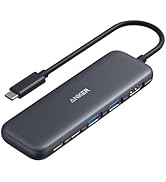
🚀 Unlock your laptop’s full potential with the ultimate 11-in-1 power hub!
The Anker USB C Hub 11-in-1 Docking Station transforms one USB-C port into a powerhouse of connectivity, featuring dual 4K HDMI and DisplayPort outputs, ultra-fast 10 Gbps USB-C and USB-A data ports, and robust 85W pass-through charging. Designed for professionals on the go, it supports multiple operating systems and delivers reliable, high-speed data transfer and multi-monitor setups in a compact, durable design.






| ASIN | B09Q5V9G5P |
| Best Sellers Rank | #396 in Computers & Accessories ( See Top 100 in Computers & Accessories ) #51 in Laptop Docking Stations |
| Brand | Anker |
| Color | Gray |
| Customer Reviews | 4.3 4.3 out of 5 stars (2,274) |
| Date First Available | June 27, 2022 |
| Item Dimensions LxWxH | 5.39 x 2.24 x 0.55 inches |
| Item Weight | 4.8 ounces |
| Item model number | A8388 |
| Manufacturer | Anker |
| Operating System | Windows 8, macOS 10.12 Sierra |
| Product Dimensions | 5.39 x 2.24 x 0.55 inches |
T**E
Light and durable.
Perfect size and optimum options for ports. Great for travel. Small and lightweight but durable feeling. I’ve had this over a year and traveled all over the world with it and had no issues.
C**Y
Works well but pay attention **REVISED**
The device has worked well for me. However potential buyers should note that the 2nd USB C port is reserved for power input from a separately purchased power supply. So the device provides only a single USB C port for attaching devices. I use the device on power from my own computer. So undocking my computer requires some careful steps in the correct sequence: (1) eject all external drives; (2) power down the external display; (3) unplug Anker from computer; (4) remove power from the computer. The device comes at a great price, though, so excellent value. *REVISION* After four months of use, the HDMI port seemed to fail--the monitor was indicating that it was not connected. I wrote to Anker support and received a reply within two hours. The reply told me how to reset the docking station. It worked. Kudoes to Anker Support!
K**Y
Works very well
Works very well with M3 Pro macbook. Displayport works and PD charging works too. Doesn’t get hot. Quality product as Anker should be.
T**P
Anker support comes through
Update: Anker support contacted me and provided a new unit. On this one, the video works fine, both via HDMI and DisplayPort. I'm much happier now that the unit, which I do like, works properly. There is still one video-related quirk that can be annoying, though, if you often unplug the external monitor from the hub but leave the hub connected to the computer. When I unplug the external monitor from the hub, the hub doesn't tell the computer that the monitor is no longer connected (the same thing happened with the original faulty unit). Since the external monitor is my primary monitor when connected, this leads to an irritating set of steps ending up with disconnecting the hub. I reported this issue to Anker support and they forwarded it to their engineering group. Initial review: I like the form factor and the many connection options. They all work fine EXCEPT that the video (whether DisplayPort or HDMI) keeps dropping out. The computer (MacBook Pro M1 14" running MacOS 13.0.1) thinks the external monitor is there, but nothing shows on the screen for a few seconds, then it comes back on, then off again. Anker support says to try updating the firmware, but to do that requires a Windows computer with a USB-C port. I do not have access to such a machine, so I'm stuck. Since one of the primary reasons I want a hub is to handle the video, I have to return the unit. This is a real disappointment since I otherwise have been very happy with Anker products.
A**R
Multiple USB and USB-C inputs, along with ethernet.
Well constructed and thoughtful design.
J**A
Good product, I suspect, if it works. (Also Marketing Needs Improvement)
UPDATE: Nope, it's just the hub. :( It's either defective or not a good product, which is unfortunate. The stutter issue has been resolved, but I can still not use the dock to push an image to my secondary monitor (1080p). I spent several hours this evening updating drivers for my Lenovo Thinkpad E15 Gen2 (AMD) without success. FYI: This laptop DOES support PD+DP through USB-C, something I confirmed before trying to go down the USB-C route in an attempt to replace my ancient Diamond USB-A dock. An image was never sent to my second monitor, whether connected via HDMI or DP through the hub. In all cases, the monitor IS recognized by Windows, so some information is being communicated, just not an image to the monitor. During every attempt, when the monitor was first plugged in, responsiveness in Windows would stutter, lag, and generally respond slowly to my KB+M inputs until, eventually, the laptop caught up and was OK. I am highly disappointed and am considering returning both products, but the USB-C dock is definitely returning. It would be nice, but I don't need a 100W charger. My hope of replacing my current USB-A dock is diminishing at the price point I was hoping for, so we shall see if it's up to the task of the new 2K monitor I have on the way and go from there. Original: Buyer be cautioned: The Anker 565 USB-C also needs power for itself, which is evident if you think about it, but it's not stated anywhere that I could find, and it may not dawn on you until things aren't working quite right. Lack of power could cause many issues I've read about in reviews. The issue: Mouse movement would stutter every 5-10 seconds. Though Windows recognized my HDMI monitor in Device Manager/Display settings, no image was sent to it through the Anker hub. Current theory: So, the manufacturer's 65W USB-C charger for my laptop cannot FULLY power the hub with one connected HDMI monitor, two USBs, and Ethernet through the USB-C hub. I did not test the two USB devices (Keyboard and headset) as there was little need once the stuttering began, which was immediate. I have an Anker Nano 100W arriving tomorrow, and I will update the review once I've re-tested. Suggestion: My ask to Anker would be to *estimate* the power draw of their dock and list it somewhere with many warnings, etc. If they wanted to go above and beyond and add averages for peripherals and the like, that would be amazing, but if not, I would understand, as I'm sure that information could become dated fast. A power warning would have prompted me to consider the power charging situation, and I may gone with one of their docks (About a $100 increase) instead. But now that I'm annoyed, I'll purchase a 100W charger that I can use for my work laptop and elsewhere as needed. :) They are still getting my money, but not as much. They make amazing products, but small details like this matter to me as a consumer.
J**N
Works well for music equipment
Works well I use it to hook up my audio interfaces, Boss rc600 looper, and other random devices. It’s a little heavy but well built.
W**I
Der Anker 565 11-in-1 USB-C Hub macht insgesamt einen sehr guten Eindruck und funktioniert zuverlässig. Die Verarbeitungsqualität wirkt hochwertig und die verschiedenen Anschlüsse sind praktisch für mehrere Geräte gleichzeitig. Worauf man achten sollte: Es wird ein zusätzliches Netzteil mit USB-C-Anschluss benötigt, da manche Funktionen nur mit externer Stromversorgung vollständig unterstützt werden. Außerdem kann es vorkommen, dass nicht alle Laptops ohne Weiteres mit der Dockingstation zusammenarbeiten – bei mir mussten je nach Gerät teilweise Einstellungen angepasst werden. Für meinen Bedarf erfüllt der Hub seinen Zweck gut, daher insgesamt zufrieden mit dem Produkt.
M**O
Ottimo, funziona benissimo
F**-
Fidèle au produits Anker ce hub usb-c fonctionne à merveille avec un MacBook Pro M1. Bonne qualité de fabrication en alu gris et câble de bonne section tressé. Il est assez gros par rapport à certains mais il y a tous les ports disponibles en 1 seul appareil Je recommande pour ceux qui utilise leur pc portable en mode bureau avec un écran externe
P**L
On a MacBook Pro M4, not all devices connected via USB 3.2 port were discovered by the OS. (They are discovered with an older hub, and with direct dongle connection).
A**5
Compré el Anker 565 Hub USB-C porque necesitaba ampliar conexiones en mi portátil y centralizar varios dispositivos en un solo punto. Tras usarlo de forma continuada, puedo decir que es un hub muy completo y fiable. 🔹 Conectividad Ofrece una gran variedad de puertos, lo que permite conectar monitor externo, periféricos USB, tarjeta SD y cargar el portátil al mismo tiempo. Para quienes trabajamos con varios dispositivos, es una solución muy práctica que evita tener varios adaptadores. 🔹 Rendimiento y estabilidad El rendimiento es estable incluso con varios dispositivos conectados a la vez. No he notado cortes, desconexiones ni pérdida de señal, algo importante en hubs de este tipo. La transferencia de datos es rápida y fluida. 🔹 Calidad de construcción El acabado es sólido y transmite buena calidad. El hub no se calienta en exceso incluso tras varias horas de uso, y el cable USB-C tiene una longitud adecuada para trabajar con comodidad sobre la mesa. 🔹 Uso en el día a día Es ideal tanto para uso doméstico como profesional. Permite convertir un portátil con pocos puertos en una estación de trabajo mucho más completa, especialmente si usas monitor externo, teclado, ratón y almacenamiento adicional. ✅ Lo mejor Gran cantidad de puertos en un solo dispositivo Funcionamiento estable Buena calidad de materiales Marca fiable y reconocida ⚠️ A tener en cuenta Es algo más grande que hubs básicos Precio más alto, aunque acorde a lo que ofrece 🔎 Conclusión Un docking USB-C muy completo y fiable, pensado para quien necesita ampliar seriamente la conectividad de su portátil. No es el más barato, pero sí una inversión acertada si buscas estabilidad y versatilidad.
ترست بايلوت
منذ شهرين
منذ 3 أيام