


💼 Unlock your legacy storage — fast, safe, and effortlessly connected!
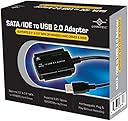
The Vantec CB-ISATAU2 is a versatile SATA/IDE to USB 2.0 adapter that supports up to 2TB hard drives across 2.5", 3.5", and 5.25" form factors. Featuring hot-swappable plug & play functionality, an integrated power switch with LED indicators, and compatibility with both Windows and Mac, it delivers reliable 480 Mbps transfer speeds. Perfect for professionals needing quick, safe access to legacy or additional storage without opening their PC.


| ASIN | B000J01I1G |
| Best Sellers Rank | #142 in SATA Cables |
| Brand | Vantec |
| Built-In Media | Adapter, Manual, cables, Converter, ac Adapter |
| Color | Black |
| Compatible Devices | Desktop, Laptop |
| Connector Type | USB Type A |
| Customer Reviews | 4.5 4.5 out of 5 stars (4,452) |
| Finish | Black |
| Input Voltage | 12 Volts |
| Item Dimensions | 2.76 x 1.69 x 0.39 inches |
| Item Weight | 0.6 Pounds |
| Manufacturer | Vantec |
| Model Number | CB-ISATAU2 |
| Nominal Power | 24 Watts |
| Number of Items | 1 |
| Number of Ports | 2 |
| Package Quantity | 1 |
| Power Plug Type | Type A - 2 pin (North American) |
| Specific Uses For Product | personal |
| UPC | 807031750276 808111653906 172302723380 872182642282 887590247042 731215278747 809185315769 804066535052 044113270448 809385165089 191120079677 737989665271 132018266922 172304256459 844767003641 |
| Unit Count | 1.0 Count |
| Warranty Description | 1 year parts and labor |
| Warranty Type | Limited |
J**A
Tested and examined it - seems solid & fully-functional
I just tested my new Vantec CB-ISATAU2 today. I have seen everything from very positive to very negative reviews on this product, but my experience so far is quite good, though I have only owned the product for one day. So I would recommend this product based on my initial experience, but I cannot vouch for its longevity. I conducted my tests using Windows XP Pro 32-bit on a Dell Inspiron E1505 laptop with USB 2.0 ports. (I did not test the transfer speed as this is very much dependent upon the particular source and destination drives used and the nature of the data transferred (sequential or random). I don't feel like doing a proper speed test.) Here are the results: 3.5" IDE Hard Drive Test ------------------------ This is an old IBM Deskstar from 2001. The connection to the IDE port and to the power were both solid and the connections were easy to make and held firmly. I initially used the Cable Select jumper configuration because that is what was already set and this worked fine. I then tried Master and Slave and both of those worked equally well. I have read in at least one review that it may be important to turn on the power to the drive before connecting the USB to the computer, but connecting the USB before the power worked just as well for me. However, disconnecting the power before the USB resulted in the operating system not recognizing that the device was no longer present, until I disconnected the USB. No problems resulted. In neither case did I bother to "Safely remove hardware". Sometimes when I connected the drive Windows gave me a "USB device not recognized" followed by a "This device can perform faster" notice. I did not determine what caused this, but the drive was still accessible in both cases. Sometimes there was a fairly long (I counted 32 secs. once) delay between the time I connected the USB and when Windows began scanning the drive and mounting it, particularly after receiving the above mentioned notices. This delay seemed to happen most consistently and for the longest time if I plugged in the USB and then unplugged it without ever powering on the drive, then powered on the drive and plugged the USB in again. Windows always recognized the drive eventually. So be patient before deciding that the device isn't working. 2.5" SATA Hard Drive Test ------------------------- This is a Hitachi drive from 2008. My experience with this drive was the same as with the other, excluding the jumper configuration tests which do not apply, and the delay problem which did not seem as bad. Everything connected well and the drive was recognized and worked properly, regardless of which order I connected the power and USB. Again, I did not "Safely remove hardware" first and no problems resulted that I am aware of. General Assessment ------------------ As I stated before, all connections were easy to make and held firmly. Just as in the case of internal molex power connections, this one, too, is very tight. The power switch on the cord works perfectly and seems to be of decent (not excellent) build quality. The build quality in general seems decent as well. The power block has what I consider to be a reasonable weight for such low wattage (12.0V @ 2000mA and 5.0V @ 2000mA). Nothing rattles and everything seems reasonably durable. The only minor exception is the molex to SATA adapter which appears cheaply constructed. But it worked, and it can be cheaply replaced if necessary. The power switch block on the cord has a small, green LED on it which indicates the status of the switch. The data adapter has a red LED which lights up when the USB is connected, and flickers between bright and dim to indicate activity.
F**N
EXCELLENT! FAST, SAFE, RELIABLE, BEAUTIFUL
I ran two TRANSFER TESTS using my five-year-old PC Seagate Barracuda 160GB 7200 RPM SATA 6.0Gb/s 3.5" Internal Hard Drive (I threw away the PC today finally). I "plugged in" the hard drive using this product to my Dell Inspiron 1545 running Win 7 Ultimate x64, Dual Core T4400 @ 2.2GHz, 3gb RAM. Test 1: 3gb from laptop to hard drive: 3mins. Speed: 20-22MB/s. 3gb from hard drive to laptop: 2:10mins. Speed: 22MB/s-26MB/s. Test 2: 3gb from laptop to hard drive: 2:38mins. speed: 21MB/s-24MB/s. 3gb from hard drive to laptop: 2:10mins. Speed 22Mb/s-26mb/S. Things to know about this awesome product: 1) The adapter comes with an ON/OFF switch. This is really nice because it allows you to leave the hard drive connected to your other computer but you can choose to leave it ON or OFF!! 2) Remember to always use the built-in feature of your OS to eject/unmount the hard drive before physically disconnecting it. This will prevent anything bad from happening. 3) In my case, it was "plug & play." Super easy. Took me 1-2 minutes. I didn't have to do anything whatsoever besides connecting the cables. My computer immediately detected it and I was able to immediately access my files. 4) This looks like a very SAFE device to use. I checked other products on Amazon and some people said their drives got fried. This product let me tell you it looks and feels very safe. The way everything is connected. Very happy with this! If your hard drive gets too hot then get a big fan and give it air or just stop using it for a few minutes. I highly recommend this product. UPDATE 6/21/12: I'm still extremely satisfied with this product. I use it a lot with my two super old SATA hdd and IDE hdd. Transfer speeds are great and I feel very safe with I connect my HDDs to this device. I still love the ON/OFF switch because after I eject an HDD (using windows) I can turn the hdd off and leave it plugged in, so if I want to use it again I just have to turn the switch ON and windows will recognize it again. Very neat!
S**A
Definitely a MUST-HAVE for transferring old drive files!!
After having had a horrible experience with one of the cheaper versions of this type of gizmo, I was hesitant about purchasing another. Fortunately, this produce had better reviews, but cost about $8 more than the previous one. I must say, the price difference was definitely worth it. I was in the process of scrapping an old computer that had a couple of 3.5" IDE drives in it (120 gb and 40 gb). I knew there were some old photos and whatnot on them, but wanted to make sure I could transfer everything possible. With the Vantec IDE to USB Adapter...everything was a breeze. Connection was easy with instructions for EXTERNAL DRIVE use (see pg. 7 of manual). Immediately upon connection, the drive showed up in my COMPUTER list, clicked on it, and everything I needed was there. Simple drag-and-drop of the items I wanted into a created folder on my new computer made the process seamless and easy. Transfer rate was far faster than I would have expected, and without a single glitch/hitch. Followed the same process for a couple of other drives. All went as planned and without issue. What's also nice is the ability to use the same system to format and wipe the drive (if desired). Since I plan on selling the used drives, I wanted to make sure they were cleaned thoroughly. Drive-wipe software recognized the drive(s), and wiped drive clean. Once again, simply flawless. I would definitely recommend this unit to anyone attempting to access an old IDE or SATA drive (3.5" or 2.5") in order to recover old files (documents, photos, etc.). Setup and connection is a breeze!
C**N
Adquirí este producto realmente me ha funcionado muy bien sobre todo para realizar respaldos en discos duros IDE, llego antes de la fecha esperada, los materiales son de buena calidad, lo recomiendo.
A**S
I bought this product because I was not prepared to put out 100.00 to have a computer shop do it for me.I am not a real computer savvy person and I felt that it was cool to have some thing more than my hard drive info after all was done. Got what I was after plus some pictures I had forgot about.This product worked fine for me.I had a 2.5 inch IDE hard drive from a old Dell laptop that packed it in and I did not relize that there was a adapter over the pin bar on the hard drive.A fellow at Staples set me straight on it and all was good..Just pulled it off.And it fit right into the reader..Cheers
H**I
I bought this to use on my 3.5" drive, but I wasnt able to use it. One - the power output was too high for my 2TB WD Caviar Green drive and so smoke started appearing from the HDD while using it. I dont know if I damaged by HDD yet, but the lack of power control is a serious issue with this. MOdern HDD's are quite efficient, so utility of this is questionable without power control. The cables are also delicate to touch and need to be handled very carefully. Overall, not an easy experience and not what was expected.
S**Y
Had to pick this unit up to transfer some old hard drive data to newer, modern drives. Even helped some people out in recovering data from laptop drives, where the drive was fine, but the laptops suffered various board/power failures. As others have mentioned, this thing works in a pinch. Does what it's meant to do, no fuss, no fluff. Did not experience issues with drive detection or interruptions in transfers. The whole power brick is a bit inconvenient, but it's nothing to raise a real complaint about. I didn't expect a fantastic price, but it was fair considering I had no headaches using the unit.
H**.
Llego en buen estado y super util, trae lo necesario para poder respaldar mis programas en discos duros IDE y DATA, hasta el momento ninguna falla
ترست بايلوت
منذ شهر
منذ يومين