


⌨️ Stay ahead with every keystroke — the wired keyboard that means business.
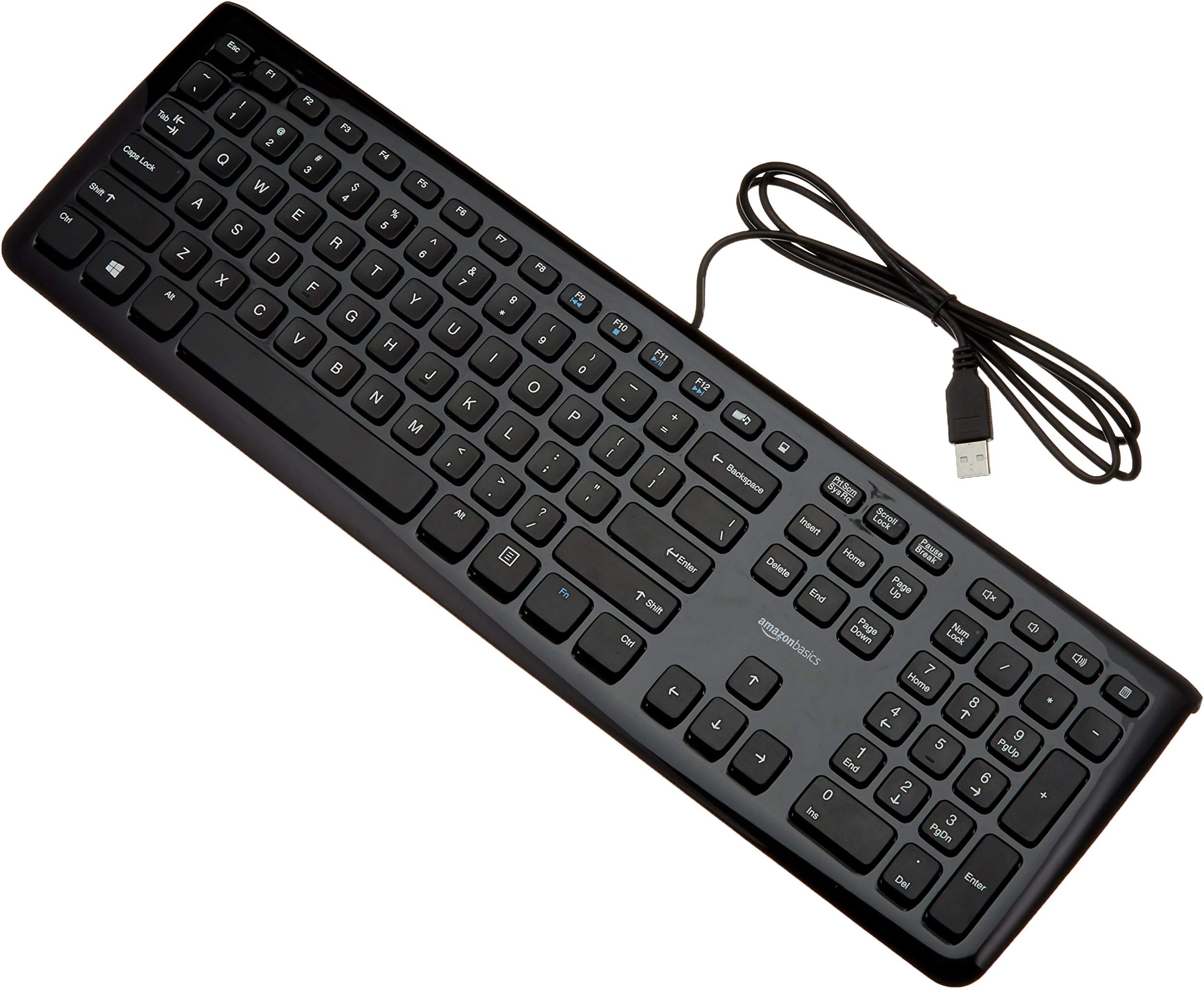
The Amazon Basics Wired Keyboard offers a professional-grade typing experience with 110 scissor-switch keys, dedicated media hotkeys, and a reliable USB wired connection compatible across multiple Windows platforms. Its durable ABS construction and ergonomic low-profile design make it a budget-friendly essential for productivity-focused millennials seeking seamless, no-fuss performance.







| ASIN | B005EOWBHC |
| Brand | Amazon Basics |
| Color | black |
| Customer Reviews | 4.5 4.5 out of 5 stars (13,233) |
| Date First Available | October 1, 2011 |
| Hardware Platform | PC |
| Is Discontinued By Manufacturer | No |
| Item Dimensions LxWxH | 18 x 5.5 x 1 inches |
| Item Weight | 1.15 pounds |
| Item model number | K3069U001 |
| Manufacturer | Amazon Basics |
| Operating System | Vista,Windows 2000 |
| Power Source | Corded Electric |
| Product Dimensions | 18 x 5.5 x 1 inches |
| Series | Amazon Basics Wired Keyboard, Keyboard only (1-Pack) |
D**M
Affordable, Sturdy.. and easy to use!! love, love, love!!!
Fantastic keyboard... very lightweight and very easy to start using! I bought this keyboard when the keyboard on my brand spanking new Dell running Windows 8 started acting funky..Okay.. full disclosure.. I didn't pay a lot for my laptop.. I really just wanted something to surf the internet on.. to blog, send emails etc.. and also to watch movies on when I was in bed.. so I wanted it to have a very large screen.. So $350 later. this Dell laptop fit the bill... Sadly.. although it suits my needs, it isn't very durable.. and one evening it fell of my dining table.. my keyboard obatined a concussion and begin not functioning properly... instead of typing an "h".. I would get "h6"... instead of a "g" I would get a "g6"... it was pretty annoying.. I type pretty doggone fast 95 wpm with very few mistakes... With my keyboard in it's current disabled state.. it would take me an hour just to compose the simplest of emails.. with all the corrections I had to make... UGH! So annoying!!! Although the laptop was new and still covered under warranty, I couldn't find the doggone receipt.. so decided to do some research and figure out myself how to fix it... uh yeah.. that always works right? After a couple of hours of playing "tech wizard"... I read one response in a forum that just suggested buying an extended keyboard... There were tons of recommendations for this affordable Amazon Keyboard.. and so I ordered it... and so it showed up... I plugged it into the USB port.. and "VOILA"! I was typing again!!! They keyboard is FANTASTIC! I like it far better than my lapto keyboard... I really enjoy it when I type and can hear the "tick, tick, tick" of the keys as I type. The feel of the keyboard reminds me of those older word processing machines with the louder keys... some may be annoyed by it.. but I enjoy it! Aside from that.. they numeric keypad is also very great... it's a standard keyboard.. just plug this puppy in and start using it.. With the combo of my keyboard and my wireless mouse.. the fact that the keyboard on my laptop doesn't work doesn't even phase me.. I could care less... And if I may also admit.. it's pretty damn sturdy.. I'm a clutz and I've dropped it several times and even managed to step on it once.. LOVE this keyboard!! "10 out of 10.. would type on it again!" Enjoy!! I'm not a techie at all..
D**T
Amazon basics does it again! Great stuff!
UPDATE (DEC 2019): It's been a year and a half and the keyboard functions literally the same as it has when it first came out of the box. The only noticeable change from when I first purchased the product is the spacebar wear that shows on every keyboard ever made since the spacebar is the most pressed key on a keyboard. Otherwise there has been zero issues with this keyboard since day one and it continues to be a fantastic value. ORIGINAL REVIEW (MAY 2018): Amazon Basics is starting to be a brand that I like the more I use. I needed an inexpensive keyboard to attach to my laptop to improve my overall desk set up on a budget and the keyboard did just that and surprised me. Pros: Key travel is great. All are very responsive and feel great when typing. At this price you're not looking for a mechanical keyboard, but this is much more comfortable to type at high volumes than my laptop (Acer V5). Awesome dedicated buttons - Calculator on the top right, MyComputer button in the middle, music player button, and dedicated volume buttons are all included as single-press actions. I have all of these features on my laptop, but I have to press a function key and this really makes my life easier! F + J + 9 (D Pad) keys have a pretty solid bump for getting right to work without having to look at the keyboard. Number lock + Caps Lock do have green lights to indicate when they're on. Backspace and shift keys seem to work well and I'm not worried about how well they'll hold up over time. SHIFT and ENTER seem small but they work just fine without slowing down typing speed or accuracy. D PAD size is great number pad is great and playing around with the calculator didn't slow me down at all. Cord is pretty long so you shoudln't have an issue keeping it connected to whatever you need. Cons: Upon further examination, the space bar seems and sounds a bit shaky. I'm worried about how well it'll hold up over time. Then again, I've had other keyboards/laptops with similar issues. Being such a cheap laptop I'm not expecting it to last forever I just wonder if that's going to be the first thing that goes. I wish it was a bit wider of a keyboard. It feels like a normal size I just feel ever so slightly cramped for a dedicated keyboard. The high gloss finish of the body shows dust and smudges, I wish it was more of a matte finish like the keys. The rubber "feet" are not very grippy I had to put a pad under my keyboard (check photos) to make sure it didn't slide around while typing (that may just be me typing too hard). The "feet" are a solid bar on the back so if you like to prop your keyboard up further (you shouldn't it's bad for you), then that'll be a con as well. Overall: Great value. Exactly what I needed. Great price.
T**Y
Long term thoughts
I’ve been using this Amazon Basics keyboard for over 8 years, primarily for gaming, and despite some serious neglect and rough handling, it’s still performing like a champ. I’m talking long gaming sessions—4-6 hours daily—hammering keys in fast-paced FPS and MMO games. The keys remain responsive with no sticking, and the printed labels haven’t faded, even after taking a beating. Its simple, sturdy design has held up through accidental drops and a couple of soda spills (cleaned up quickly!). The USB connection is rock-solid, with no lag or issues across multiple gaming PCs. The only minor flaw is some visible wear on the plastic casing—light scratches and scuffs from my heavy use—but it doesn’t impact performance. It’s not a fancy backlit model, which some gamers might want, but for a budget keyboard, that’s no surprise. Compared to other keyboards I’ve owned that died within a couple of years, this one’s durability is unreal. If you need a tough, reliable keyboard that can handle intense gaming without breaking the bank, this is a fantastic choice. Highly recommend!
M**G
y es que programar en un teclado español es un dolor de muelas. por lo demas, el formato "chicle" (cada tecla esta aislada del resto), al principio parece raro... pero en cuanto estas media hora, no quieres volver a tocar otra cosa. lo uso tambien para jugar, y la verdad que nunca he tenido un teclado "de gaming", pero este se comporta bien (igual que cualquier teclado normalito). si que he visto que el cable a veces no hace buena conexion, pero no se si es del propio cable, o del hub al que lo tengo conectado.... (yo diria que del hub, porque lo cambie de puerto y no ha vuelto a dar problemas. ) un detalle importante es que no tiene "patas" que lo levanten mas. el de por si ya tiene una ligera inclinacion, pero no se puede subir un poquito mas. realmente es irrelevante, pero no deja de ser un dato a tener en cuenta.
S**S
What can be said about a bare-bones no-frills computer keyboard? Lots. First this a plug-and-play wired QWERTY keyboard. Advantages: Reliable performance, clearly marked keys, small workspace footprint. It is ideal as a desktop backup or for those whose laptop computer has a small confusing key array. Wireless keyboards may be convenient, but a single wireless keyboard can churn through a huge number of batteries every year. Disposal of those batteries is not only environmentally unfriendly but Murphy's Law says the batteries will die at the most inopportune times (think mission-critical deadlines). A wired keyboard avoids all that. This keyboard needs to be seriously considered by both two-fingered keyboardists and those who keyboard using the legendary Columbus Method (when you think you've found what you're looking for, land on it). Gamers and whiz-bang ten-fingered keyboardists need to look elsewhere for a fancier keyboard. This keyboard has all the usual keys in the usual places including a key for the Windows calculator and a key not commonly found: for Windows "My Computer". That key will be often used by those with a multi-partition system, which admittedly is not a majority of people. Next to that key is amusement, a key which calls forth Windows Media Player. Really. Now no one I have ever met actually uses WMP. Not when there's *vastly* superior freeware readily available (think WinAmp for audio and VLC Player for video - google them). There's even special volume control keys for WMP. You have to wonder what the designers of this keyboard were thinking. Speaking of volume, I've found the main all-purpose volume control buttons (located elsewhere) are often, but not always, slow to respond. This slowness is not the fault of the keyboard, but the poor design of Windows. Given the inexpensive price of this keyboard, have it kicking around in the event of an accident disabling your usual keyboard. (Ever spill a coffee on a keyboard? Ouch. RIP keyboard. It happens more often than you think.) Or get this keyboard for an inept child still struggling with basic keyboarding. Come to think of it, there's a few adults in that category, too. Note: This review was written with this keyboard. All errors and typos are the fault of the keyboardist and not the keyboard.
F**A
Sono 35 anni che picchietto su tastiere per computer di tutti i tipi, ne ho provate dozzine e dozzine. Dalle piu' economiche a membrana, alle carissime a microswitch per gaming, alle leggendarie Model M di IBM (CLOP CLOP!), Apple ][, Amiga, Logitech, fino alle MacBookPro retroilluminate di gran design. Questa Amazon Basics, nonostante un prezzo risibile e una fattura ultra economica, e' veramente, incredibilmente buona. Corsa breve da notebook, struttura piatta e molto sottile, tasti larghi e piatti "alla Apple" (pare vadano molto di moda ora), feedback tattile molto "leggero" ma preciso, superficie lucida delle plastiche e serigrafie chiare. Ha un sacco di tasti aggiuntivi: controllo volume, applicazioni piu' usate, ecc. Mi ci trovo benissimo, e ore e ore di digitazione non pesano quasi per niente: non si fa fatica a scrivere veloce, o a giocare col WASD piu' selvaggio. Un piccolo difetto: i tasti funzione, piu' piccoli degli altri, sono in una fila continua ESC-F1..F12-Multimedia-PC, e risulta un po' scomodo trovare "a tatto" i singoli tasti: una separazione F1-F4, F5-F8, F9-F12 piu' classica avrebbe aiutato parecchio a riconoscere i tasti senza "contarli" con le dita (o peggio, leggerne la serigrafia!). Questa tastiera ha layout USA, quindi ideale per programmatori e sistemisti. Non ha le accentate. L'unico tasto con superficie non-piatta e' il tasto Windows. I led di stato sono integrati direttamente nei tasti Caps Lock, Num Lock e Scroll Lock. Per questo prezzo, sinceramente non mi aspettavo una tastiera cosi' soddisfacente.
G**S
Je frappe tres vite au clavier (aussi vite que l'on peut parler). Les touches suivent sans souciller ma cadence de frappe, elles rebondissent bien et son relativement discretes au niveau du bruit. Le clavier pourrait etre un peu plus lourd en lestage, car quand je frappe rapidement il a tendance a gigoter un peu sur place et bouger. Il comporte des patins en dessous mais pas avec le grip requis pour une frappe rapide. Les touches ont un aspect un peu arrondi, extremement agreable a la frappe. Un peu le meme feeling que le clavier de mon Thinkpad qui a sans doute le meilleur clavier que j'ai jamais eu (a part un Happy Hacking Dvorak). Le cable pourrait etre 15 cm plus long. Si l'unite centrale n'est pas sur le bureau, il sera trop court. Il faudrait rajouter 30 cm de cable. Placee sur le bureau, j'ai largement eu de quoi brancher le clavier et le deplacer a gauche de deux ecrans cote a cote. Les touches CapsLock et NumLock ont en haut a droite de petites diodes vertes. Les touches de fonction sont espacees de la meme largeur tout du long : particulierement appreciable. Ce clavier remplace un Logitech dont les touches de fonction etaient groupees par quatre, une vraie plaie. Le clavier n'a pas de pattes pour le relever, car elles sont deja integrees dans le plastique du clavier. L'angle est relativement reduit, les touches tombent sous la main. Le bord le plus proche de soi est trop droit, anguleux. Quand on pose les pouces dessus on sent l'arrete. Il faut arrondir le plastique a cet endroit pour qu'on ne sente pas une sorte d'arrete. En touches de fonction et d'acces rapide on a des Fn + volume, play/stop et avance/retour pour le lecteur audio, un bouton pour lancer le lecteur audio au dessus de backspace et juste a cote un bouton qui ouvre "Computer". Ce bouton est genial. Des qu'on a besoin d'un explorateur de dossiers, on appuie dessus et ca apparait. Les touches flechees ont une bonne taille, et ne sont pas trop collees ce qui permet de les trouver sans les regarder. Des boutons de reglage du volume et un mute tout en haut a droite, facilement accessibles pour couper le son tres rapidement en cas d'appel telephonique. Et tout en haut a droite du clavier, un bouton calculette. On frappe sans regarder au bout et on a la calculette. Sympa. Les touches font environ 1.2 ou 1.3 cm de cote. Je l'ai pris en Qwerty pour programmer en C# et avoir les [] et {} accessibles par simple shift (Alt-Gr contorsionniste du clavier francais, non merci). J'apprecie sa rapidite, le feeling au rebond des touches, leur aspect doux, et les touches d'acces rapide bien placees. Je n'aime pas du tout l'arrete au bas du clavier (je vais aller raboter ca ce week-end) et le cable n'est pas assez long pour poser le clavier sur une table face a un ecran, et l'unite centrale au sol. Car le cable doit remonter au dos du meuble, puis parcourir la distance en passant sous l'ecran ou les ecrans. Au feeling, explose sans souci un Logitech.
I**Y
Wer eine preiswerte und dennoch top verarbeitete Tastatur mit amerikanischem Layout sucht kann hier absolut nichts verkehrt machen. Pros: * kein Klappern, die Tasten sitzen fest * Tastenabstand ist ok, man kann angenehm tippen * Multimedia-Tasten * einfaches, schickes Design * Status-LEDs bei Caps Lock, Scroll Lock und Num Lock Tasten Contras: * etwas schwerer Hub, man gewöhnt sich aber dran * nicht höhenverstellbar Allgemein: * flache Tasten (entgegen den Bildern) Ich bin so zufrieden damit, dass ich mir noch eine zweite für zu Hause zugelegt habe. Ein kleiner Tipp für alle, die natürlich weiterhin Deutsch schreiben müssen/wollen: Nutzt das Layout "English US (AltGr international)" in den Tastatureinstellungen eures Betriebssystems. Damit kann man bequem Deutsch/Englisch schreiben. Die Umlaute beispielsweise sind dann per AltGr+Q (ä), AltGr-Y (ü) und AltGr-P (ö) zu erreichen (ja, man gewöhnt sich schnell daran :)). Auf dem normalen US-Layout gibt es nämlich keine Umlaute.
ترست بايلوت
منذ 4 أيام
منذ 3 أسابيع