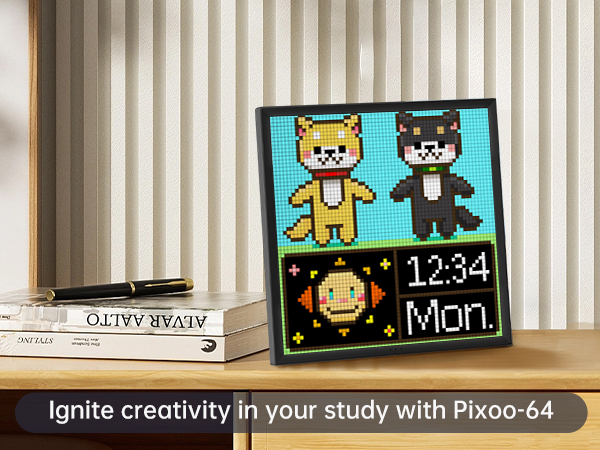
🖼️ Elevate your space with pixel-perfect vibes — don’t just decorate, captivate!
The Divoom Pixoo-64 is a 10.3-inch Wi-Fi enabled digital pixel art frame featuring a 64x64 LED panel. Designed for creative professionals and social media enthusiasts, it offers app-based control for custom animations, real-time updates, and a vast community gallery. Powered via USB for continuous display, it’s perfect for gaming rooms, offices, or any space craving a personalized digital art upgrade.


| ASIN | B09H3YWPCH |
| Aspect Ratio | Unknown |
| Best Sellers Rank | #62 in Digital Picture Frames |
| Brand | Divoom |
| Color | Black |
| Compatible Devices | Smartphone |
| Connectivity Technology | Wi-Fi |
| Control Method | App |
| Customer Reviews | 4.2 out of 5 stars 1,492 Reviews |
| Display Size | 10.3 Inches |
| Frame Material | Plastic |
| Item Dimensions L x W | 12.5"L x 2.75"W |
| Item Weight | 3 Kilograms |
| Manufacturer | Divoom |
| Memory Storage Capacity | 4 GB |
| Model Number | 819285 |
| Power Source | Corded Electric |
| Resolution | XGA |
| Screen Size | 10.3 Inches |
| Touchscreen | Touchscreen |
| UPC | 840500104231 840500103951 |
| Unit Count | 1.0 Count |
M**G
This is one of the coolest gadgets!
The Divoo Pixoo 64 is hands down one of the coolest office gadgets you can buy. At first, I was a little hesitant due to its operational nuances, but once I got the hang of it, I was blown away. One thing to keep in mind is that you absolutely need the proper wall adapter - a 5V 2Amp minimum. I went with the Amazon Basics USB wall adapter, and it's been smooth sailing since. The device operates flawlessly with it. What truly sets the Divoo Pixoo 64 apart is its app functionality. After a few days of tinkering, I found it incredibly easy to use. I've stationed it on my desk at work and programmed it to dim itself at the end of my workday and brighten up as soon as I start. This feature alone has made my workspace more efficient and enjoyable. And let's talk about customization! The Divoo Pixoo 64 is a canvas of endless possibilities. I've set up a sleek weather clock that not only looks great but also keeps me informed. Whether it's a vibrant pixel art display or practical information, you can tailor it to your heart's content. In short, the Divoo Pixoo 64 is a game-changer for any office setup. Once you get past the initial learning curve and have the right wall adapter, you'll have an amazing time with it. It's become an integral part of my workspace, and I couldn't be happier with its performance and versatility.
A**R
Fun little Retro pixel display
Hello there! I fell in love with this gizmo when I first saw that it was a pixel display😊 and offers pixel artists a place to apply their trade. It’s a great decoration for any living room/workspace/game room as you can set the display for each environment. Some of the flaws are well highlighted in the 1 star reviews in that you will have to babysit the device as it has the tendency to crash. Usually a simple unplug and re plug will fix it. The slow reaction time also which I guess is a symptom of the 2.4gz wifi speed can be a lil bit of a pain. But even with the flaws, there is an entire world of artwork that can be put on this thing😊 so the picture potential is literally limitless. Theres 3 custom modes on the app that let you generate your own slideshows of art. I wish you could add more alas, but for now it’s just 3.
A**L
A cool device but needs work
Ok, so I have had this for a few days. My thoughts on the product have changed a bit from day one. My first con is if you plan to run this machine throughout the day you need to go out and buy a 5v plug immediately. The plug that comes with the device will only work for someone who might use the device for a limited time during the day. THE COMPANY should have included a proper plug so the customers can make the decision on how to run this without having to buy extra items. When this happened to me, it wasn’t obvious it was a plug issue as the screen kept only displaying the divoom pixoo name over and over. I think a-lot of the issues people might have are related to this. My second con is lack of communication on how to run the device. While the app is fairly easy to navigate I found, I also found it difficult to know how to set up some pretty big features. To add the gifs on screen I had to look up a tutorial online, there is no way to look this up in the application. Also the device has limited information stored in the app. Like the amount of room on the TF card should be displayed somewhere in the app, however its not. The limited information on the device is very frustrating, and the information book it comes with isn’t any help at all. There is customer service you can speak to, but when I messaged them I received no response back. Also there is a chat feature where you can ask questions to other users, but I found it was not very helpful. My only other complaint is that the colors on the device are a bit washed out compared to when they are displayed in the app. The pros of this device are is very cool to look at. Its has THOUSANDS of things you can display on it. Once you learn how it works, it’s easy to navigate. It’s very customizable. It makes for very cool decor. Its a fun device to have, and play around with. Overall I would recommend this device with the stipulation that you make sure you buy a 5v plug, and watch some tutorials online first. Also check your internet to make sure it can support this device. Id give the device a 4.5/5, and the application a 3/5 because of communication issues. (Sorry for any grammar mistakes 😅)
J**R
Best option don't go smaller
I love this thing! Really helps if you're feeling depressed,you can have a happy little animation playing to cheer you up. You don't have to unplug it at night and you can make playlists of things you want to watch on it as well as create your own. It's really interesting and fun. I recommend this gift highly. The resolution is great! I tried to go smaller and get the 32 x32 version but I wasn't impressed. This one has all the best features and display capabilities!
B**E
Not great for weather, get a cheap tablet, install WhatWeather App
*I'm going to get a cheap tablet, install WhatWeather App on it, make a frame for it, hang on wall, boom done. PRO: 1. Set-up is tricky. 2. Weather is delayed by a few hours. 3. Lack of OTHER weather "modes" (some please make one) that's equal to the default weather one. 4. Fun if you are into this kind of stuff, I just played around with it for a bit, then set it to weather. 5. Can set-up the dim, display off, and re-boot times as needed. CON: 1. Cannot adjust colors of the default weather app. 2. Don't have time to "code" a module myself. 3. Set-up was a pain in the arrrrse, and now I have another app on my phone. *sigh* OTHER: 1. This device tapped into TWO (Three) genres: A. The old people that want a big display that shows weather, date, time, info. etc. B. The geeks that want pixel art, cool background for tiktok videos, etc. C. Folks like me, that do both. :P 2. BUY if you want a versatile device that works well as a data center, or a kidsy fun toy background item. 3. DO NOT BUY if you are a serious weather buff, get a tablet and install the WhatWeather app, and hang on the wall for that.
C**.
I wanted this to work so badly!
I was really excited about this product. I had planned to show my Facebook, Instagram, TikTok, Bluesky, Pinterest, and other social networks' business accounts. I specifically wanted follower counts for these networks. Unfortunately, the device has no Instagram configuration. Further, the Facebook integration doesn't include Facebook pages, and only works for likes and views of personal account photos and videos. The TikTok integration works partially. It will show your likes and views, but it does not show your follower count. The Pinterest integration was great, but I couldn't get the device to scroll through the multiple Social Media integrations. I had to pick one and if I wanted to see another, I had to open the app on my phone and change it. I tried adding some photos from my phone as uploads in the custom animations option, and it really did render the photos well as Pixel Art. But again, if I wanted to switch between the pixel art and the social media counters, I had to open the app on my phone and manually change the display. The device itself is sleek, lightweight, and appears well built. It uses a standard USB-C power cable. A power block (wall plug) was included. Setup of the product required me to change my WiFi SSID and password because the device will not connect to any networks with special characters in the SSID or the password. This was a pain because so many of my devices needed to be re-added to the network once the changes were made. Unfortunately I plan to return the product. It's too expensive for its shortcomings. If you're in it just for the pixel art, and you understand the caveats above, then you will love this product. If you're like me and want it for social media follower counts, this is not the product for you.
F**Y
Very cool product and great customer service
I had the smaller version for a long time and love it. To the point I gave it to a friend and bought the biggest version. 3 months after there was an issue with one of the pixels. I was expecting the experience with customer support to be "can you send it back". Which is always a pain in the butt and just aggravating. They asked me to prove my order and prove the problem with the pixel so I sent a pic of the amazon order details and pics of the problem pixel. They just sent me a new one out immediately. Class A service... The product itself is just a fun piece of tech. The colors it can produce is actually quite impressive. I would definitely recommend. The only small gripe is that I think the app could be a touch better, but I know this can be difficult. The fact that people can create the artwork/animations they do on it is actually impressive.
S**S
The required cell phone app is hot garbage
Look, the thing is fantastic once you get your images/gifs on it, but getting there is the most monumental pain in the ass. You have 2 options to get images/gifs onto this thing. The app, or load up the SD card ahead of time Getting pre-existing images into the app is a nightmare. Not to mention that the app is trying WAY TOO HARD to be a social media platform. It is really stupid. You have to create a new image in the apps version of MS paint, that is where you can import images from your "camera". From there you can select images from your phones internal storage. To get a gif into the app you have to switch the editor to animation mode then import the gif. You cannot get more than 100 frames when doing this. Also it does not care what your gifs animation speed was, it forces you to use a stupid slider to reconfigure the gifs speed again. And because the slider is hot garbage, you will never get the speed to be exactly what it was originally. You could put gifs with more than 100 frames on the SD card. But if you want the gif to loop more than once, you have to duplicate the frames in your gif and make it twice as long, because the only option you get when you play from the SD card, is "play once". There is no way to upload anything to the card from your PC or phone, you have to remove the card every time you want to change anything. The option to play from the card is buried in the device settings, not even in the normal playback screen. There is no way to get the device to play from the card at startup by default. In fact anytime the thing loses power, you have to re-connect to it with your phone and tell it what to display. There are several settings on what to play on startup, none of them work. YOU HAVE TO RECONNECT TO YOUR PHONE EVERY POWER CYCLE. and the only way to do that is via wifi...which only supports 2.4g....in 2022 So you have an outdated wifi protocol being forced upon you, just so you can get the stupid thing to show images/gifs. Trying to navigate the app and all it's cringy social media bull crap. There are hundreds of apps that do pixel art better. All the app should be is a playlist generator. The device should not need an always on internet connection. And there is no reason not to be able to upload pics/gifs directly to the SD card from the phone or pc via the USB cable. EDIT: Dropping stars. I have tried different cards and different power supplies. the device keeps either crashing or resetting. It will play gifs from the card for a few hours and then just stop. It looks like it got rebooted, but it did not play the startup animation. It appears to be looking for gifs in a "channel" to play, but I purposefully have all my channels blank, because I want it to play from the SD card not from the internet. I have a support ticket open, but from what I hear about their support, I am not hopeful. This may be getting returned.
ترست بايلوت
منذ 3 أسابيع
منذ شهر