Desertcart purchases this item on your behalf and handles shipping, customs, and support to Israel.
🚀 Elevate your home WiFi game—because buffering is so last decade!
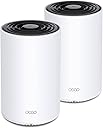
The TP-Link Deco X68 is a cutting-edge Tri-Band WiFi 6 mesh system designed to deliver ultra-fast AX3600 speeds and seamless whole-home coverage up to 5500 Sq.Ft. It supports up to 150 devices simultaneously using advanced OFDMA and MU-MIMO technology, ensuring smooth 4K/8K streaming and gaming. The AI-driven mesh intelligently optimizes your network, while TP-Link HomeShield provides robust security and parental controls, making it the ultimate upgrade for modern smart homes.


| ASIN | B08Z492RK9 |
| Antenna Location | Home |
| Antenna Type | Internal |
| Best Sellers Rank | #572 in Computers ( See Top 100 in Computers ) #5 in Routers |
| Brand | TP-Link |
| Built-In Media | 1 Quick Installation Guide, 1 RJ45 Ethernet Cable, 2 Power Adapters, 2 x Deco X68 Units |
| Color | white |
| Compatible Devices | Gaming Console, Personal Computer, Printer, Security Camera, Smart Television, Smart Thermostat, Smartphone, Tablet |
| Compatible devices | Gaming Console, Personal Computer, Printer, Security Camera, Smart Television, Smart Thermostat, Smartphone, Tablet Compatible devices Gaming Console, Personal Computer, Printer, Security Camera, Smart Television, Smart Thermostat, Smartphone, Tablet See more |
| Connectivity Protocol | Wi-Fi |
| Connectivity Technology | Wi-Fi |
| Control Method | App, Voice |
| Controller Type | vera |
| Coverage | Cubre Hasta 5500 Cuadrados |
| Customer Reviews | 4.4 out of 5 stars 1,241 Reviews |
| Data Transfer Rate | 3577 Megabits Per Second |
| Frequency | 5 GHz |
| Frequency Band Class | Tri-Band |
| Frequency band class | Tri-Band |
| Has Internet Connectivity | Yes |
| Has Security Updates | Yes |
| Is Modem Compatible | No |
| Item Dimensions L x W x H | 10.5L x 10.5W x 16.9H centimeters |
| LAN Port Bandwidth | 1000 Mbps |
| Manufacturer | TP-Link |
| Maximum Upstream Data Transfer Rate | 500 Megabits Per Second |
| Mfr Part Number | Deco X68(2-pack) |
| Model Name | Deco X68 |
| Model Number | Deco X68(2-pack) |
| Model name | Deco X68 |
| Number of Antennas | 10 |
| Number of Items | 2 |
| Number of Packs | 2 |
| Number of Ports | 2 |
| Operating System | ZyNOS |
| Other Special Features of the Product | WPS |
| Router Firewall Security Level | Basic |
| Router Network Type | hybrid |
| Security Protocol | WPA3 |
| Special features | WPS |
| UPC | 840030701399 |
| Unit Count | 2 Count |
| Voltage | 100240 Volts |
| Warranty Description | 2 year manufacturer |
| Wi-Fi Generation | WiFi 6 |
| Wireless Compability | 802.11ac, 802.11ax, 802.11b, 802.11g, 802.11n |
| Wireless communication standard | 802.11ac, 802.11ax, 802.11b, 802.11g, 802.11n |
K**.
A bit unstable
Overall the coverage is great and works relatively great when it wants to. Problem is stability. Too often lost connection or unable to connect
A**A
Deco X68
Este router (deco x68) es muy bueno. En cuanto a precio no me parece tan elevado y al ser un modelo tribanda es más estable que los doble banda. Pensé que la tecnología wifi 6 no se iba a notar la diferencia puesto que tenía un AirPort Extreme de Apple que es wifi 5 pero si es un gran cambio. Tanto la cobertura como la calidad de la señal aumentaron hasta en dispositivos que no son wifi 6. Ampliamente recomendado.
R**I
A very surprising performance boost to my home!
I was very surprised with the performance of this item. My previous setup consisted of a Netgear WiFi router/switch on the 2nd floor where my cable modem and computer is, and a Netgear range extender and switch on the first floor. My old house has tin ceilings and very dense walls, and my WiFi performance was sluggish. On the patio with my laptop, my download speeds was often less than 1mb/s and I'd often use my phone as a hotspot to get better performance. My liviing room equipment (TV, streaming device, PS5) were all plugged into the range extender, and they'd get a couple Mb/s speed, taking forever to download updates on my PS5. My upstairs bedroom with my gaming and streaming device would likewise be very slow. I needed to purchase additional switches for the Deco units since each Deco unit only has two ethernet ports on it (one for the WAN/Cable Modem connection and one for a device or a switch), but good gigabit switches are under $30, so that wasn't a problem. First I hooked up the 1st Deco unit to my cable modem and then plugged the switch into the 2nd ethernet port. I plugged all my devices (computer, printer, NAS, etc.) into the switch and then went into the Deco app on my android phone. I used the app to connect to the Deco and configure it, giving it the same network name and password as my old Wifi system, and then let it do its thing. I had to go through it twice, I'm not sure why it didn't quite work the first time. But it worked the second time and I pretty quickly had the 1st unit set up. I went downstairs, plugged the 2nd unit into the power supply, plugged the switch into it and all of my entertainment devices into the switch, and then used trhe app one more time to acknowledge the 2nd unit and add it to my network. It worked flawlessly then. Before I go on and extoll the good points, I'll point out the negatives. I'm not sure it's possible to configure the devices without an Android or iPhone. I logged in with my web browser on my PC, but it's just more or less a status screen showing the network and clients and doesn't seem to have anything in the way of configuring the devices. I knocked one star off of User Interface because of that. I know almost everyone has mobile phones now, but I don't like that they're absolutely required to configure a network that may not even have one as a client. Also, my previous devices had some high-level configuration options. A lot of this mesh networking is automatically handled by the devices. I like more user-controlled options. The good points? Signal strength throughout my house is dramatically better! On the patio, my download speeds increased from less than 1mb/s to about 50mb/s. My living room where there was some sluggishness and the speed was just a couple megabytes per second increased to about 250mb/s. My bedroom likewise saw a huge speed boost. I no longer have to wait long amounts of time for updates and downloads. All devices that connected to my previous network connected to this one with no problem, and every single device saw a huge performance boost. This was a wonderful upgrade to my home network!
J**N
Solid Wi-Fi mess with great cover.
I placed the order on Blackfriday with very good deal. The packet has 2 router and either one we can use for 1 main and 1 sub. 1.Signal Cover: extremely good. This what I never experienced before with only 2 device but the signal cover entire of my house 3000sf 2 floor down to basement full bar. I bough 2 set but end up only use 1. Very satisfy. 2. Setup: For commonly user like me and doesn’t need a lot of advance setup, this router can peace your mind. It still allow do Port forwarding and a lot basic setup. Only down side this router doesn’t let you split 2 separate 5g-2.4g Wi-Fi and does need smart phone to control. All in 1 app. The setup take a bit for first run because it download and run in the back end until it ready for setting up. Really need our patience. My house use full Ring smart home system and it can use Wi-Fi freely without issue. Some Ring product require 2.4g Wi-Fi but they recognize by itself. I have fiber Verizon and run no issue, lag or disconnect. Conclusion. Great device for the price. Simple to use and support highspeed internet with great signal.
E**.
Fácil de instalar, no falla la señal.
Para el costo beneficio del producto. Es bueno. Es buena inversión para primas generaciones de redes 6G.
A**X
Fast and easy.
My initial impressions are positive for this unit. I've been waiting for a fast, affordable Wifi 6 mesh router and this unit finally fit the budget. I wish there was a 3 pack option, but I get great coverage with the 2 units. I have gigabit internet, and saw 2ms ping times and 3-400 Mbps speeds on most wireless devices (wired got 900-1k as expected) everywhere in my house. I did not see any measurably reduced performance when using the remote node thanks to the dedicated wireless backhaul, but the option to wire it is nice if needed. This was a big improvement over my previous (high end) router which failed to cover my house with strong 5ghz. The app was easy to use and set up, although I do not like that it sends lots of notifications by default and tried to market a subscription to some service. But I do like how easy it is to see what devices are online and how much data they're using. My only other complaint is that they only have 2 Ethernet ports each, (some of which will be used to connect WAN and potentially backhaul, meaning you will need extra hardware to connect more than 1-3 wired devices.
Trustpilot
2 weeks ago
2 weeks ago