🕹️ Elevate your cockpit game — fly like a pro, feel the thrill!
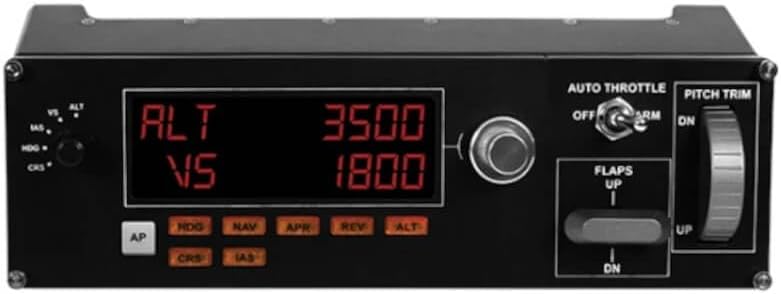
The Logitech G Pro Flight Multi Panel is a precision-engineered autopilot control panel featuring LED displays and physical switches designed for serious flight simulation enthusiasts. Compatible with major flight sims like FSX, X-Plane, and Prepar3D, it offers tactile control over altitude, throttle, flaps, and trim, enhancing immersion and reducing reliance on mouse controls. While setup may require additional software for the latest MSFS versions, its robust build and cockpit integration make it a must-have for millennial pros seeking authentic flight experiences.


| ASIN | B01LWRNBI0 |
| Best Sellers Rank | #13,612 in Video Games ( See Top 100 in Video Games ) #46 in PC Game Flight Controls |
| Brand | Logitech G |
| Color | Black |
| Customer Reviews | 4.5 4.5 out of 5 stars (939) |
| Date First Available | September 28, 2010 |
| Hardware Platform | PC |
| Is Discontinued By Manufacturer | No |
| Item Dimensions LxWxH | 11.1 x 2.24 x 3.31 inches |
| Item Weight | 14.8 ounces |
| Item model number | 945-000028 |
| Manufacturer | Logitech, Inc |
| Operating System | 8 . 1,Windows 7 |
| Power Source | Information Not Available |
| Product Dimensions | 11.1 x 2.24 x 3.31 inches |
| Series | Pro Flight |
| Voltage | 127 |
M**W
Works as should (But after stressful configurations)
Bought this the month of August 2025 - I tried with Msfs 2024 - incompatible product right out of the box. I updated drivers, adjusted power settings on USB ports, so much trouble shooting only to find out i got this product to work using a 3rd party Software called, SPAD.NXT (I used a 14 day free trial - i had to pair each button up through spad.nxt and msfs recognized it.) Product is now fully operational but was a pain to set up. Not sure if its a Msfs 2024 update problem or if its a logitech driver issue- none the less expect an additional 30$ payment for 3rd party softwares in order for product to work with msfs 2024. I am not sure about 2020 - sorry. After set up and configuration i can honestly say, I love this multipanel. Makes my flights seem more real and I can use the mouse less which for me is the ultimate goal. I rate 5/5 stars cause I just love simming and this product works but just mind you .. its stressful configuring it to 2024
C**Y
Excellent product but
When purchasing make sure to purchase a powered usb hub (B08PDS465Q) is what I purchased and make sure to install the Logitech plugins for the games you play. They are required and I highly recommend running the plugins as administrator after launching the game you want to play.
A**Z
Logitech panel
Amazing device for MSFS , very realistic for IFR.
H**.
Working Finally
My 1st impression was poor and I started the process to send it back. Now for the rest of the story......just about to box it up and return to Amazon when I did the following. I uninstalled the driver and files I got from Logitech support. I started MSFS 2020 to see if everything was working but I immediately ran into problems. The file and drivers were uninstalled but none of the associated controls would work. The dials would now light up when hovered over but you could not turn anything. I know the driver was uninstalled but somehow there was something that was left behind making MSFS unusable. Looked like I would have to reinstall to rid myself of what logitech had put on. I tried on last thing..................I reinstalled the Multi-Panel driver, hooked the panel back up and WOW everything was working perfect. I decided to keep it rather than reinstall MSFS because it was working perfect.
C**Y
Works great with MSFS 2020 and even when paired with the Bravo Throttle Quadrant
This works great with MSFS 2020, but anytime you make adjustments, you will need to reset it by clicking off and on the corresponding button. For instance, if you set altitude to 12,000 and you want to climb higher or lower, you would rotate the dial to the altitude desired and then press on the ALT button to disengage it and then once again press on it to engage the altitude setting. I am not a pilot, but in a sim plane, the altitude dial accepts changes by rotating the dial only, so I am not sure which is correct. Just want to point out this very minor inconvenience to others, but it is 100% worth it to have this multi-panel as part of your sim hardware. For those that may be wondering, I had it paired with the Honeycomb Bravo Throttle Quadrant. I no longer own the throttle, and while many of the functions on this panel and the Bravo throttle are redundant, it was still a better experience using the Logitech multi-panel rather than the panel on the quadrant. The added bonus of the LCD screen made it much easier to view information rather than having to zoom in to the instrument panels on your monitor during a flight.
A**R
Great addition to my flight sim!
Awesome product!
S**Y
Great, when it works.
Simple plug and play mostly... but it only displays intermittently. I've found the knobs and selectors all ways work but the display doesn't. Most of the time the virtual cockpit display on the monitors will show you're changes but the actual panel you purchased does not.
G**Y
Good addition to MSFS 2024 and MSFS.
A good edition to my flight sim. Takes a bit of time to get the controls worked out for each plane but glad I have it.
M**D
Worked perfect. Thanks
C**Z
Excelente producto para las opciones ofrecidas como autopilot genérico, bueno para cualquier avión excepto para familia Airbus A320 por los modos de automatización, difícil la compatibilidad con x-plane 11, lo recomiendo más para Flight simulator. Tuve que ajustar el voltaje de la salida de usb para que la pantalla pudier verse, ya que por default viene con un ajuste de voltaje diferente, si lo compras y al conectarlo no prende la pantalla, solo debes hacer el ajuste que digo, el tutorial lo puedes encontrar en YouTube.
M**A
Fácil de configurar e forma de voar ganha um nível muito mais realístico e proveitoso! Qualidade do material ótima!
G**P
This autopilot is easy to install with all other Logitech equipment, bringing a more intuitive feel to flight simulation, even with a simplistic setup. It is taking some getting used to, but I do enjoy not having to operate the autopilot from the aircraft panel on the computer monitor, clicking on each control (easier to make a wrong input), or in some cases, having to open up a separate autopilot display to input the parameters. However, I do like being able to cross-check the readings between the autopilot and the 'soft' panel on the PC monitor to ensure consistency, and that my simulated aircraft behaves as expected. Ideally, I would have liked to be able to use the built-in USB hub on my flight yoke (also Logitech), but the autopilot seems to have a higher power draw from what the hub can put out (could also be that I have a joystick and the switch panel plugged in there that's limiting the power draw). However, it still works plugging the USB connector to the port on my PC or some other independent USB connection. Several functions are provided, and will work if available on the aircraft (for example, you can only set/control indicated airspeed on jet aircraft, and with auto-throttle needing to also be engaged for most - such as on the Boeing 737-800). Overall, a satisfactory product.
S**N
Excellent product and service.It was very quick and appreciable
ترست بايلوت
منذ شهر
منذ 3 أسابيع