Desertcart purchases this item on your behalf and handles shipping, customs, and support to Israel.
🔗 Power Up & Plug In: The Ultimate Hub for the Connected Pro
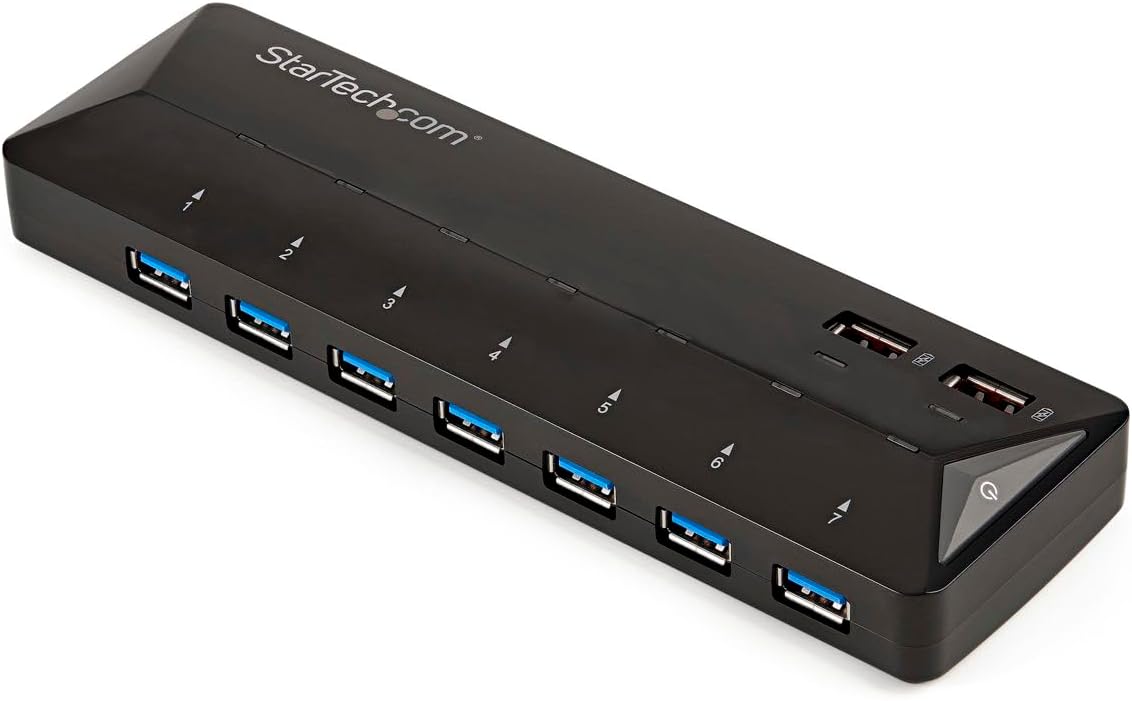
The StarTech 9-Port USB-A Hub (ST93007U2C) combines 7 high-speed USB 3.0 data ports with 2 dedicated 2.4A fast-charge ports, delivering up to 5Gbps transfer speeds and universal device compatibility. Designed for professionals who demand reliable, driver-free plug-and-play performance, it features a sleek, compact design with international power adapters and smart port layout to optimize your desktop setup and keep all your devices powered and connected effortlessly.


| ASIN | B018L4IS3C |
| Additional Features | Plug and Play |
| Best Sellers Rank | #69 in Computer Networking Hubs #1,148 in USB Hubs |
| Brand | StarTech.com |
| Built-In Media | 1-7-port USB 3.0 hub + 2.4A dedicated charging ports^1-USB 3.0 host cable^1-universal power adapter (NA/EU/UK/AU) |
| Color | Black |
| Compatible Devices | PC |
| Customer Reviews | 3.8 out of 5 stars 24 Reviews |
| Data Transfer Rate | 5 gigabits_per_second |
| Enclosure Material | Unspecified |
| Global Trade Identification Number | 00065030861717 |
| Hardware Interface | USB 3.0 |
| Item Dimensions L x W x H | 8.58"L x 5.75"W x 2.6"H |
| Item Type Name | Startech.Com 7-Port USB 3.0 Hub plus Dedicated Charging Ports - 2 X 2.4A Ports - USB Peripheral Sharing Switch - 7 Ports - Desktop - Black |
| Item Weight | 1.2 pounds |
| Manufacturer | StarTech.com |
| Mfr Part Number | ST93007U2C |
| Minimum Required Operating System Version | Windows 10 |
| Model Number | ST93007U2C |
| Number of Items | 1 |
| Number of Packs | 1 |
| Number of Ports | 9 |
| Operating System | Android |
| Special Feature | Plug and Play |
| Total USB Ports | 7 |
| Total Usb Ports | 7 |
| UPC | 065030861717 |
| Unit Count | 1 Count |
| Warranty Description | 2 year warranty |
L**D
New product fixes former problems
The number of people with malfunctioning units worried me. I notice that those were smaller port units while this is a new product. I may have gotten a new production run because my order was delayed for weeks and I was thinking about cancelling it. I tested all 9 ports using a thumb drive, an SSD drive, a printer, an iPod and an iPad. Charging and data transfer were comparable to directly plugging into my computer. The port connections are solid and the standard lights show which ports are active including the charging ports. The Hub and "brick" are larger and slightly heavier than the hubs I've been using. That usually translates into more robust parts lasting longer based on my work experience in the industry. I’ve had some hubs die after a couple of years. My 10 port HooToo hub is shorter but wider. I do like StarTech’s design of placing the power ports on top because it is easier to plug iPods and iPads into while leaving the permanently connected hard drives and printers down on the desktop level. The StarTech 4 port hub has slide on adapters for foreign wall outlets. This unit has dedicated power cords with the various international plugs. The “brick” (transformer) does not plug into the outlet which means it does not take additional room on a surge protector. That’s where the power cord really pays off.
J**K
good upgrade from USB 2
This was a great upgrade for my aging USB 2.0 hub. The performance upgrade of going from USB 2 to USB 3 is quite impressive for any USB 3 device. I attached both a USB 3 external hard drive enclosure as well as a USB 3 thumb drive attached to this hub, along with a number of USB 2 devices (mostly printers and input devices, mouse, keyboard). For the USB 3 drives, performance goes up between 4x and 5x when I connect this StarTech hub. Instead of getting about 15MB/s, I now regularly see 60 to 80MB/s. Performance to the USB 2 devices is unchanged from before (no surprise). If you're currently using a USB 2 hub and have newer, USB 3 devices (with the blue ended cord), this is probably a very worthwhile performance upgrade. Of course, none of this matters unless your computer also supports USB 3. So you'll want to be sure of that before spending the money. The two dedicated charging ports work well. I like that I can leave a device plugged in and charging even when the host computer is disconnected! Overall, I have nothing bad to say about this USB hub. It gives you an excellent performance boost and is svelte and non-intrusive.
K**R
Top-Charging Design is Perfect If You Don't Need USB-C Otherwise Adapt
A desktop USB hub is an essential for most home uses, and probably now and then for the more innovative office settings. An absolute must is a AC to DC converter via a separate power supply. This one has got it. The length of the AC-DC adapter is more than half the width of the hub, so you'll need space for that puppy. (Similar to PC laptops -- not small Apple smartphone / tablet PSUs). What sets this unit apart is the design of the charging jacks on the top of the unit. Since these see more action than the data ports, it's better to see them more easily. The charging port specification: USB 3.0 A (Fast-Charge, 9 pin, SuperSpeed) Female. You get two ports with this unit. Don't you have two devices to charge right now as you're reading this? The activity lights work well, which I like for troubleshooting - as with the laptop-oriented smaller unit StarTech makes. (Though not for the uplink activity). Seven ports seems to be a magical number for desktop hubs (think George Miller's Seven Plus or Minus Two). That's the same as another unit I purchased from Amazon, though the competitive unit doesn't have any charging capability.
J**P
The unit appear to be used
The unit appear to be used, cables were unwrapped with twist ties lose in bags. They would not replace and had to buy a replacement the cost an additional $5.00.
B**R
Very handy USB port and charger
I like having a USB hub attached in front of my computer so that I don’t have to go behind the computer to attach and eject a USB port. My computer is all in one and I do not want to knock it over by trying to attach a USB port. The Star Tech 7 port USB 3.0 Hub is perfect for my computer. Just plug the USB plug into the computer and the Hub and I have 7 USB ports available plus a charging port. This Star Tech 7 port 3.0 USB hub comes with a regular plug, plus three other ones for different currents. This will come in handy when I visit my children overseas.
A**M
Lots of promises, little delivery.
I was pretty excited to get this and put it to use at work. I have a MacBook Pro without a dock, so am pretty limited on USB space. The very first thing I depend on from a USB functionality perspective is the wireless dongle for my keyboard. The StarTech.com USB hub was a complete failure on this front. My keyboard would work for a few minutes and then progressively get worse after about 2 minutes - I would start to see some delay, then missed keys, then no keystroke recognition at all. I would have to unplug the wireless adapter, plug it back in, then re-sync only to have to repeat the process 5 min later. Awful. I have a super cheap Belkin USB hub that works flawlessly with my keyboard; this really shouldn't be difficult to accomplish. I didn't even check the rest of the features due to this one, simple, poorly-executed feature.
H**S
When it works, it's very nice. Too bad connectivity seems to be a little flaky...
A powered 7 USB 3.0 hub plus 2 independent USB charging ports. What's not to like, right? In the old days of towers, you'd occasionally need an external USB hub as you maxed out the 4-6+ ports on the tower itself. But these days, one is often running off a laptop and many of these have very few USB ports, and often only one. That's the case with my Microsoft Surface that powers a desktop setup in one room of my home (a couple of external monitors attached to the Surface; the second external monitor is connected via an adapter that uses the single USB 3.0 port). Expanding that single port to 7 one fell swoop? Great. The two separate USB charge ports? Outstanding! I am ALWAYS short of USB charge ports these days (since EVERYTHING charges via USB nowadays). So far so good. Setup is, as you'd expect, trivial. Attach the appropriate power cord for your country (US in my case) to the power brick, connect the output to the USB hub. Connect the USB hub to the computer's USB port. Click on the power button on the hub. Miracles occur. Waters part. God talks to you. Well, maybe not. Or at least maybe the conversation is via a shaky connection. I set everything up and connected a couple of devices to the computer to via the hub: An external USB 3.0 hard drive, an external USB 3.0 video display adapter, a USB mouse, a tablet that to which I wanted to transfer some files... And then it happened...suddenly all the devices were disconnected from the computer. Huh? I turned the hub off and on and everything got connected again, real nice like...And everything was happy and homey again. Well, until the next morning when I came down and some of the devices had again gone missing as far as the computer was concerned. I turned the hub off and on, and all devices appeared again. Hmmm... All was good again for a few days, and then this morning, same thing again. Not so much liking this. When it's working, it's great. I checked the USB 3.0 transfer speeds for the hard drive via the hub and when directly connecting the hard drive to the computer's USB port and they are effectively identical. So the speed is good. The dedicated charge ports work fine. But the flakiness of the hub itself is...not so great. I've used other powered hubs on this laptop and they have been stable for weeks on end. So one wonders that the deal is here. Can't say, except to say there is a deal. Too bad, because otherwise I really like this unit. Maybe I got a flaky one? Included in the box: Separate power cords for basically every civilized country (unusual--you'll probably only ever use one), the power brick itself, the USB hub, and a standard USB 3.0 cable that connects your computer to the hub.
R**F
Works reliably for me
This is a fine USB 3.0 hub that is a great addition to a power user's laptop. I use an external DAC, gaming keyboard, gaming mouse, and USB external HD daily. I can add a thumb drive or whatnot as needed. Speeds are everything you'd expect as is reliability. I haven't done much charging, but it seems to get the job done. Note I'm using this on USB 3.0 ports on a HP Probook running Windows 10. No issues at all for me, but other reviews are a bit mixed. Nice touches are all of the ports on the same side (I'm over USB hubs that put them on multiple sides, and it's just hefty enough not to wander. I cannot find any faults with this, though I've used a couple (including all metal ones) that I may prefer.
P**T
Configuration automatique et fiable
Produit correspondant à mon attente
カ**ー
USBの充電にもってこい
電話機の買い替えに伴いUSB3.0のハブが欲しかったので探したところ、ちょうど条件にあったのがこれでした。 ポート数が多くてセルフパワー(ちゃんと充電にも使えるやつ)。 電源ボタンを押さないと使えないというトラップはあったものの(取説読んでなかった)、スマホのデータ転送も充電も問題なく行えており不満なしです。 電源アダプターはノートPCのようにちょっと大きいですが、給電能力を考えると多少は仕方ないでしょう。
D**O
work's perfect with my macmini
loads fast using the 2 additional USBA ports , also loads on the other 7 USB3.0 and at the same time connects your iphone to the mac in finder , 7 ports work also well en fast with usb memory sticks 5Gbs , ipad, webcam, keyboard , mouse all connected at the same time
Trustpilot
3 weeks ago
1 day ago