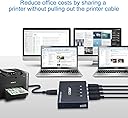
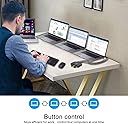
🔄 Master your multi-PC setup with effortless USB sharing!
The AIMOS USB Switch Selector is a compact, metal-encased 4-port USB 2.0 KVM switch that enables seamless sharing of up to 4 USB devices across 4 computers. Supporting plug-and-play compatibility with Windows, Mac, and Linux, it offers fast 4800 Mbps data transfer and dual switching via push buttons or a remote cable, making it an essential productivity booster for multitasking professionals.
| ASIN | B085915CTB |
| Actuator Type | Push Button |
| Brand | AIMOS |
| Brand Name | AIMOS |
| Circuit Type | 4-way |
| Color | 4x4 USB sharing Switch |
| Connector Type | Usb |
| Connector type | Usb |
| Contact Material | Metal |
| Contact Type | Normally Closed |
| Contact type | Normally Closed |
| Control Method | Touch |
| Controller Type | Push Button |
| Current Rating | 2 Amps |
| Current rating | 2 Amps |
| Customer Reviews | 4.0 out of 5 stars 771 Reviews |
| International Protection Rating | IP54 |
| Item Dimensions | 10.2 x 6.5 x 2 centimeters |
| Item Weight | 0.02 Pounds |
| Manufacturer | AIMOS |
| Material Type | Metal |
| Model | AUB085915CTB |
| Mounting Type | Panel Mount |
| Number of Items | 1 |
| Number of Positions | 4 |
| Operating Voltage | 5 Volts |
| Operating voltage | 5 Volts |
| Operation Mode | Manual |
| Operation mode | Manual |
| Part Number | AUB085915CTB |
| Specification Met | IP54 |
| Switch Type | Push Button |
| Terminal | Button |
| UPC | 788125932153 |
| Unit Count | 1.0 Count |
C**S
Funciona como lo esperaba
La instalación fue fácil, viene con cuatro cables para las cuatro computadoras que se pueden conectar al dispositivo (de momento sólo he utilizado dos pero funcionan correctamente). El teclado y el ratón funcionan bien, tengo un adaptador USB de audio conectado a un tercer puerto y mi computadora (con Linux) lo reconoce, manda el audio correctamente. Lo he probado en una laptop con Windows 10 y una computadora de escritorio con Pop OS Linux 20.04 y en ambas los dispositivos funcionan correctamente. La carcasa es de metal y se siente de buen peso, los cables no desbalancean el concentrador. Der tamaño es bastante compacto. Los focos que indican la computadora activa de repente no se ven bien si no lo ves por encima. El control externo funciona al igual que los botones integrados. En general es un gran producto.
A**Q
Great little tool: 4 in and 4 out.
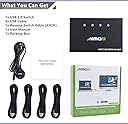
I tried several different options before landing on this device, and I really like this for the following reasons: - Individual input selector This allows you to select directly the computer you need to connect to. Other similar devices only have one button, which forces you to cycle through inputs, and it gets annoying if you have more than 2 computers. Additionally, these buttons are not mechanical, and there is a green LED that indicates which input is selected. Yes there is some "bleeding" of light but not very annoying, and becomes irrelevant if you just use the wired remote on your desk. - Optional wired remote This welcome feature allows you to "tuck away" this device and reduce clutter on your desk. The only small "con" is that this device does not have mounting holes, no big deal. Note that the wired remote is detachable, so you can reduce clutter on your desk if you do not need it. - Four ports available for devices (output) This might seem a minor thing, though I find 4 ports to be the perfect number for all you need. Other similar devices only have 2 ports and will force you to use a USB hub expansion like this one: https://www.amazon.com/gp/product/B00BWF5U0M/ref=ppx_yo_dt_b_search_asin_title?ie=UTF8&psc=1 While this may seem OK to do, it will make a difference if you connect any of the inputs to a docking station. Daisy-chaining USB hubs is never a good idea. - It is a compact device Even if you do not use the wired remote included with this device, it will not use much space The metal casing feel sturdy and does not look cheap. - comes with 4 input cables These are standard USB "printer" cables, and makes this item "ready to go, out of the box" The other devices I tried and used before switching to this one are the following: 4 inputs + 2 outputs, 4 electronic buttons switch: https://www.amazon.com/gp/product/B07L6VSFC8/ref=ppx_yo_dt_b_search_asin_title?ie=UTF8&psc=1 4 inputs + 1 output, 4 mechanical buttons switch: https://www.amazon.com/gp/product/B01M5IXEFJ/ref=ppx_yo_dt_b_search_asin_title?ie=UTF8&psc=1 2 inputs + 4 outputs, 1 electronic button switch: https://www.amazon.com/gp/product/B01MXXQKGM/ref=ppx_yo_dt_b_search_asin_title?ie=UTF8&psc=1 The 1 and 2 output switches in my case required the use of a USB hub to expand to 4 outputs, which created issues with my docked laptop (USB daisy-chain). The 4 output was great but only had 2 inputs, and I needed 3.
D**R
One button for each computer
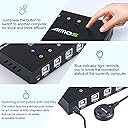
Massive metal case with 4 USB AB cables (not the best quality - but they do the job). Best feature is that you can switch between computers by pressing individual buttons for each computer on the top of the case. You do not have to go through all channels by pressing a single button repeatedly, which essentially corresponds to connecting and disconnecting your USB devices rapidly to each computer. There is a remote button that I don't use. You can see which computer is connected by the LEDs on top of the case. However, when the case is flat on the table, these LEDs are almost impossible to see. I pass my fingers over them in 1" distance and see the reflection of the LED that is on on my finger tip. Overall a great USB switch. I had ordered 5 different ones with the highest ratings, but only this one delivers on what it promises.
A**A
Indispensable para los que usamos más de un equipo a la vez
Aceptable, es una vuelta opción para no tener varios teclados ocupando espacio en el escritorio
J**I
Great hubbuh, except for the LEDs
TL;DR. Everything about this is great except that the little green LEDs are almost impossible to see. If seeing the LEDs is important, buy something else. Now, on with the show! A good hubbuh is a godsend for a dev. This one isn't bad: it works well, and it has a solid steel case, good button feel, and a separate button for each PC so you don't need to hit the lone button 3 times to get from 2 back to 1 (there are hubbuhs that cost $4 less that only have one button. Pay the extra $4 and get this one). It has good quality connectors and includes 4 usable 1.5m (5ft) USB A-B cables. And it has 4 ins and 4 outs, so you can plug in a mouse, keyboard, and two other devices that you switch from machine to machine. It only has one glaring (irony) flaw: you mostly can't see the LEDs. It's possible if you move your head around on a line perpendicular to the hubbuh, but it's not easy. It's not the LEDs: they're bright. There's a ton of emerald green light pouring out the large side vents (they're there for artistic reasons: this device uses no appreciable power and generates no heat) but almost nothing coming out the little holes (1.1mm) by the buttons. I promptly took it apart to find out why (I'm not you, I'm me. Raccoon spirit: everything needs to be taken apart). The LEDs are current "chip" parts, barely visible on the board. They are 15mm from those 1.1mm holes, which means they shoot a little LED beam out the hole. My first thought was to enlarge the holes, like I did a single-button plastic hubbuh the other day. I took them up to 2mm (OK, close to 2mm. I used a 5/64ths drill, that's 1.98mm). It helped a little, partially from widening the beam, partially for having shiny metal inside the hole, instead of black paint. The only thing that will fix this is fiber optics. If I had some 2mm plastic rod, I could make some. But I think I'm going to just suffer with it the way it is. I've got it Velcroed to a monitor stand that angles it suficiently towards my eyes that I can see 3 of the LEDs clearly. Oh, and I call this a "hubbuh" because it combines a "hub" and a multiplexer, a "reverse hub" or "buh". Hubbuhs solve a lot of problems for me. I have 2 workbenches with 6-10 (depending on the week) computers (ranging from a tower PC to laptops, tablets, phones, Raspberry Pies (the plural of Raspberry Pi is either Pi or Pies, it is not Pis. Don't go there) and other embedded systems. My current bench configuration is an L. One bench is simple: a PC and a tablet. The other is a little more complicated: a Raspberry Pi based prototype of something I'm working on, a Samsung with DeX, a Lenvo laptop. Each hubbah has a mouse and keyboard and 2-3 computers or computerish devices. And then there's the man in the middle. There's a macbook on a corner wedge that joins the benches. The monitors have enough switchable inputs so that the tower can drive 1, 2, or 3 of them, and the macbook gets whatever is left over. It's got USB 3 hubs on both inputs, and both hubbuhs are connected to it, so it can use either keyboard. Even Synergy couldn't untangle this mess. (Most everything on the benches connects to a pair of 8-port gigabit Ethernet switches, more than enough bandwidth for Synergy: it just doesn't work well in this environment).
Trustpilot
2 days ago
2 weeks ago