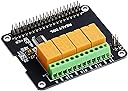
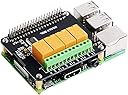
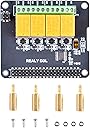
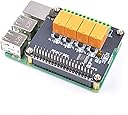
⚡ Power your smart home projects with precision and ease!
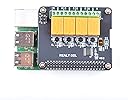
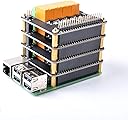
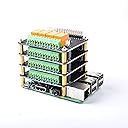
The GeeekPi 4 Channel Relay Module is a versatile expansion board for Raspberry Pi models 2, 3, 3 B+, and 4 B, enabling control of up to four devices via high-quality relays. It supports both direct shell access and programmable interfaces, features DIP switch-configurable I2C addresses to prevent conflicts when stacking multiple modules, and is designed for fast, easy installation. Ideal for smart home automation enthusiasts seeking reliable, scalable relay control without complex setup.
| ASIN | B07Q2P9D7K |
| Are Batteries Included | No |
| Best Sellers Rank | 134,879 in Computers & Accessories ( See Top 100 in Computers & Accessories ) 536 in Barebone PCs |
| Brand | GeeekPi |
| Customer Reviews | 4.5 4.5 out of 5 stars (96) |
| Date First Available | 16 Jan. 2019 |
| Form Factor | Stick |
| Guaranteed software updates until | unknown |
| Item Weight | 59 g |
| Manufacturer | GeeekPi |
| Manufacturer reference | EP-0099 |
| Memory Technology | LPDDR2, LPDDR4 |
| Operating System | Raspberry Pi OS (ehemals Raspbian) |
| Package Dimensions | 10.69 x 8.1 x 3.1 cm; 59 g |
| Processor Brand | ARM |
| Processor Count | 1 |
| Series | Raspberry Pi 4 Model B |
| Wireless Type | Infrared |
I**N
Works as expected, thanks
M**D
Easy to configure and use
As others have mentioned, the silk screen printing for the relay connections is wrong. Normally open (N/O) is actually normally closed (N/C) and vice versa. Check the connections for yourself with a meter. The board is very easy to use, just follow the instructions. You do need some knowledge of programming a Raspberry Pi, but everything needed can be found on the internet. While there is a rating of 250 Volts for the relay contacts, the board is not safe for use with mains Voltages. Just be realistic and switch low Voltages, such as 12 Volts. It would have been a 5* review if the screen printing had been corrected.
D**A
Carte très propre et bien fabriquée ! Il y a même une vis/écrou/colonnette supplémentaire. Pour pouvoir accéder au bus i2c (ici sous dietpi/linux avec utilisateur par défaut : dietpi) IL FAUT : Ajouter l'utilisateur au groupe i2c : sudo usermod -a -G i2c dietpi Vérifier avec ls -l /dev/i2c* que cela donne crw-rw---- 1 root i2c 89, 1 2 oct. 16:37 /dev/i2c-1 Propriétaire root et groupe i2c Pour avoir accès aux commandes i2c... depuis un utilisateur non root ici "dietpi" il faut rajouter l'accès à /usr/sbin en ajoutant la ligne : # rajout accès aux commande i2c dans /usr/sbin export PATH=$PATH:/usr/sbin dans le fichier /home/"utilisateur"/.bashrc avec éditeur nano par exemple. Sauvegarder puis lancer la commande source .bashrc Maintenant vous pouvez taper les commandes sur le site du fabricant du style "i2cset -y 1 0x10 0x01 0xFF" En espérant que cela vous aura éclairé... J'ai réalisé un script shell pour rendre la chose plus simple. Je vous le propose : #!/usr/bin/env dash ## installer paquet i2c-tools ## script cog_relay -> commandes 4 relais i2c RPi ## -> chmod +x cog_relay ## ./cog_relay carte: 1/2/3/4 relais: 1/2/3/4 status: on/off ## (c)dja licence domaine public/CC0 on='0xFF' off='0x00' ## 3 paramètres transmis... ## adresse carte i2c en $1 if [ -z "$1" ]; then echo "carte 1/2/3/4 ?" exit 1 else card="$1" fi ## numéro relais en $2 if [ -z "$2" ]; then echo "relais 1/2/3/4 ?" exit 1 else numrelay="$2" fi ## état on/off en $3 if [ -z "$3" ]; then echo "status on/off ?" exit 1 else status="$3" fi ## numéro de carte @i2c case "$1" in 1) card="0x10" ;; 2) card="0x11" ;; 3) card="0x12" ;; 4) card="0x13" ;; *) echo "carte 1/2/3/4 ?"; exit 1 ;; esac ## numéro de relais 1/2/3/4 case "$2" in 1) numrelay="0x01" ;; 2) numrelay="0x02" ;; 3) numrelay="0x03" ;; 4) numrelay="0x04" ;; *) echo "relais 1/2/3/4 ?"; exit 1 ;; esac ## status on/off case "$3" in on) status="0xFF" ;; off) status="0x00" ;; *) echo "status on/off ?"; exit 1 ;; esac ## commande du relais ## @bus_i2c @carte_i2c relais $status ## ex: i2cset -y 1 2 on (relais 2 on sur carte 1 -> on) i2cset -y 1 "$card" "$numrelay" "$status" exit 0 Cordialement
B**T
This was super easy to set up on a Rpi5. I have a sort of unique project creating a 'smart" thermostat that integrates with my home assistant server. I wanted to make something 100% stand-alone so that it will still work if the power goes out and/or my homeassist server goes down. I chose node-red running on raspbian and the official pi display. I tested the i2c connection at the command line and it worked immediately. A few quick searches and adding a module to NR and I have control in of all 4 relays. It was extremely simple. For anyone doing something similar, you set the "command" to the relay number, and the payload is just a number in hex (0x00 or 0xFF, off/on).
5**9
Ausgezeichnet, man kann per i2c jedes Relais einzeln steuern und abfragen. Bei den günstigeren Alternativen mit pcf8574 und nicht mit Microcontroller wie bei diesem Produkt ist die Steuerung deutlich aufwendiger! Werde mir gleich noch 2 bestellen.
D**P
Used this for my Pi 4 to turn on my bilge pump on my boat, running Venus OS
V**I
I am using this board to control four 24VAC irrigation valves with a Raspberry Pi 3 B+ to fill (and not overfill) a 2000 gallon cistern and control the backflush of the filter when the output pressure drops (monitored using pressure transducers and an ADC). I really like that this board uses I2C to communicate with the Pi. It's easy to stack several of these boards to get additional relay channels. It has a nice pass through header, so you can still attack your other devices and sensors. Bottom line, it works perfectly. I highly recommend this board for applications where you don't need more than three amps per channel.
ترست بايلوت
منذ أسبوعين
منذ يومين