We remain fully operational. Our teams are working around the clock to ensure your deliveries continue safely.

قم بتنزيل التطبيق


معلومات عنا
حقوق الطبع والنشر © 2024 Desertcart Holdings Limited
قم بتنزيل التطبيق


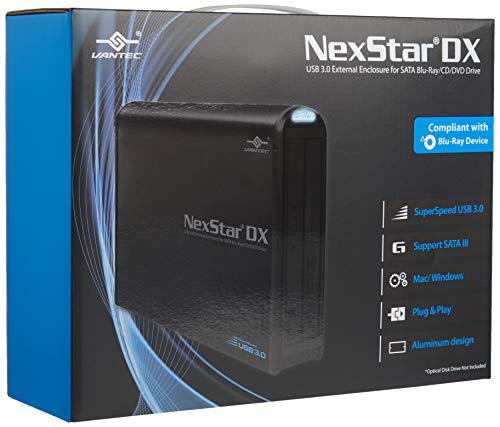


🚀 Elevate your optical drive game with stealthy speed and style!
The Vantec NST-536S3-BK NexStar DX is a premium external enclosure designed for 5.25" SATA Blu-ray, CD, and DVD drives. Featuring USB 3.0 for blazing 5Gbps transfer speeds, an aluminum case that minimizes noise and vibration, and a hot-swappable, plug-and-play design, it effortlessly converts internal optical drives into sleek, high-performance external units. Its all-black finish and compact footprint make it a stylish and practical addition to any professional workspace.


| ASIN | B01MRUN0HQ |
| Aspect Ratio | Unknown |
| Batteries Included | No |
| Batteries Required | No |
| Best Sellers Rank | #299,828 in Electronics ( See Top 100 in Electronics ) #8 in External Read\/Write Blu-ray Drives #45,705 in Computer Accessories & Peripherals |
| Computer Memory Type | EPROM |
| Customer Reviews | 4.6 4.6 out of 5 stars (1,981) |
| Data Transfer Rate | 5 Gigabits Per Second |
| Date First Available | 10 February 2017 |
| Does it contain liquid? | No |
| Global Trade Identification Number | 00844767022550 |
| Hard Disk Form Factor | 5.25 Inches |
| Has Auto Focus | No |
| Item Dimensions LxWxH | 25.1 x 4.8 x 17 Centimeters |
| Item model number | NST-536S3-BK |
| Manufacturer | Vantec |
| Max Number of Supported Devices | 1 |
| Model | NST-536S3-BK |
| Model Year | 2017 |
| Product Dimensions | 25.15 x 4.83 x 17.02 cm; 725.75 g |
| Programmable Buttons | No |
| UPC | 844767022550 |
| Wattage | 24 |
D**R
From my research I already knew for a fact that the highly rated OWC Mercury enclosure had already gotten bad marks from disappointed users for only supporting installation of 7" (177.8mm) or shorter 5.25" optical drives. My objective was to install my 7.5" (192mm) Panasonic SW-5584 BluRay drive (that had previously been installed in a desktop PC that died and was replaced by a smaller machine that didn't have any 5.25" expansion bays) into an external enclosure. So I knew I couldn't use the OWC enclosure as the SW-5584 drive is about 192mm (7.55") long with the front bezel attached. I then found the Vantec enclosure which is a bit longer than the OWC. The Vantec NST-536S3-BK enclosure is actually 252mm in total length but the electronics and connecting SATA/power cable at the rear of the internal tray between the drive and the rear panel with USB and power connectors take up some of that total length. The documentation says the enclosure supports an optical drive 185mm (7.3") or shorter. That means the SW-5584 is about 1/4" longer than supposedly acceptable in the Vantec enclosure, but it might be too much. Or, it might just fit if I was really lucky. I called Vantec tech support to ask bout this and they thought it would just fit (depending on where the side fastening holes were on the drive relative to the rear of the drive where the SATA connectors live). The problem is not with a bit of the excess projection out the open front "nose" of the enclosure but rather how much clearance the rear of the drive (from the fastening holes on the side of the drive back to the rear end of the drive) consumes once the SATA power/data connector is attached and the drive must be slid back in the tray in order to be tightened down with screws. Worth a shot I decided. Well, it arrived today, and to my glee it JUST BARELY FIT! No extra room to spare, but nothing broken either. It works! Yes, I had to carefully push the drive back into the tray after attaching the drive to the SATA connector in order to fasten the drive to the tray with the four screws, to be sure to not do any damage to the short SATA power and data cables. These had to be curved up in a short loop to allow the tray to be pushed all the way back, without getting damaged or breaking any solders to the electronics in order for the drive to be slid back far enough so that the fastening holes of the drive were now just visible through the fastening slots on the tray. Miraculous. It was just barely enough. Not one piece of extra room left. Inside the rear of the enclosure the tray was now backed all the way to where the SATA cable actually meets the electronics it's soldered to. It's as far back as it can go, and all four fastening screws are tightened cleanly between tray and drive. Then I the completed tray+drive assembly into the metal enclosure, fastened the rear-end black plastic cover with two screws to now hold the tray+drive securely inside the enclosure so that it's all one unit now, and I'm done. All black stealth. The front black bezel of the SW-5584 peeks out of the open front "nose" of the enclosure by maybe 1/4" but the enclosure itself is also all black as is the SW-5584 so that you would never even know it's probably supposed to be flush on the front . Looks perfect, with the small protrusion of some of the bezel actually looking very attractive. And it works perfectly as well. The drive tray opens and closes perfectly, and the unit is handled perfectly by Windows. I hope there's no unnecessary stress on the SATA cable solders caused by the U-shaped curve I had to impose on it in order to slide the tray all the way back, but I think it'll be just fine. Case closed. Surgery a success. Pressing the four small rubber feet pads (with sticky adhesive on one side) into the four indentations present on the enclosure's underside lets it sits horizontally on my black tabletop and be very decorative, and functional as well (its top surface can be used for anything, as there's no heat generated). The black bezel of the SW-5584 looks straight ahead and the tray opens/closes easily and perfectly It's a very attractive all-black desktop addition, and the curved blue light that shows USB-active/drive-ready is also sleek. Excellent product. I couldn't have gotten away with this install if my drive had been 8" long (as some Sony drives are), but I was able to successfully install my SW-5584 which I measured to be around 7.5" with the bezel on. Highly recommended.
M**N
I slide my BlueRay drive into the enclosure, screwed it in place, closed the cover, more screws, plugged it in, turned it on... and voila. It works. It was very easy to setup. So far so good it's a good product now to see if it will last. A+ Recommended.
H**B
I needed a DVD drive to hook to the laptop that we have plugged on the TV, and after wasting money on those compact slim DVD drives/burners that barely work, that are slow as hell and that can’t read half of the DVDs you put in, I finally decided to go for a full size desktop DVD drive and this enclosure and couldn’t be happier. It feels very sturdy and when you put a DVD into it, the movie fires within seconds. Plug and play with Windows 10. The power switch is a nice addition if you don’t need your DVD drive every time you start your PC. Installing the DVD drive was a breeze. Beware the size though. The thing is much bigger that it looks in those pictures. Not a problem for me, but it’s good to know.
B**Y
I thought that this enclosure was a little bit expensive for what is was until I received it. Then I realized that it is a high quality metal case. I was really surprised. It's aluminum metal and it has a nice, high quality finish to it. Assembly was pretty easy. It comes with instructions and pictures. You'll need a small/medium sized phillips screwdriver. It comes with a special usb cable which you need because it has a somewhat uncommon usb receptacle in the back. I was however surprised that this kit did not come with a power supply. It's not a big deal for me because I have extras laying around but I was sure that it was going to come with one. Make sure you have one or order one if you decide to get this kit. Anyway, I'm pretty happy with this. It's great for my needs. Update 2/6/19: I later found that the power supply did come with this unit. It was hiding in the bottom of the shipping box and didn't come out when I poured out the contents. I'm already using one from my old drive so I'm just going to continue using it; I think it's better quality. I've now ripped a few hundred audio cd's with this unit and it works great. I highly recommend it.
D**E
My new PC has no front bays for optical drives. Most things these days are going digital however I still like watching Blue Ray and DVD disks, burning application disks and listing to CD's. Thats where this product came in. It is literally Plug-n-Play (with access to a USB 3.0 outlet of course). There are many others to choose from, but a Blue Ray Burner / Player requires more speed for data transfer. This was easy to install the drive and works simple and flawlessly. Highly recommended!
ترست بايلوت
منذ أسبوعين
منذ شهرين