We remain fully operational. Our teams are working around the clock to ensure your deliveries continue safely.

قم بتنزيل التطبيق


معلومات عنا
حقوق الطبع والنشر © 2024 Desertcart Holdings Limited
قم بتنزيل التطبيق
Buy anything from 5,000+ international stores. One checkout price. No surprise fees. Join 2M+ shoppers on Desertcart.
Desertcart purchases this item on your behalf and handles shipping, customs, and support to Israel.
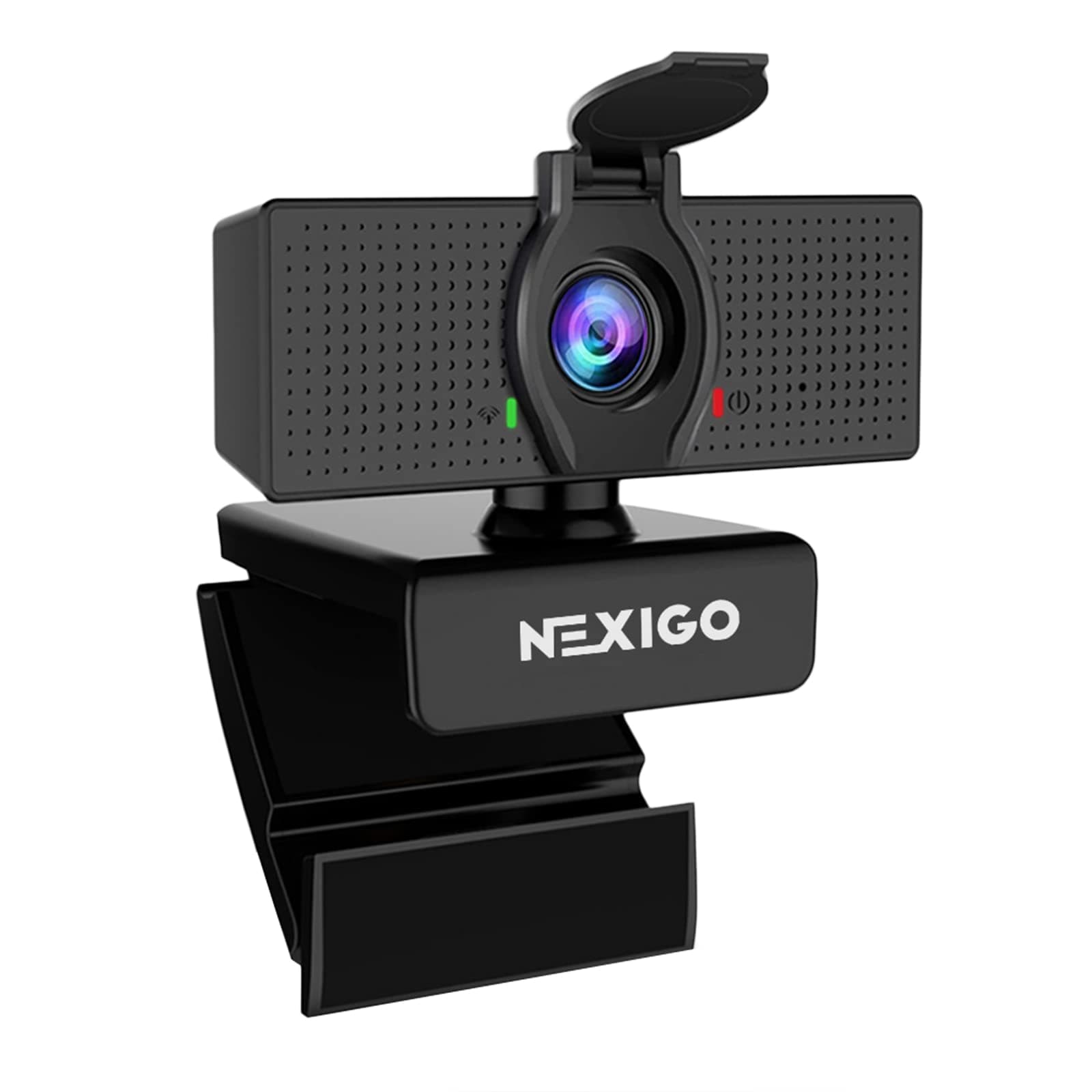
🎥 Elevate your video presence — never miss a moment, never compromise on clarity!
The NexiGo N60 is a compact, plug-and-play 1080p HD webcam featuring a 2MP CMOS sensor and 110° wide-angle lens optimized for indoor use. It includes a built-in noise-cancelling microphone and a physical privacy cover for security. Compatible across multiple OS platforms without driver installation, it delivers crisp video at 30fps, making it ideal for professional conferencing, streaming, and remote collaboration.


| ASIN | B088TSR6YJ |
| Antenna Location | Video conferencing, online school, streaming, gaming, recording, video calling |
| Are Batteries Included | No |
| Best Sellers Rank | #4 in Webcams |
| Brand | NexiGo |
| Built-In Media | webcam |
| Camcorder Type | Video Camera |
| Color | Black |
| Compatible Devices | Devices with USB connectivity and software support for webcam features |
| Connectivity Technology | USB |
| Customer Reviews | 4.3 4.3 out of 5 stars (52,177) |
| Digital Zoom | 4 x |
| Display Resolution Maximum | FHD |
| Effective Still Resolution | 2.07 MP |
| Effective Video Resolution | 1080 Pixels |
| Exposure Control Type | Automatic |
| Features | 1080P, Adjustable FOV, Low Light Correction, Privacy Cover |
| File Format | JPEG |
| Flash Memory Speed Class | C10 |
| Flash Memory Type | Internal flash memory |
| Flash Memory Video Speed Class | Class 10 (U1) |
| Focus Type | Fixed Focus |
| Form Factor | Compact |
| Has Image Stabilization | No |
| Image Aspect Ratio | 16:9 |
| Image Capture Speed | 30 fps |
| Image stabilization | Digital |
| Item Dimensions D x W x H | 2.55"D x 3.14"W x 2.16"H |
| Item Weight | 0.15 Kilograms |
| Lens Type | Wide Angle |
| Manufacturer | NexiGo |
| Maximum Aperture | 2 f |
| Maximum Focal Length | 1 |
| Minimum Aperture | 1 Millimeters |
| Minimum Focal Length | 2 |
| Model Name | N60 |
| Model Number | N60 |
| Operating System | Multiple (Windows, macOS, Linux, Android, Chrome OS) |
| Optical Zoom | 2 x |
| Photo Sensor Size | 1/3-inch |
| Screen Size | 19.6 Inches |
| Sensor Type | CMOS |
| Shooting Modes | Automatic |
| Style Name | 1080p Webcam |
| Supported Audio Format | MP3, WAV, AAC |
| Supported Image Format | JPEG |
| UPC | 766214622888 |
| Unit Count | 1 Count |
| Video Capture Format | ASF |
| Video Resolution | 1080p |
| Viewing Angle | 110 Degrees |
| Warranty Description | 1 |
| Water Resistance Level | Not Water Resistant |
| White Balance Settings | Auto |
| Zoom | Digital Zoom |
D**A
Excellent product
I’m very happy with this webcam. The video quality is clear and sharp, and the 1080p resolution makes a big difference during video calls. It was very easy to set up—just plug it in and it works right away. The autofocus works well and the image looks natural even in normal room lighting. I’ve been using it for online meetings and it has been very reliable. Definitely a great value for the price. I would recommend it to anyone who needs a good webcam for work, school, or streaming.
T**A
Works great!
I really like this. Just plug in, very easy. Good quality for what I need. I can easily move it around if needed. I use it for bible study with my sister every week. It is great to see eachother and visit.
M**I
For your Zooming!
My aging PC has no camera, so this accessory was just what I needed to be able to participate in zoom meetings. It was plug and play, no hassle. It sits on my desk, or clips to my monitor, and broadcasts my face to the other meeting participants. It has good quality reproduction. It has a handy cover which temporarily blpts out the picture in case I'm doing something I don't want anyone to see! I will leave it up to you to guess what that might be 😊
A**R
Love the picture quality
I was surprised how well the camera worked. I have to use it for zoom meetings, and the quality was fantastic. It connects very easily (by usb) and it has a microphone inside so i could use that to speak. I've had zero issues months later.
C**T
Great Starter Webcam for Content Creators
I’ve been using the NexiGo N60 webcam for a while now and I really like it. It connects to my computer very easily and works well for my YouTube recordings and video calls. The setup was simple and it’s very convenient to just plug it in and start using it. The only thing I wish is that the video quality were a little crisper. It’s still good for the price and works perfectly for my needs, but if you’re looking for ultra-sharp video, you may want something more advanced. Overall, it’s a reliable and affordable webcam that gets the job done, a great option if you need a simple webcam for recording or meetings.
D**E
Outstanding Webcam – Total Beast!
The NexiGo N60 1080P Webcam with Microphone is straight-up amazing. The video clarity is off the chain super sharp, clean, and professional-looking right out of the box. Whether you’re on Zoom, Teams, streaming, or recording, this camera delivers crystal-clear visuals every time. The sound quality is just as impressive. The built-in microphone picks up my voice perfectly clear, natural, and no distortion. No need for an external mic unless you’re doing studio-level work. Setup was quick and painless, and it just works. For the price, this webcam punches way above its weight. Highly recommend it to anyone looking for top-tier quality without breaking the bank. This webcam is a BEAST. 💪🎥 You will not be disappointed!
G**0
good quality, worth spending money on
we bought and returned several of these dash cameras. we had this one for months now, & honestly there is nothing to complain about it. works great! does good job at recording & easy to use
J**H
NexiGo Webcam
Surprisingly good webcam and reliable video quality. However, its microphone quality is not great. It could just be the Webcam I ordered as sometimes they can arrive damaged, but it’s something to keep in mind if you’re planning on ordering this product.
F**S
War wirklich überrascht von der Qualität der Kamera. Verschiede Licht Farben ob Kalt oder Warm, per Touch einstellbar. Qualität für Stream etc. Wirklich sehr gut. Das Mikrofon ist eher für kleine Räume gedacht und nicht für große Räume (hall).
M**O
Qualidade e densidade de pixel igual ou superior a 1920p
P**E
This webcam is affordable and absolute quality. I use for Zoom, Skype, Teams etc in working from home. It provides a fantastic picture and sound quality to do so. The company also provide at no cost an extended warranty AND free software for if you wish to adjust any camera settings. That set the camera plugged in and set up no problems and the default settings were perfect. They also have a great website and unlike Logitech they actually seek to please and want to hear from you and ensure you have all the assistance you need to derive the full benefit of the product. I am now throwing out my Logi C920 & C922, neither of which ever worked for me and encourage anyone to use NexiGo as everything from start to finish was provided and they truly appear to want your business and ensure you have a great experience. THANK YOU
J**E
Esta bien. No queda totalmente fija en donde la pones ya que no tiene soporte. Cuidado si la mueves sin querer pue esta se caera. El tripie es inútil realmente no sirve. Actualización Lo compré para dar clases en pandemia hoy 2023 oficialmente no sirve el contra peso. Ya es completamente inútil debo ponerle cinta adhesiva para que se mantenga en su lugar.
G**I
Facilmente autoinstallante, non brilla per definizione dell'immagine. Si fa fatica a ridurre la luminosità del soggetto inquadrato: basta l'illuminazione dello schermo del PC, per rendere il viso troppo chiaro.
ترست بايلوت
منذ 3 أسابيع
منذ 3 أيام