We remain fully operational. Our teams are working around the clock to ensure your deliveries continue safely.

قم بتنزيل التطبيق


معلومات عنا
حقوق الطبع والنشر © 2024 Desertcart Holdings Limited
قم بتنزيل التطبيق

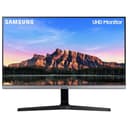
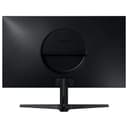
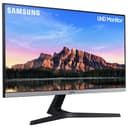
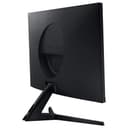
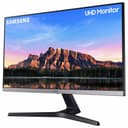
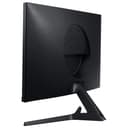
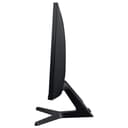
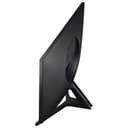
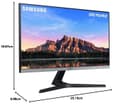
🚀 Elevate your workspace with 4K brilliance and seamless performance!
The Samsung LU28R550UQUXEN is a 28-inch 4K UHD monitor featuring a crisp 3840x2160 IPS display, HDR10+ support for enhanced color and contrast, AMD FreeSync technology for smooth gaming, and multiple connectivity options including 2 HDMI ports and a DisplayPort, all wrapped in a sleek, frameless dark grey design.


| ASIN | B081TR5BMH |
| Adaptive Sync | FreeSync |
| Aspect Ratio | 16:9 |
| Aspect ratio | 16:9 |
| Best Sellers Rank | 26,198 in Computers & Accessories ( See Top 100 in Computers & Accessories ) 513 in Monitors |
| Brand | Samsung |
| Brand Name | Samsung |
| Colour | Dark Grey |
| Compatible Devices | Laptop, Desktop, Gaming Console |
| Contrast Ratio | High |
| Customer Reviews | 4.4 out of 5 stars 8,891 Reviews |
| Display Technology | LED |
| Display Type | LED |
| Hardware Connectivity | HDMI |
| Has Color Screen | Yes |
| Image Brightness | 200 cd/m² |
| Image contrast ratio | High |
| Is Electric | Yes |
| Item Dimensions D x W x H | 9.9D x 25.1W x 18.9H centimetres |
| Item Type Name | Monitor |
| Item Weight | 5.1 Kilograms |
| Manufacturer | Samsung |
| Maximum Display Resolution | 3840 x 2160 Pixels |
| Model Name | LU28R550UQUXEN |
| Model Number | LU28R550UQUXEN |
| Mounting Type | Wall Mount |
| Native Resolution | 3840x2160 |
| Network Connectivity Technology | 2 x HDMI, 1 x Displayport |
| Picture Quality Enhancement Technology | IPS Panel, HDR10+ |
| Pixel Pitch | 0.155 |
| Power Consumption Size | 41 Watts |
| Product Features | Flicker-Free, Tilt Adjustment, Wall Mountable |
| Product Warranty | 2 year manufacturer |
| Refresh Rate | 60 Hz |
| Resolution | 4K UHD 2160p |
| Response Time | 4 Milliseconds |
| Screen Finish Type | Flat |
| Screen Size | 28 Inches |
| Screen size | 28 Inches |
| Screen surface description | Flat |
| Series Number | 55 |
| Shape | rectangular |
| Specific Uses For Product | Business, Gaming, Personal |
| Total HDMI Port | 2 |
| Total Video Out Ports | 2 |
| Unit Count | 1.00 Count |
| Viewing Angle | 170 Degrees |
| Voltage | 41 Volts (DC) |
A**_
Amazing Value
Edit: I bought a second one. This was the same amazing value, but in the year between the two orders, Samsung had corrected the stand angle problem, with a slightly adjustable stand. I'll be buying a third soon. [End of Edit] When I ordered it, this was the lowest cost 4k 28" monitor by a huge factor, so of course I was expecting it to be unacceptable in some way. I thought I would try it, then return it, and pay nearly twice as much for a different screen. Happily, what happened instead was that I got a very nice monitor, with no dead pixels or any other fault I can detect, for very little money. The one fault, and it's something other reviews have picked up on, is the stand. This is designed to place the monitor on a shelf above your keyboard area, as in a professional workstation. If you put the stand on the same level as your keyboard, it does tilt the display down somewhat. The solution for me, was £3 worth of rubber door wedges; one under each end of the stand front t-bar. It looks fine, and works perfectly.
P**Y
Awesome screen for working on web dev and online marketing
For just under £200 you get a 28" UHD screen 3840 x 2160 res with razor-sharp definition - I paid £185 5 years ago for a Dell 1920 x 1080 res 23" screen which I still use and has been great, but just shows what incredible value we get as consumers currently! I plugged into my Dell XPS15 and it worked immediately as a second screen no problems - I recommend installing DisplayFusion so that your mouse pointer doesn't get "stuck" moving between screens of differing resolutions. The Samsung is superb with three whole pages of an MS Word document displayed next to each other crisp, clear and very readable. A second screen is always essential, the Samsung is like having two screens for the price of one because of the amount of windows that can be displayed simultaneously and still be readable/ useable. I was tempted to knock of a star because the stand could be better - there is no adjustment capability - the Dell can be slid up and down as well as rotated through 90 degrees which can be useful. But to give it 4 stars would be an injustice, it's a superb bit of kit. I am impressed. I don't do gaming so I can't speak for it's ability in this area.
K**S
MACBOOK OWNERS PLEASE READ THIS FIRST!
For whoever is reading, I received this monitor on the 18th Jan, and can finally write the review (date of writing 1st Feb). First of all, I want to say I'm really happy with how this monitor looks and performs. So please dont let anything you read below take away from it's performance or how 'happy' you would be if you bought it. Im considering getting another one of the next month or so. Now, the positives: - it's a very pretty monitor in terms of picture quality. - great entry level for 4k @60hz, so overall it's a very nice monitor if you're just working from home, gaming, editing video/photos like I am. - i have heard people complain about receiving the monitor with some dead pixels on edges - not the case for me. I do apologise for not being extremely technical, computer terms are foreign to me. But it's a good monitor - you'll be happy with it if you're looking to get into 4k visuals like I am. HOWEVER! The main reason Im buying this is the absolute hassle I went through to make sure my Macbook Air 2020 was showing content on the monitor in 4k @ 60hz. Given I work from home and speak to clients over zoom, my internet connection is extremely important. So an ethernet cable is necessary for me. Mixing this with the desire for 4k video, i had a problem. To save you the effort and energy I had to go through, I found the only way for it to work is to buy Apple's own adaptor (allowing you plug a hdmi, ethernet via usb dongle, and charge the laptop) within one dongle. Once the Apple dongle is plugged in and connected to the monitor, go to 'System Preferences', then 'Displays', click on the monitor, then hold 'options' as you click on 'scaled', then you'll see resolutions appear. Click on the 4k resolution, and then underneath the list, there is a button saying 'low resolutions'. By clicking on that, you'll be shown the refresh rate, and you can choose 60hz (30hz if you're nasty). I previously bought that dongle that plugs into both usb-c ports, and had 8 ports on it itself - it was great! But I soon realised i couldn't both charge the laptop, and display max settings on the monitor, given the one thunderbolt port on the adaptor. So, invest in the Apple dongle as I've found that that's the only one that works. I promise I'm not an Apple salesman - I actually hate the fact that they've done things like this. There are two dongles, so I'll send the link for the one I bought below: https://www.amazon.co.uk/gp/product/B07XFYZLTJ/ref=ppx_yo_dt_b_asin_title_o01_s00?ie=UTF8&psc=1 Now for the negatives: - The holes for screws to mount the monitor are extremely high. So if your arms dont extend that high above your desk, the monitor could sit just above it, or worse, hit it. - It's also not VESA mount compatible. So find which mounts actually fit the holes provided. I had to improve with the mount I bought and literally drilled my own holes into them just to make it work. - the Menu is a bit finicky - mainly because there's only one button (the same setup as Samsung TVs with that one joystick button thing on the back of the TV). - As much as the manual says you can tilt the screen when on its monitor stand provided, mine doesnt... - Sometimes the settings for picture quality/colour etc are editable, and sometimes they're not. I'm not sure why, but it might be because something has been turned on/off before. While it could be my fault, they could have made it clearer that IF you change this setting, other settings are unchangeable. - There is some darkening of screen depending on which angle you're viewing from. - Not relating to the monitor, but Samsungs customer support is TERRIBLE! I hope this review helps - the culmination of buying over 4 dongles, 3 wires, countless customer support hours and Youtube videos wasted.
C**D
Perfect for PS5 and Xbox Series S
After extensive research, I finally purchased this monitor. I was initially looking at HDMI 2.1 monitors, but seeing as there aren’t many games that can run 120fps, there was just no point. This monitor is perfect, the colours are fantastic (better than my friends 2.1 monitor hands down) and it’s so easy to set up and use. I haven’t noticed any screen tearing or slow responses. I play both competitive shooters and open world games and every single one looks fantastic - especially at 4K 60fps. If you buy this monitor I promise you won’t be disappointed. One slightly annoying this is the fact it doesn’t have speakers, but I mainly play with headphones. I did buy a cheap pair of gaming speakers from B&M for around £20 (see picture) and they are more than fine as they just plug into the aux input.
K**M
Good monitor for a decent price!
I got this to go with my new Xbox One S, my initial thoughts were not good, the picture didn't look any different to my old 1080p monitor which this replaced, however after about a half hour of fine tuning I am very impressed with the 4K resolution! Forza Horizon 4 looks stunning, you can make out an awful lot more detail in 4K. It also works perfectly with my Windows 10 PC which has a Nvidia 1050ti, it runs very well in 4K, Battlefield V looks particularly good!! I have the Xbox in HDMI 2 60hz and the PC in HDMI 1 30hz and both work without a problem. 4K You Tube videos look stunning and I have tried The Revenant and Alien 4K via Xbox, again both look stunning. Overall a good monitor, obviously better ones are available but if you are on a budget this is very well priced!! Recommended...
M**W
Amazing 4K Curved Monitor
Bought this 32" 4K curved monitor a couple weeks ago during the Prime Day sales ready for the PS5 launch and I couldn't have been any happier. Was a bit concerned initially as some reviews stated that it came with dead pixels straight out the box - but I must have gotten lucky because I've scoured the screen and not found any. Currently been using the monitor to watch TV/films/series (mirrored through my laptop) and to play the PS4 - not Pro - and it's incredible to look at even at 1080p. I will say that straight out the box the picture settings will need a bit of calibration/tweaking but once done it really does shine. For gaming my only criticism is that there is a very (very) slight motion blur which I've never noticed before on my previous LG TV , however I've upped the monitor response time to 'fastest' and it pretty much eliminates it. It is a bit annoying having to switch this setting back and forth when watching stuff connected from my laptop because the fastest and faster settings induce a black frame insertion which lowers the displays persistence and can cause colours to sometimes look unnatural/flicker but when dropped to 'normal' this disappears. Overall though - and so far- this is a really amazing monitor if you're looking for a 4K display that can do a bit of everything.
F**E
Awsome screens. Used in studio
I needed some high res screens to use with Cubase in my studio. These have a beautiful picture, high res, running at 3k using DisplayPort cables from my music machine. Have two other machines connected to the screens too at HDMI 1080p. Love them. Don't know how I got on so long without 3k displays for my music production as Cubase needs a lot of screen space. Runs perfectly in 4K too, but my eyes are not what they used to be, so I need to upscale by 125% in Windows. These are great monitors (I have two of them), and they have lots of great features. Some people have complained about the control knob on the back, but I got used to it very quickly, and I can navigate the menus with no issues whatsoever. I like them. I am not much of a gamer so I can't really comment on that, however Cubase has lots of refreshing graphics and spectral analysers, meters, and graphics, and it's as smooth as you like. I used to see jerkyness with my old 1080p monitors, but these seem pretty smooth and have a fairly decent refresh rate. I am very happy with these.
J**D
Hunk of crap
You can here a capacitor constantly charging an discharging for the little power led , it’s literally as annoying as something could be , a slowly growing electric whine that then drops to a lower tone and starts again. Besides that it can’t detect input source automatically, it doesn’t turn on when a source is connected, doesn’t pass button presses through hdmi, the mount is at the top of the screen so you can’t rotate it 90 degrees, the screens viewing angle is largely fixed with massive variance in colour and brightness for a small angle change. The power cord is so short you have a floating power brick suspended between monitor and plug. The button/stick control is so brittle you have to talk it into button presses for fear actually touching it will snap it . No usb of any type. has a habit of causing windows devices to switch audio device to the monitor despite it not supporting audio output. Just terrible in most every regard. If you sit in a fixed position and don’t work with colour , don’t need sound or use slack / zoom as it’ll constantly drive you wild changing the audio output then it might suffice. If you have eyes and a penchant for not killing you entire family through frustration avoid this shoddy hunk of crap.
ترست بايلوت
منذ أسبوعين
منذ شهر