Some deliveries may take a little longer than usual due to regional shipping conditions.

قم بتنزيل التطبيق


معلومات عنا
حقوق الطبع والنشر © 2024 Desertcart Holdings Limited
قم بتنزيل التطبيق

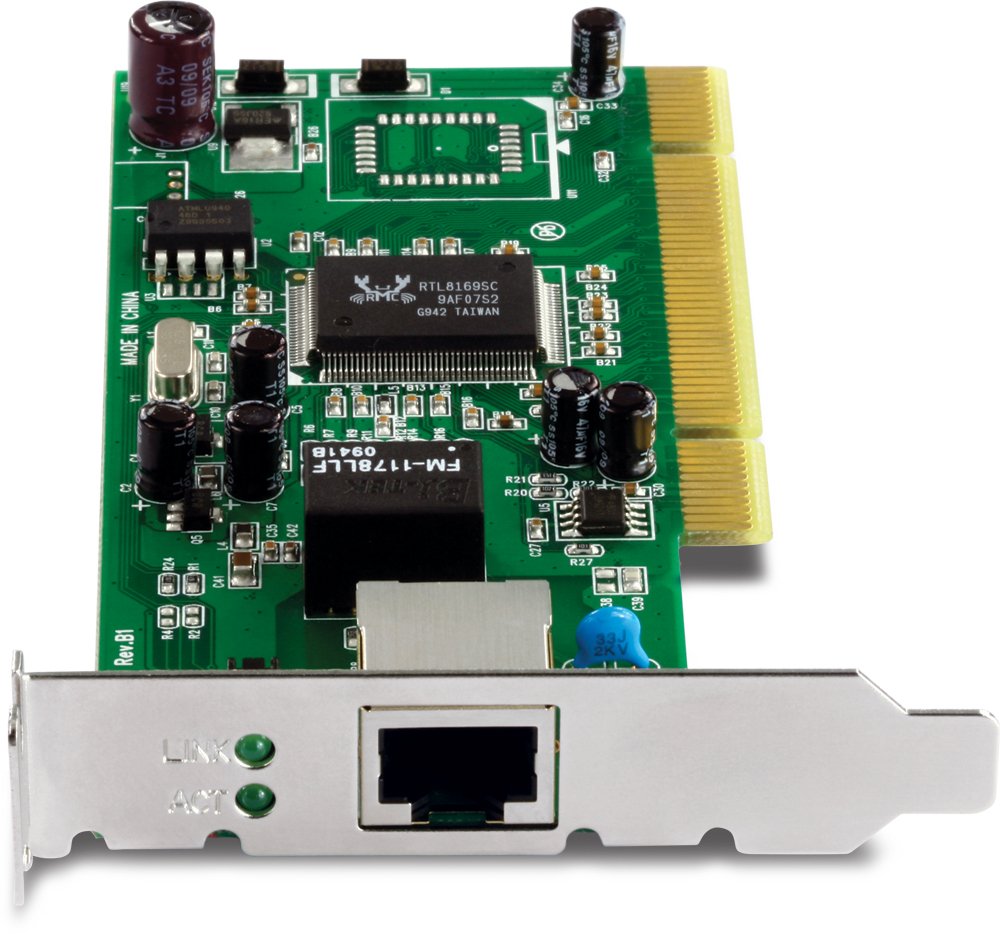
🚀 Upgrade your desktop’s network game with gigabit speed and sleek efficiency!
The TRENDnet TEG-PCITXRL is a low profile PCI network adapter delivering up to 2000Mbps full-duplex speed with built-in FIFO buffers for optimized data flow. Compatible with multiple Windows and Linux OS, it supports Wake-on-LAN and installs easily via plug and play, making it the perfect upgrade for compact desktops needing high-speed wired connectivity.


D**T
Unable to POST in older PCIE 2.0 system (AMD 785G chipset)
This card works in a newer system I have but will not POST in an older system I had intended it to be used in. Granted, it's an old AMS 785G chipset Gigabyte board, but the specs should work (PCIe 2.0).
B**.
High Speed No Issues
I wanted to take full advantage of my new Modem which supports 5 gig so this was an affordable alternative with room to grow down the road. It was simple plug and play. I’ve been very happy with my improved performance after installation.
D**E
My not be the cheapest 10gbe NIC but it works!
So at the time of my purchase, this card was a little over a bill. There were other options from Asus, ALFA, TP-Link & Rosewill just to name a few, all cheaper than the TrendNet card (Rosewill being the cheapest) and some of these may even be using the same Marvell AQTion controller, but for me, I just trust TREDNet a little better and this is the 3rd revision of the NIC so I'm hoping these guys worked out some bugs.Won't really try to go into too much technical details here, I just needed a nic that would get me a 10gbe.Cabling: I am using my existing Cat6. The runs are much shorter than the 50meter limitation of cat6's 10gbe spec. (Cat6a or higher can get you runs of 100Meters, though when using the SFP+ port, the run is limited to only 30Meters regardless of cable used).Switch: Zyxel XGS1250-12, Firmware v1.00. (B08TC3VJ61) This is a new switch that was released, I am still working on my review, in short, it rocks! I have tested using this NIC into one of the existing copper ports on the switch as well as using a Copper SFP+ transceiver (B075WMGBHX). I have had no issues establishing and maintaining a 10gbe connection.Installation: This is my only concerning point of this review, when I installed the NIC, I downloaded the "Latest" drivers from Trendnet's website, which is listed as version v1.00 with a date of 8/31/2020. However shortly after installing said driver and running Windows 10 updates (oh yeah, I'm running Windows 10 20H2), the driver was updated to version 2.2.2.0 with a date of 04/30/2020... If you go to Marvell's website, you can download their "latest" driver, version 2.1.21 with a date of 04/26/21 (The day I am writing this review is 04/25/21)I am unable to tell at this time if there is a higher version than 2.2.2.0. Regardless, its workingFinal Thoughts: So I have 2 machines, both running Windows 10 x64, where I installed these cards. (GA-z87x-ud7 TH & x99 Taichi). I had plenty of room in each system and I made sure there was good air flow. I see lots of concerns regarding anything 10gbe with how hot things can get. I'm attaching a screenshot from a simulated test I did between both machines. I found out shortly after upgrading my nics, my new bottle neck is the hdd array in my data server. I went from maxing out at 112MB/s (1gbe) to around 377MB/s (10gbe), though triple what I was getting, it wasn't quite 10x faster ;) So I enabled a RAM disk on both devices thus eliminating the drives array specs (ram disk gets around 23,552MB/s) and I would start seeing me hit the 10gbe max (around 900MB/s). My main work flow is photography, I'm now able to start moving my data to my storage server (which has multiple forms of data protection) but work on these files as if they were stored on one of my local drives on my main editing rig.Just verify that your system meets the min specs for this card, I am sure you will be satisfied.
T**E
A big step up over 1Gb
I got a number of the 10Gb RJ-45 cards a couple years ago, and finally am getting around to writing a review as I'm about to order another. I believe the ones I got back then were revision 2 cards, currently this is probably a revision 3 (don't quote me on that, though). The revision 2 cards were not automatically installed by Windows 10--I needed to download a driver from Trendnet. I don't know if the v3 cards will be automatically installed.I am using them in my home network, hooked up to a 10Gb switch, in order to keep "My Documents" and other folders of my home network in a central location. It works well for this. I don't remember any exact numbers, but I am thinking my tests for the cards came out to about 6x faster than 1Gb (Intel PCIe nics). Given the limited choices for 10Gb (commercial networks seemed to have mostly skipped 10Gb in favor of 40Gb), I'm satisfied with the performance of these cards for now.One caveat emptor is the poor performance of the Trendnet's offloading features. You should immediately turn them off because they kill the performance of the card. This has reportedly long been the case of chipsets besides Intel, so I'm not really surprised.All in all, they are a really good upgrade over 10Gbe that don't cost a ton of money.
D**M
Doesn't transfer at 10 gig..WAIT I WAS WRONG! :(
I installed both cards on ubuntu 20.04 through a mikrotik 10gig switch and windows 10. It starts out transferring at 240MB and then drops below 1 gig. I have auto turned on, then manually turned it 10g, the light doesn't switch to amber - stays green which means 1 GIG. I have cat 8 cabling, tried 7, still nothing above 240 and it only lasts temporarily. Ubuntu said wrong driver at first, but both windows and ubuntu show Aquantia drivers. Everyone on here is happy that it transfers at 1 gig but it should be transferring at 10GIG if you have 10 gig setup..UPDATE:First I want to say that I was ignorant In setting this up and not underdstanding the complete extent of high speed data and hardware compatibility. So I figured something out :Set a folder up and specially give it a. Different IP address and subnet. 1.1.1.1 with 255.255.255.252 no gateway no dns. Computer you are transferring files from set it 1.1.1.2 with 252 subnet. Now share a folder with that IP address NOT the name of the computer. Windows will use the slowest connection as it’s method of transferring. 1 gig internet connection should be set up normally. Get yourself SSD DRIVES. On both computers I went from 95-104 MB from 7200 internal to 7200 internal. I copied files over to ssd and transferred to a 7200 hd. Now I’m getting 240MB speeds ! I have a ssd in order which should give me 500-600MB speeds. Remember it can only transfer as fast as your hardware can accept it and windows or Mac will always use the slowest speed hardware. By separating the 10GIG cards in a different subnet and naming the folder \\1.1.1.1\test will give you the speeds. Of course our hardware is not set up for 10GIG yet but achieving 6-8 gigs is feasible for large transfers of video files. So I’m leaving my original review plus this to show that anyone can make this mistake and mess it up. Use cat 8 if possible but if not cat 7 works really well.
T**S
Small and fast, no issues
Arrived with full hight bracket mounted and half hight in the box. Easy swap.Works well in booth 2.5 Gbps and 10 Gbps mode.Pushes speed jus fine with iperf.Works well with 9k jumbo frames (could not test 16k since i have nothing at the other end that support it..)
C**P
So far so good
Bought them in with discounted price 2 weeks ago.Only today manage to install in my HP Elitedesk 800 G2.Slot in at the bottom empty PCIe slot.Boot in Win10, but Win10 is not able to get the correct driver.There is a small CD for the driver, but i straightaway google for the latest driver.Hence, I notice that what I am getting is version 2.0R (which the website mention that it has been discontinued).I am ok with older version as long as it work, my HP desktop was 3 years old too.I haven’t bought 10G switch yet, hence can’t confirm performance.So far it is running 1Gbs properly.I may install my 2nd 10G adapter to another PC, and connect both PC directly, for testing of 10Gbs performance purpose.
V**A
does not work well, buy otherq cards instead
I bought this for my gaming and server PC, to utilize my Bell 3 Gbps fibre to the max. This card never goes beyond 2.7 Gbps and averages 2.1 Gbps. I thought the router was the problem but it wasn't. I tried troubleshooting, trying everything I could possibly think of. Tuning the card, changing netsh, tcp and registry settings, trying another ethernet wire, clean installing windows, latest Marvell drivers and firmware etc. but nothing works. At some point, I found that a software called 'Aquantia Command Center', which is a Marvell software, was slowing it down and also causing PC crashes. It took a lot of work to uninstall it without crashing, which was annoying and it did increase the speed but still not 3 Gbps. I eventually decided to try a different network card, this time a 10Gtek Intel X540, and it fixed all my problems, I'm finally getting 3.2 Gbps which is what I'm supposed to be getting and it is what the router gets, plus Intel software is a lot more stable and not buggy. I was going crazy, thinking it was my router the whole time but it was this network card. I'm not sure what the problem is, maybe I got a defective card, but buying a different one solved all the problems. I think it's best to avoid this card, if you actually want consistent speeds above 2 Gbps and get the speeds you pay for. The Intel cards are way more expensive but will give you the performance you need. This card is cheap but it doesn't perform well. Marvell drivers and software seem to be outdated and really buggy. I would rate this two stars, if the Marvell Command Center did not mess up my PC.
V**9
Excelente
Agregué conectividad a mi QNAP en minutos, por ser PCIe Gen 2 es apta para equipos legacy.
A**R
It works
No default driver detected on Windows 10, but can be easily downloaded and installed from internet.Work like a charm, and i got about 8Gbit/s over ethernet.
ترست بايلوت
منذ شهر
منذ أسبوع