


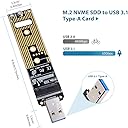


NVMe to USB Adapter
Product ID: 154416901
Details
- BrandJESOT
- ColorGolden
- Hardware InterfaceUSB
- Hardware PlatformMac
- Product Dimensions4.3"L x 0.9"W
⚡10 Gbps USB 3.1 Gen 2 speed
🔥Thermal pad for heat dissipation
🔧Supports PCIe NVMe M-Key SSDs only
🚀 Upgrade your storage game with lightning-fast NVMe on USB — because speed waits for no one!
The JESOT NVMe to USB Adapter is a compact, cable-free converter designed exclusively for PCIe NVMe M-Key SSDs. Featuring a 10 Gbps USB 3.1 Gen 2 bridge chip, it delivers ultra-fast data transfer speeds compatible with Windows and Mac OS. Its hot-swap capability and thermal pad ensure easy, efficient, and cool operation, making it an essential tool for professionals cloning or expanding their SSD storage on the fly.


| ASIN | B07VVNGYFV |
| Best Sellers Rank | #742 in Enclosures |
| Brand | JESOT |
| Color | Golden |
| Compatible Devices | Laptop |
| Connectivity Technology | USB |
| Customer Reviews | 4.5 out of 5 stars 1,130 Reviews |
| Data Transfer Rate | 10000 Megabits Per Second |
| Enclosure Material | USB |
| Hard Disk Form Factor | 2.5 Inches |
| Hardware Interface | USB |
| Hardware Platform | Mac |
| Item Dimensions L x W x H | 4.3"L x 0.9"W x 0.2"H |
| Item Weight | 0.33 Ounces |
| Manufacturer | JESOT |
| Material | USB |
| Mfr Part Number | 568947 |
| Model Number | 568947 |
| Product Dimensions | 4.3"L x 0.9"W x 0.2"H |
| Supported Devices Quantity | 1 |
G**S
QUICK & EASY, inexpensive & it worked great!
Got this to be able to clone my WIN 10 PC's original small SSD to a larger SSD. Had not fooled with SSDs ever and was a little wary of this adapter and me even trying to replace my SSD but I was happy to say: WORKED GREAT! I took this adapter out of its bag, took the SSD I'd bought out of its packaging, inserted the SSD into this adapter with the included heat pad under the drive, and secured the retainer screw with the included mini screwdriver. I plugged the adapter (with new SSD onboard) into a usb3 port on front of my machine. It immediately was recognized by Windows, installed, and lit up, ready to go. I crunk Macrium Reflect software to clone my original drive to the new one. It went 100% perfect first try in a snappy 11mins38 seconds (THX, George Lucas! LOL ) and after it finished, I shut down PC, and swapped out the original SSD for the newly cloned larger one. Put everything back to right, and my PC crunk up perfectly as if nothing had happened except my system drive was now correctly larger! YaAy! This adapter worked perfectly for me on my first try, seemed to work well and quickly, and the clone operation seems to have gone perfectly by all indicators. The adapter was definitely pretty warm (!) when the cloning run was finished but cooled quickly after. I'm retaining my original SSD as a backup, but others who are also planning to UPSIZE to a larger/newer SSD as I did could opt to use this adapter as a flash drive by attaching your old SSD & reformatting/ wiping it to use all the space. (once you've had the new SSD for a while and verified it's cloned correctly and working well/and/or made a backup of your new SSD's conetents). So, this is a handy adapter even after you've set up or cloned a new SSD with it. This product was exactly what it promised and what I needed so I'm happy to recommend it based on my experience.
D**E
Great adapter
I desperately needed to connect a second pcie type nvme drive to my system and I was only able to find a pcie card as my only other option to do so. I don't have any slots left to spare and I don't like swapping out pci cards. This device works perfectly as long as you don't need the pcie nvme drive to be recognized as being internally installed in the system (basically a permanent device that is connected to the motherboard). It is super easy to use. Basically it is just a port on a plug. The screw is the only annoying part, but that's an issue with the type of drive, not the adapter. As long as you have a small philips screwdriver, it isn't even much of a problem. I do recommend having a good magnet to make sure that you don't lose the screw. The led is nice and shows that it is receiving power and blinks when the drive is being read/written to. I was originally worried about static discharge with it not having a case, but I have actually tried to get an esd and it still works perfectly. It's actually been nice not having to remove and replace a case. The adapter itself doesn't suffer from this problem, but the nvme drive can get hot. It would be nice if there was a red light that warned you about this, but the adapter can't have a thermometer that knows where the hotspots are on each brand and model of drive. There is enough clearance for two sided drives, but if your heatsink wraps around the bottom of even a one sided drive, it may need to be removed before the drive will fit into the adapter. This doesn't cause any functionality problems as USB cannot match nvme speeds, but it can get annoying to have to remove the heatsink and then put it back on in a situation where you are moving drives around. This isn't really a problem and keeping the drive at the intended distance from the adapter does keep it from being bent, so it is probably better this way. It's just a minor inconvenience that I encountered with my heatsinked drive when I had to use it in this adapter. Overall, I absolutely love this device and it works perfectly. I highly recommend it
B**N
Effective USB device for M.2 drives
This device worked quite well for me. Was doing a PC rebuild and moved from a Samsung 960 EVO to a 980 PRO. I used the Samsung Data Migration app. Plugged this into a free USB 3.x slot on my PC, launched the data migration app and it discovered the new drive. I was going from a 1TB M.2 to a 2TB and the clone/transfer took a bit over and hour for the amount of space I occupied on the old drive. The transfer rate on-screen was ~220MB/sec. I didn't have issues with heat, though I did put the supplied thermal tape on the new drive while attached to this adapter. I also have a small desk fan I had pointed at it while the transfer was going, as a precaution. I was able to remove them thermal tape well enough to reuse one more time, if needed in the future. The activity LED was nice to know stuff is indeed happening! Yes, you see progress in the on-screen app but still is a nice addition. The supplied screwdriver was helpful as well. Though I wouldn't use it on your motherboard fasteners as it doesn't provide enough leverage for those. The device is definitely 'frail' but I'm pretty careful with this sort of stuff so it wasn't a problem. However, I can see how it can be easily broken if not used gingerly or roughed during shipping. Overall a good value for the money. Now I have something for use externally over USB for M.2 drives.
D**N
Watch out for overheating of an uninitialized NVME drive
The adapter was easy to use and worked well. However, I first used the adapter to attach an unformatted Crucial 1TB nvme drive to the USB port, as I thought that was the first step in doing a disc cloning operation (internal drive to external drive). After about 10 minutes of reading online about the next step and downloading cloning software from Crucial, I realized that I needed to swap the drives BEFORE running the cloning operation. So I used the USB eject command to prepare to disconnect the drive. When I went to physically disconnect the drive from the USB port, I found the drive was extremely hot, to the point where the flat thin top plate of the drive had warped in places. I was afraid I had ruined the drive. I completed the installation per Crucial software's instructions, and found the new drive was working fine. To avoid potential overheating of the old SSD drive (which was installed in this adapter during the boot and cloning step) I put a small baggie of ice on top of the drive as a heat sink. I don't know if that was necessary, but I didn't want to risk damaging the original SSD drive. By best guess is that an uninitialized 1TB drive mounted on this (or any) USB adapter gets stuck in some high-power consumption loop, I was never able to see the uninitialized drive in the device list or show up as anything on the desktop, so I wasn't doing anything directly to cause any activity to produce heat. Note that I had not installed the heat sink pad on the adapter, which might have helped, though only marginally, since there was still an air gap between the mounted SSD and the heat sink pad.
R**T
Actually does work with Samsung Data Migration software and the Samsung 970 Evo Plus
I was upgrading a single M.2 slot nvme SSD from an old Kingston M.2 to a new Samsung 970 Evo Plus 1TB. (July 2020) I had seen comments everywhere that Samsung's Migration tool doesn't see these USB adapters, so I was prepared for a bit of work using Macrium Reflect. I had Macrium Reflect Free all ready to go, but before using that, I updated the ASUG ROG motherboard firmware, installed all the latest Samsung tools (Wizard and Data Migration software and the Win10 device drivers), took a backup to a USB stick, mounted the 1TB drive in this adapter and plugged it into a USB 3.1 port. And then just in case it did work, opened up Samsung Data Migration. Well, surprise, it showed the USB stick (see pic), so I proceeded to clone with Data Migration, and everything went fine! My PC's now been running with the new 1TB drive for a few weeks, no issues. So I'm super happy. I've not tried using the adapter with the old SSD yet... but that's not what I bought it for. If you're in need of something to migrate to a Samsung M.2 nvme SSD, this is great!
D**O
Works as advertised. Recommend for IT toolkits.
Had a problem with an NVMe SSD in a system, and needed to test in the field. This USB adapter did the trick, and was able to work with the SSD perfectly. The problem turned out to be the motherboard of the computer, and this device saved me a lot of time in troubleshooting. I would not recommend this be used as daily backup drive (w/SSD installed) as it does not have any cover to protect things, and would be too easy to bump and break off the USB connector. I would not use a USB extension cable due to exposed electronics for backup either. Works great as a testing or temporary data recovery tool.
C**E
USB Power provided?
Device works OK But Watch the power requirement of the M.2 Drive You may burn out the USB Port External Power injection solves this problem
J**E
NVMe to USB Adapter
Product works fine. I see transfer rates that average about 350MB/s which is kind of what I expected. I've used this to access data on NVME drives that were pulled from failed systems or to migrate data from one drive to another. It's just a tool for the tech tool bag. Just be aware that any software you use custom for the NVME drive you have installed on this will NOT be able to detect the make/model of the drive. Keep this in mind if buying this for data migration using custom software that needs to be able to detect the drive to work properly. Won't work with this device.
F**Z
Couldn’t get use of it due to Bitlocker…
The USB successfully read my old SSD, but unfortunately due to Bitlocker encryption I couldn’t actually access my old files… Make sure you have your Bitlocker key before you try to read a windows SSD
R**R
MVM2.2 usb
Perfect item worked well
Trustpilot
1 week ago
2 days ago