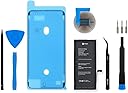
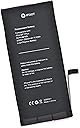

iFixit Battery Compatible with iPhone 7 Plus - Repair Kit
Product ID: 151031632
⚡11.1 Wh power output
🔋2900mAh high capacity
🛠️Complete DIY repair kit
Desertcart purchases this item on your behalf and handles shipping, customs, and support to Israel.
🔧 Power your iPhone 7 Plus like a pro—DIY repair made effortless!
The iFixit Battery Compatible with iPhone 7 Plus is a premium replacement battery boasting 2900mAh capacity and 11.1 Wh power, tested to ensure 95% or higher capacity. This kit includes all necessary tools and adhesive for a smooth DIY installation, fits multiple iPhone 7 Plus models, and comes with a 1-year warranty, empowering users to extend their phone’s life with confidence.

| Best Sellers Rank | #41,279 in Cell Phones & Accessories ( See Top 100 in Cell Phones & Accessories ) #182 in Cell Phone Repair Kits |
| Customer Reviews | 4.3 out of 5 stars 99 Reviews |
M**B
Great replacement battery kit and great instructions
One day my iPhone would charge to 100% but when I disconnected it from the charger, the battery level would drop to 1% (that's not a typo) within 5 minutes. When it was connected to a charger it was pretty much useful (other than being tethered to something not particularly mobile), but it would periodically reboot itself. The battery included with the iPhone 7 Plus is rated at 2900mAh capacity, but there are there are outfits selling replacements that they claim are 4000, 5000, or even 10000 mAh. I don't believe them - the battery would need to be considerably larger than would fit inside the phone. So I avoided those and went with iFixit, a trusted brand that didn't make bogus claims about the battery capacity. Replacing the battery isn't rocket science, but it does require quite a bit of care and detail. Before you buy, read iFixit's documentation on how to replace the battery and watch their video. Read the comments that other people have left on the instruction steps - they have incredibly helpful information and tips. Watch a couple or a few other videos on youtube. Then if it looks like something you want to try, buy this kit which includes pretty much everything you need except a hair dryer to loosen the adhesive between the phone's display and the phone's body; and some pennies and books to help seal the display when you've finally closed up the phone after replacing the battery. In my opinion one of the most important things is to have is somewhere to safely store the various screws you need to remove. They are nearly microscopic - about the size of the head of a pin - and are different sizes. You need to put the right ones back in the right place or you are screwed. I had 8 little plastic jars (like might hold cosmetics) - one or two for each step that screws were removed (2 jars when there were different sizes involved in a step). Each of the jars was labeled and had screw on lids so even if I knocked something over and sent things flying I'd be able to collect all the jars knowing that the screws were secure. After doing the replacement my iPhone is good as new. I've had it for about 8 years so far and it still does what I need it to do so $25 for a new battery that should get me at least another 5 years is great! Just for reference this iFixit iPhone 7 Plus battery replacement kit was $24 (Oct 2024). The photos show my "screw management system" and the iFixit kit (along with my screw management system) but without the battery and the display adhesive component since they are inside my phone.
J**P
Super easy to use and def worth the money!
I've recently got into fixing phones and I thought I would start by replacing my old iPhone 7 Plus' battery. So, I did some research and it seemed like iFixit was a well known brand for replacement parts, so I decided to go with this kit. Upon opening, the presentation and unboxing at first was very delightful. Everything was packaged neatly, so not a single part got damaged during shipping. I have to admit I was a bit skeptical because one wrong move could ruin this phone forever, and I had a lot of memories saved on here. However, Ifixit made it super simple to install and use. It was actually really easy! Everything fit perfect and worked great. This kit was only a little under 30 dollars, and I am very surprised because of that. My battery went from a 5 minute work time to a 5 day work time (okay a little exaggeration won't hurt anybody) Overall, definitely recommend this iFixit kit!
D**Y
Much Better Capacity Than The Original
You can get cheap iPhone replacement batteries that claim all kinds of crazy mAH ratings, and I had one of those in my phone for the past year. They are actually nowhere near their "ratings," but the can still be OK. My previous cheap battery was as good as the factory battery at first, but it faded relatively quickly. This battery, still not expensive, but not the rock bottom ones, has much better actual capacity. When you put these batteries in, you're supposed to fully charge your phone, then let it fully discharge to calibrate. So i charged it to 100% and set it on my table to wait for it to discharge. I left it in airplane mode, so it wasn't drawing a bunch of radio power, and I didn't really use it much, but it took almost 5 days to run down to zero. I started using it after that, and it lasts roughly as long as my new iPhone 15 max pro, although heavy use seems harder on the old iPhone 7 battery than it does on the 15. Anyway, after a few weeks of use, it's still great, quite a bit better than the cheap battery I had before, and I'll come update this review if it doesn't continue to perform quite a bit better than the factory battery. Oh, the tools that come with it are pretty meh, although not as bad as the disposable screwdrivers -- this screwdriver at least is metal, with rubber grips, and holds interchangeable bits. I guess now that I wrote that, metal with rubber grips is kind of nice. The spudger isn't my favorite though, and the picks are fine. It comes with one display adhesive/gasket, and I managed to get it almost all the way around and in place, except for the upper right corner. The work was cleaning the old one out with isopropyl alcohol, a spudger, toothpick, and fingernails. With a phone this old, I almost skipped it because really, who cares if it doesn't survive a dunking. The gasket is probably about as easy to install as it could be, coming on a stiff plastic backing that keeps it in place right up until you press it in.
D**N
Great kit for iPhone 7plus Battery
This ifixit battery kit for my iPhone 7plus did the trick and it is a very high quality repair kit and battery. After a week of use with the new battery, my phone is lasting a whole day of regular use and still has 20-30% left at the end of the day. I’ve had my iPhone 7plus since 2016 and the battery wouldn’t last more than 6 hours with the lightest use. My phone battery health said to change it so I bought this kit and changed the battery myself at home. This kit had everything I needed except for a hair dryer to heat the adhesive. Ifixit had a repair article online to follow plus there are many videos to help as well from other sources. I have a little experience with replacing iPhone internal parts but I haven’t done it since the iPhone 5 came out so I wasn’t sure how but this kit and the online repair article were exactly what I needed. My battery health now says 100% and I can easily get a full day of use out of my 7+ year old iPhone 7plus.
A**0
Battery is equal to old battery
I know this is a reputable brand but the battery I received, absolutely stinks! There is no change whatsoever from old battery or their “new” battery. I know an iPhone 7plus is an older phone and these batteries may have laid around for a while but it should still perform better than what’s it’s doing. When I put the battery in, it was on 54%. I put it on charge and didn’t touch it until the next morning so it had hours and hours to really top off. Next morning I played a game for 6 minutes and the battery dropped 13%. I looked online and it said to use battery down to zero then charge again, untouched until 100% then also leave on charge for additional 2 hours. Then it said to hard reset phone so it could recalibrate with battery. I did all that and the battery goes down so fast still. The biggest thing is, I have all apps deleted off the phone because it’s just a back up phone with 2 “time waster” games. So disappointed with this purchase.
R**S
Awesome kit and battery is perfect!
Overall, this was a pretty easy repair. You can watch the ifixit video which is helpful. I watched a few videos from various people on YouTube and each one gave a few extra things that helped. I didn’t heat the seal with anything special, I just used a blow dryer for about a minute. Not totally sure if it was even necessary. Once you start popping up the screen, the very top is locked in, you have to slightly slide it down before the top will pop up. At reassembly, I would recommend watching an ifixit video that’s specifically on the seal. The seal/gasket goes on the battery side of the phone not the screen side. When putting the screen back on, you start a little lower and then slide the top back in first. After the top is in, the rest of the screen snaps in no problem. I’m extremely happy with the purchase. The phone now shows the battery capacity is at 100% and the phone works so much better.
J**N
Nice
It’s all right I bought it for my old phone
L**D
Something extremely important to know but iFixit video doesn't tell enough
After referencing serval YouTubers' videos, I successfully replaced the battery for my 7Plus iPhone. The battery works perfectly. However, I am only giving four stars due to my dissatisfaction with the official video of iFixit. The instruction in iFixit's video was sounding too easy and lacked of details, possibly leaving us unaware of the risk of terrible explosion if the old battery's outer casing punctured accidentally during the removal process. Also, the product did not include the iOpener (a heating bag) shown in the video. According to what I finally learned from other videos, warmth to the bottom of the phone with the appropriate temperature makes the battery easier to remove. After accidentally breaking all three strips of tape, I attempted to forcefully remove the firmly adhered old battery for about 10 minutes. Fortunately, even though the battery had all crumbled inside its wrapper by my rough pulling, I didn't (but almost) use metallic tools. So, thank God! The wrapper hadn't gotten any holes. My audacity was due to lack of crisis awareness and iFixit's insufficient guidance. It was just luck that there was no explosion. I think it would be better if iFixit puts all the details into one video entirely.
Trustpilot
2 months ago
3 weeks ago