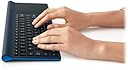
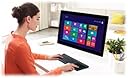
⌨️ Elevate your workspace: one device, endless control.
The Logitech Wireless All-in-One Keyboard TK820 combines a full keyboard with a built-in multi-gesture touchpad, featuring an ultra-slim design and advanced 2.4 GHz wireless connectivity. Compatible with Windows 7 and 8, it offers fluid typing with Perfect Stroke keys and a large touch surface for effortless navigation, making it the ultimate clutter-free productivity tool.
| ASIN | B00DR9V1T0 |
| Additional Features | Touch Panel, Wireless |
| Antenna Location | Desk |
| Best Sellers Rank | #7,400 in Computer Keyboards |
| Brand | Logitech |
| Built-In Media | USB Cable |
| Button Quantity | 13 |
| Color | Black |
| Compatible Devices | Laptop |
| Compatible Operating System Family | Windows |
| Connectivity Technology | Wireless |
| Customer Reviews | 3.8 out of 5 stars 417 Reviews |
| Enclosure Material | Rubber |
| Hand Orientation | Ambidextrous |
| Item Dimensions L x W x H | 16.9"L x 1.8"W x 7.9"H |
| Item Weight | 1.9 Pounds |
| Keyboard Description | Wireless |
| Keyboard Layout | QWERTY |
| Language | English |
| Manufacturer | Logitech |
| Mfr Part Number | 920-005108 |
| Model Number | 920-005108 |
| Number of Batteries Required | 4 |
| Number of Keys | 104 |
| Power Source | Battery Powered |
| Recommended Uses For Product | Desk |
| Series Number | 920005108 |
| Special Feature | Touch Panel, Wireless |
| Style Name | Contemporary |
| Switch Type | Mechanical |
| UPC | 097855094315 803982763181 211131850123 |
| Unit Count | 1.0 Count |
S**S
This is by far the best keyboard I've ever used.
I'd like to start with that I am not a standard typist, I do not work in an office and I am not a casual computer user. I use my keyboards for many things including games and programming, but nothing that would cause the keyboard wear and tear. The weight of this device is REALLY nice. It's like a guarantee that the keyboard is not going to get up and run towards the monitor. The weight, and the rubber feet that elevate it, are just two peas in one pod. I never thought the weight of a keyboard would be important to me until I picked this thing up. _K_E_Y_S_____________________________________ Let's get down to the keyboard part of this thing. This is the top dog right here - hands down. I've owned 11 keyboards, including a Microsoft Sidewinder X6 and I wore out the keys in a year, just from typing. Those keys were nice, but these are much nicer. Logitech used to make awesome keyboards, sadly I didn't own the previous "awesome" ones. I've only owned another one, the K400r, and that was absolute garbage. Logitech -REALLY- made a comeback with this model. Typing on this thing is amazing. I can press a key and not worry that I may have hit the edge and nothing appear on the screen. The key stroke for this is great. It's fast, and fluid. The spacing on the keys makes it easier for me to know I'm not 'side fingering' - (highly annoying pinky or ring finger light key pressing) another key causing typos and what-not. I don't know about anyone else, but I can honestly say my typing speed increases. I can take the highway to hell, without looking back due to increased accuracy from this keyboard. Typos occur 99% less often. _M_O_U_S_E___________________________________ The touchpad. Oh, the touchpad. Back when I got my HP dm4 3055, I noticed I could use multi touch on the track pad. Do note it is a windows 7 machine as well. I went out and bought a Microsoft Wedge mouse too, and loved that I could swipe my fingers left and right to scroll sideways. These mentioned things, are just way too small. The Logitech TK820 gives you wayyyyyyyyyyyyyyyyyyyyyy more real estate to play with. I can scroll across more area with less finger movement. It's like a vast plain, in contrast to what you see on recent laptops and individual touch pads and mice sold by other companies. I love the fact I can still use 2 fingers to scroll and 1 finger for mouse cursor movement - But I didn't realize this until about 10 times of it happening. - Did I mention that you have more area to work with? You can use 3 fingers to emulate the Windows Key (super key). I was trying to figure out why my windows were disappearing and it was getting annoying, thinking I had a virus or something. Turns out if you use 3 fingers and scroll up or down, all of your applications will minimize, or restore on the screen. That's a neat feature, but it was kind of annoying when I didn't know this. Now that I do, I don't really classify it as a 'con'. I do love that the touch pad gives you left and right clicking at the bottom. That's just insane - no other touch pads do this that I am aware of. I do however, have hands that explore flat surfaces easier than other people. I try to right click things and if my finger isn't exactly on the right bottom edge of the touchpad, it'll left click instead causing hyperlinks and other things to activate. I'm sure that can be remedied with the software calibration or something. ________________________________________ The only thing I wish this keyboard had, is bluetooth. I mentioned above how they made 'awesome' keyboards in the past. One reason was due to them using bluetooth instead of their new 'Unifying' receiver. It's neat, that I can link up multiple keyboards or mice, but why would anyone have more than 1 keyboard and mouse on the same machine? Today, All laptops and tablets have bluetooth, but not all of them sport a USB port. _________________________________________ Here's the quick and dirty. ____________________ Pros: [ + ] Non-slip feet - Standard on most keyboards, but Logitech did a justice and made it near impossible to skid with the rubber they used. [ + ] Batteries came pre-installed. I opened the box and just plugged in the receiver. Nothing to it. [ + ] Special drivers from logitech aren't required - I don't need extra software on my pc. The keyboard and mouse functions normally without it. [ + ] Typing is much faster, and less stressful. [ + ] The height of this is perfect. It doesn't act like a cheese wedge and isn't a clipboard. [ + ] Key size is amazing. I don't have huge hands, but I'm sure anyone WITH huge hands would have less problems with this due to the spacing and size of each key. [ + ] Typos occur less often due to the strike zone of each key. [ + ] Nice and thin. Not paper thin, like those apple keyboards that seem like they'll fold into an airplane if you put your palms on it. __________________ Cons: [ - ] Uses 4 'AA' batteries. It's not backlit, or requires that much power, but it adds to being a good thing causing it to weigh more, resulting in less slipping. [ - ] Right clicking is a bit difficult if your finger isn't comfortable on the right bottom edge of the touch pad. [ - ] No slot for unifying dongle. - Their other models have had a space under the battery cover for the receiver dongle. [ - ] The function keys at the top are only activated by holding the FN key - But this can most likely be switched off with the logitech software. _B_O_T_T_O_M___L_ I _N_E___________________________ [ #] The short and sweet I would recommend this keyboard without hesitation. I bought mine, while I think Amazon had it on pre-order for $69.99 - Now it's $79.99 - Good timing. Get it. You'll be more productive knowing you have about 500 more horsepower under your fingertips.
E**S
Perfect keyboard to type while on your lap, and works with Windows 7 as advertised
*Please note: I do have a Windows 8 laptop for home use, but I have not yet tried this keyboard with it yet. This review is only for Windows 7 compatibility, and has only been tested after 2 hours of use. I will update this in a few weeks after extended use* I purchased this keyboard for the interesting and innovative design of a keyboard touchpad all in one. Being an iMac user with a Magic Trackpad at home, I've longed for the ability of gestures on a Windows 7 Laptop computer that I use for work; primarily the two finger scrolling function. So with that said, I was pleasantly surprised that the two finger scrolling did work on my HP Laptop computer. The setup was plug and play. No fooling around with drivers or updating anything. It even came with 4 AA batteries (yes 4…consider purchasing some rechargeable batteries). Setup - Plug in usb; turn on keyboard; wait for Windows 7's *ding* that the device is ready and start typing. That's it. Now I'm VERY picky on the keyboards I type on. I *love* apple keyboards. I love the chiclet design and snappy feedback from typing on them. I'm a touch typist that doesn't like to hammer down on keys, but rather glide my fingers over them without feeling like I have to press down with the force of Thor's Hammer to type the letter "a". I also am a sneaky ninja typer and don't want my neighbor from 3 blocks away hearing me type. This keyboard isn't like an Apple keyboard, but it's pretty close. The keys feel a bit more stiff and not as snappy (which may go away after extended use), the sound from typing on it isn't more loud than my Apple keyboard, and the key layout and button sizing is EXACT to the apple bluetooth keyboard - just with Windows buttons. There are some function keys that are specific to Windows 8 keyboard shortcuts that I haven't tried out yet and the top function keys are loaded with extra shortcuts for music, volume, search, etc. It clearly lacks a numerical keypad, but that doesn't bother me as I hardly use that for work. The trackpad is very smooth. Compared to the Magic Trackpad it's more smooth and slick feeling, but it's about an inch smaller in width. I don't' find that I miss that extra inch at all when using it. It's very responsive, I hardly have to touch it, and touch right/left clicks are equally responsive. I really like how the keyboard and trackpad are molded together in one unit. I can sit back, lay this on my lap and have everything I need to navigate anywhere I want and keep my laptop on the table and not burning on my lap. It does have an unexpected heft to it, but it's nothing compared to the weight of a full sized laptop. Ultrabook users might feel a little bit of the weight difference, and that should be noted if you plan on lugging this around in your laptop bag. Also for those that want to carry this around, I have yet to find a place to store the tiny USB connector within the keyboard. If you're not organized, you will most likely lose it. I find this a design flaw, and a bit of an oversight by Logitech as most wireless USB devices have areas to store the USB when not in use and not plugged in - hence the 4 stars and not 5. There's ample space where they could have designed this in. A plus side to the small USB connector is that it is small; it may stick out about a half of an inch - if that. There's nothing worse than an oversized USB connection to the side of your PC and blocking other USB ports; this one doesn't do that. All in all, if you're on the fence with this keyboard and you're comparing this to something similar, go with this one. Logitech is a trusted brand, and are known for their superior keyboards. This keyboard is no exception. I plan to update my review in a few weeks after heavy testing with my iMac, Windows 8 Laptop, and further testing with my Windows 7 laptop. 1/26/14
D**K
The keyboard is really great, much better then the cheaper keyboards
From other reviews I was thinking this was a 3/4 full keyboard. However the keyboard I received is a full keyboard, it measures 6.75" from the center of keyboard letters Q to P. Compare that to your favorite keyboard at home to get an idea of the keyboard size. I'm a touch typists, I don't look at the keyboard when I type. For people like this the keyboard layout and feel is very important. The keyboard layout is correct for touch typing. The Shift keys are in the right place, the backspace and enter key are the correct size. Surprisingly not all keyboards have the correct key layout, most don't that I looked at on-line. And after owning one I find them difficult to adjust to after so many years of typing on the standard keyboard. With that the cursor keys and the function keys at the top are half sized a normal key. I find this is ok and works well for me. The keys on the keyboard only press down a short distance, maybe a 1/16". However, the feel is spot on, it feels just right and I can type my normal speed or maybe a little better with this keyboard. Previously I only used keyboards with a full button press. The keys on this board have a smooth press, and it is smooth from any place on the key. You get the same feel pressing the space bar on the far left or far right or the center of the key. This is the way it should be, not all keyboards are like this though. The keyboard does not have a numeric keypad or the Page Up/Page Down, Home, End keys. However there are ways to do all these functions with the keyboard. Shift-Arrow Down is Page Down. Likewise, Shift-Arrow-UP is Page Up. Since the shift key is close to the arrow keys it works well. The touchpad is the reason I purchased this keyboard. It works very well, I think it is as good at the Logitech T650, almost the same size, just a little smaller at 4.25" square. The touchpad allows the use of the double touch to click on an item. The pad also has build in pressure buttons, you can press on the lower left or right to perform a mouse button click. However the double touch is way better and I adjusted to it very quickly. The keyboard is very thin, about 1/4" for most of the keyboard and 3/4" at the far end that holds the AA batteries. It looks nicer than the big thick keyboards. The keyboard is built well, it is heavy for the size. It is heavier than my Logitech large key board that I have been using. The weight is at the far end, slightly off center balance. I don't think this really matters but it does hold to the desk top well, never slips or feels like it would slip. Overall, this keyboard has an excellent feel for a touch typist, I can type my normal speed or better. I'm really surprised at the quality of the keyboard, the key pressing is just right. It is a much better feel than those small keyboards for the tablets. Those that have not tried a touch pad in a while or only tried the laptop touch pads should give touch pads another try. I have used a mouse since they first came out in the 80's and always hated laptop touch pads. That has all changed, I have quickly adapted to the touchpad and I'm close to saying I'm better with it than a mouse. Need a little more time to fine tune my skills but I have adjusted quickly.
M**E
Best keyboard ever!
Love this keyboard and how easy it is to use. Great weight, simplicity of setup and total space saver due to its all-in-one design. The company is fantastic to work with and extremely responsive when you need them. Another very satisfied customer! 👍👍
K**R
Don't buy this keyboard!
I really wanted to like this keyboard. I don't - at all, and I am returning it. I have been looking for the perfect keyboard for my needs. I use a Windows PC and I am a writer. I wanted a wireless keyboard. And I did not want to give up two USB ports for both a mouse and a keyboard. I don't need the right side keypad of so many PC keyboards - I wanted something more compact. I tried a Logitech K-480, a bluetooth keyboard. The keys felt good. But it turned out to be a disaster. For one thing there was frequently a lag between keystroke and acceptance by the computer. Bad. For another, it seemed to miss about 5% of my keystrokes. Now, English is a highly redundant language and doesn't need all the letters to understand the meaning, but that is ridiculous. Another problem with the K480 is that it was designed to be useful for PCs - and Apple equipment and Android as well. It was trying to be all things to all men. If all you want is a QWERTY keyboard, other than the above issues it meets that test. But for dedicated PC use, you are giving up a lot of useful functionality. Unfortunately, I have come to rather like the "End" key, and dedicated "Page Up" and "Page Down" keys. I use them a lot and miss them badly when they are not there. I can make do with "FN" key combinations up to a point but I much prefer not to. In any case, I decided that the killer problem with the K480 was the Blue tooth issue, and so went back to the Logitech well once again, and bought the TK-820. Bad mistake. At the selling price you expect a premium product. It does seem nicely made. The keys do feel good. And it even has the delete key in the upper right corner where I prefer it. But... The first thing that put me off was the totally unexpected rattle of the touchpad on the right side whenever I pressed any key. The rattle is unpleasant and disconcerting. I did not need the touchpad at all - I prefer a good mouse. But that came with.and I decided I could live with that. But the final straw was that somehow the internal electronics of the keyboard slowed to the extent that it would accept a keystroke about every half second after some internal buffer was filled. I couldn't believe it was the keyboard, and tried typing on the laptop keyboard - no problem there - but the Logitech keyboard continued S-L-O-W. Logitech brags about the 128 bit encryption the keyboard offers - great - but I don't need it. What I do need is a keyboard that is always responsive. The TK820 is not. And again, we have a keyboard that is trying to be an Apple keyboard as well as a PC keyboard. Which means it is lacking some of the keys I want and need. Bottom line - I won't be buying another Logitech keyboard any time soon. If they ever decide to offer a quality premium keyboard that is dedicated to Windows PCs, is wireless but not Bluetooth, does not have the key pad on the right - OR a touchpad - and stays instantly responsive, maybe I'll try them again. I'm not holding my breath. And by the way I tried to contact Logitech to communicate my thoughts - now THERE is a hopeless task. In the meantime I am back on my klunky, wired Dell keyboard that at least has the keys I really do want and it completely responsive. \\\\\\\\\\\\\\\\\\\\\\\\\\\\\\\
C**Y
Disappointing quality and performance for the price
I'm a professional writer and software engineer, so I spend an obscene amount of time typing. I was replacing the original Logitech DiNovo Edge, which was mostly fantastic, but it had serious problems maintaining a reliable and steady connection with Windows 8 (and got worse with 8.1). I'm already a regular user of M570 wireless trackball, so I knew the unified receiver is very reliable and I thought a trackpad built into the keyboard would be a handy addition. Pros: - Maintains a great connection over the unified receiver - Battery life is solid. I've been actively using the keyboard for a few months without changing the batteries and they are still pretty full. Cons: - Keypress action is inconsistent and jams on some keys. - Trackpad is miserably inaccurate. I'll start with the overall unit and performance. Wireless connectivity is basically perfect. I've only had a handful of dropouts and they either self-corrected within a few seconds or I just had to toggle the power switch on the keyboard to restart it. Battery life has been solid, I haven't had to replace them yet, despite moderate-to-heavy use. The software is the same standard package Logitech uses for everything, which means it's not heavily configurable, but it covers just about everything a regular user will want and it's not too bloated. Unfortunately, it does encourage the use of a Chrome extension to enable smooth scrolling, and that thing can be really glitchy with some apps. The Keyboard Most of the keys have an acceptable press action, but it's not quite to the level I expect from a keyboard in the $80-$100 price range. I don't mind this too much, but the really big problem is that some of the keys are inconsistent and even jam up on the downward action, especially the modifier, function, and arrow keys. This stickiness doesn't usually prevent the keypress from registering, but it is incredibly distracting and forces the user to double-check the screen to be sure everything is ok. The Trackpad Unfortunately, the trackpad is virtually useless. The gesture detection isn't reliable, the accuracy is horrible, and it feels cheap compared to Apple's trackpads, which were obviously the inspiration for this product. There have been many times that I try to simply slide a single finger across the trackpad and the mouse cursor doesn't even respond. Technical issues aside, there is also a design issue that I didn't anticipate, which is the sheer proximity of the trackpad to the right-most keys. If I'm feeling for keys on the right edge, as many heavy typists will do for the arrows, it's incredibly easy to accidentally tap the trackpad, which causes a mouse click. On numerous occasions, I have accidentally placed a cursor in the middle of a wall of text and started typing. Overall, the idea of this keyboard seems great, but it's not very well designed and the quality is just mediocre. Given the array of features, I can understand why it carries the price for an upper-mid range keyboard, but so many corners were cut that the end result isn't worth that much. I can't say that I would recommend it to anybody.
S**S
Keyboard good, touchpad bad
I use the TK820 for my HTPC. I'll skip the wall of text and dive into what you care about instead: >> Keyboard The Good + The keys have a great click feeling that make typing very easy and comfortable. + The keys are well spread out. + SetPoint allows you to disable the Windows and Caps Lock keys. + The F1 - F12 keys are defaulted to perform their media functions (e.g., pressing F9 mutes instead of performing "F9"). You need to press Fn+F# in order to send the desired F# key. That said, I believe SetPoint allows you to swap this functionality (e.g., you need to press Fn+F9 to mute instead). + Dedicated on/off switch (not a button so you can't accidentally turn it off). The Bad - No Home, End, PgUp, and PgDn keys. - No numeric keypad if you want one. - No "flippers" to incline the keyboard if you're into that. Overall score: 9/10 >> The Touchpad The Good + Larger than most touchpads. + Surface is slightly rough providing a nice tactile experience. + Supports a wide array of multi-touch gestures. It supports up to 4 finger recognition (swipes, presses). + SetPoint software is fairly customizable (e.g., you can change the scroll direction when 2-finger scrolling). + Very sensitive. You don't need to press hard in order for the touchpad to detect your finger. The Bad - Poor click/movement detection. This does not mean the touchpad is not sensitive. Rather, the software driver has a hard time distinguishing when you want to click and when you want to move the pointer. Sometimes you'll click when you want to move the pointer, and sometimes you'll move when you want to click. This happens often and is a large annoyance. - The touchpad has 2 DEAD ZONES. If you look at the touchpad and draw a vertical line about 0.66" (I don't have a ruler handy) from the left and right sides (like this: [ | | ]) of the touchpad, those are the dead zones. When you're moving the pointer and your finger crosses either of these lines, the pointer will momentarily stop. If I had known about this beforehand, I probably wouldn't have bought this keyboard. These dead zones might be related to software-enabled scroll regions but I didn't see anything in the SetPoint settings. I am also on the latest version of the SetPoint software as of the date of this review. - Mechanical click actuation is stiff. I'm usually a mechanical clicker but I think I'm going to rely on tap clicking with this touchpad because it's just too stiff. For reference, I have used a number of touchpads, and this one ranks near the bottom. If you think you're going to have an Apple experience with this touchpad, you're gonna have a bad time. Overall score: 3/10 >> Recommendation Get this if you're a mostly keyboard user but want the option of a touchpad. You may want to look at the cheaper Logitech K400. I haven't used it, but the price difference is large enough to warrant a look.
B**R
Bought in 2014, still going strong
5/5 Pro: +Originally bought this in 2014, and its still kicking, no loss in functionality. +Keys feel good to type on +large trackpad. I use my PC as a home theater PC as well as for gaming. I use a separate mouse for gaming when I want KB/M. The trackpad on this is great for sitting on the couch and browsing the web, but anything more than that like games or 3D modeling or any kind of work you'll want an actual mouse. +good battery life. It takes a few AA's but I don't feel like I have to change them more often than I should. Cons: -track pad full "click" feel isn't that great. The "tap" to click is much better than the full button press. The trackpad still gets the job done and supports gestures. I might have spilled on this and that could be causing a little bit of a sticky feel. If that's the case, put this in the pros column because it survived a brush with death.
C**Z
Excelente calidad y precio
Cumple con lo que promete, tiene una excelente calidad, llego mucho antes de lo esperado, en muy buenas condiciones 100% recomendado
M**H
One of the Best Keyboards ever
Love this all in one keyboard with trackpad. This stylish keyboard functions as good as it looks. I was using an apple keyboard and separate track pad device but hated that they were separate devices. Only wished Logitech offered this in white and sliver. Then it would be the best keyboard ever!
H**S
Thumbs up
Superb keyboard. Thoughtfully and elegantly designed. Very responsive. Worth the price.
K**.
great for Windows and Linux, don't bother with it for MacOS.
Arghh sooo close! Like so many other excellent Logitech products, this one is for Windows 8. I was hoping to use it on MacOS, but there is a little snag: the trackpad. The trackpad is multitouch, true, but the gestures are interpreted by the device itself and send to the computer as keystrokes. I am upset about this: let's create a gorgeous keyboard with an excellent trackpad, but let's dumb it down for a crappy OS. As things stand, the only gesture that works on MacOS is the two-finger scrolling. Other than this, I notice it is not sensitive all the way to the edges. To my knowledge these are not mapped for scrolling, so the reason for this is a mystery. On the upside, if you are using it on Linux, you can intercept the keystrokes and interpret them however you want. You can enjoy a driver-free (though not setup-free) multigesture keyboard on Linux. Also, the keyboard is not backlit, maybe this is not the best keyboard for a home theater, though it certainly has the appeal.
X**Z
Five Stars
Excellent quality.
Trustpilot
3 weeks ago
4 days ago