

Desertcart purchases this item on your behalf and handles shipping, customs, and support to Israel.
💡 Light up your life smarter, not harder.
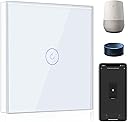
The BSEED Smart Light Switch is a sleek, WiFi-enabled touch switch compatible with Alexa and Google Home, designed for 2.4GHz networks and requiring a neutral wire. It supports multi-way control through the Smart Life app, voice commands, and custom scheduling to optimize energy use. With group control and remote access, it transforms traditional lighting into a connected, efficient smart home experience.


| ASIN | B07PQGFZ36 |
| Actuator Type | Push Button |
| Best Sellers Rank | 3,075 in DIY & Tools ( See Top 100 in DIY & Tools ) 28 in Switches & Dimmers |
| Brand | BSEED |
| Circuit Type | 2-way |
| Colour | White |
| Compatible Devices | Amazon Alexa-enabled devices, Google Home devices, Smartphones with Smart Life app |
| Connectivity Protocol | Wi-Fi |
| Connector Type | Screw |
| Connector type | Screw |
| Contact Material | Brass |
| Contact Type | Switch |
| Contact type | Switch |
| Control Method | Voice |
| Control Type | full |
| Controller Type | Amazon Alexa, Google Assistant |
| Country Of Origin | China |
| Current Rating | 10 Amps |
| Current rating | 10 Amps |
| Customer Reviews | 4.0 out of 5 stars 985 Reviews |
| International Protection Rating | IP20 |
| Item Dimensions | 8.6 x 8.6 x 3.5 centimetres |
| Item Weight | 0.18 Kilograms |
| Manufacturer | BSEED |
| Manufacturer Part Number | V1-T1 |
| Material | Glass |
| Model Number | LIN1-11W |
| Mounting Type | Wall Mount |
| Number of Items | 1 |
| Number of Positions | 1 |
| Operating Voltage | 250 Volts |
| Operating voltage | 250 Volts |
| Operation Mode | ON-OFF-ON |
| Operation mode | ON-OFF-ON |
| Specification Met | IP65 |
| Switch Type | Touch |
| Terminal | Physical |
| UPC | 676422580408 |
| Unit Count | 1.0 count |
| Upper Temperature Rating | 70 Degrees Celsius |
| Wattage | 1000 watts |
Z**E
What a great bit of kit ! Easy to install and set up
Couple of points : Firstly if you're not electrically skilled please seek advice before installing this. Secondly I see this time and time again - if you do not have a neutral wire terminated in your light switch this switch will not work ! Thirdly the switch itself is fairly deep and you may need a spacer around the switch if you cannot replace the back box. I already had a Wifi dimmer light switch which works really well with Alexa and the Smart Life app. I hadnt tried this brand before and generally expectations of stuff like this is that they can be difficult to set up and instructions are poor - not so here all worked like a dream. Installed 2 switches in my Daughters redecorated room. First one was 1 gang 1 way replacement for a single way switch. Straight forward wire swap and connect to neutral. Powered up and switch worked ok with touch on and off. Then pressed and held for 3 secs and red light blinks, opened smart life app and connected to 2.4 Ghz WiFi network (doesn't work on 5 Ghz). Smart life app found the switch immediately and asked for my WiFi password. It was connected within less than a minute. I got a notification on my phone from the Alexa app saying a new device had been set up in Smart Life (nice !). I could work the device immediately from Alexa but I went in to change the name of the device. I set up the second device in the same way but this was slightly more complicated electrically because it was a 2 way switch. This is where novices should seek help (or watch you tube but I didnt say that !) I identified the live supply and the switched live to the light . I then discarded all the 2 way switching wires by coiling them up in the switch box. I then connected the neutral. With so much wiring the back of the box, depth was limited and I ordered a 10mm spacer to space the light switch off the wall. Set up was then as simple as for the previous unit. These switches operate 2 banks of down lighters in the same room. from 2 locations. Once set up in the app I was then able to group them into a room and gave the room a name (lets just say Fred). I could then say to Alexa turn Freds room lights on or off and it would operate both. I could also say turn on light one or turn on light two to switch the banks on individually. My daughter is very pleased with her new lights and bluetooth speakers in the ceiling which also connect to Alexa - all from Amazon :-)
K**N
Bseed smart sockets
One of the sockets I ordered online didn't work..the staff was nice and replaced after nearly or even more than a year later..really understanding and friendly and I was so happy with this as it helped me to have all the sockets the same in one room ..so happy and pleased with this product too ..highly recommend
D**T
Esat to connect to the SmartLife App.
It took a minute or so to realise that the switch unit clicked into place on the backing plate but once I did there was no problem fitting as long as you have a deep enough back box. Connection to the SmartLife App and Alexa was straight forward and the switch functions well. I would certainly buy again.
S**N
Great idea, fatally flawed
Arrived quickly, looks great and very easy to install (literally 2 minutes to swap the old for new). However, and this is what makes it pointless, the LED light remains on, regardless of the switch state. When it's off, the brightness drops by about 90% but the lights still glow. Switching on brings them to full brightness. The circuit has been tested and it's fine so the switch is leaking power even when turned off. Great idea, doesn't work.
M**T
Works a treat
Works well, was easy to set up but I do have my router set up with both 2.4 & 5ghz bands so stuff like this is easier to do as it will only work on the 2.4ghz channel, Google operates it fine once you have the BSEED app linked with your Google. It is a deep light switch on the back which most of them are so you may need to make the recess slightly deeper, think I used a 35mm back box for it
L**S
Power cut causes the switch to lose its network connection
Quite good, but annoying. If there is a power cut, the switch loses it’s connection to the network and you have to use the SmartLife app to make it rejoin
J**N
Looks good
It works and looks good, but you do need an earth wire, so if you're replacing an existing switch and haven't got one you may need to run one from your fuse box. An electrician installed ours, now we can turn the ceiling lights on and off at the switch, with our phone or with Alexa
S**S
Perfect
Exactly as described and what I wanted. Box was a bit tight but I fitted an extension top plate. Perfect
K**N
Kapot na 1,5 jaar.
Na 1,5 jaar in gebruik te hebben werken 4 van de 5 knoppen al niet meer. Wel via de app, niet via het glazen paneel. Dus de schakeling werkt nog maar ik kan de lampen niet meer met de hand aan of uit doen. Erg slechte kwaliteit als het product maar 1,5 jaar mee gaat.
L**E
Fonctionne bien, permet de commander tout un tas d'objets
Il est possible d'utiliser cet interrupteur pour contrôler des objets connectes (lampes, ventilateurs ou autres) COMPATIBLES TUYA, c'est important. Pour cela il faut faire ces quelques étapes, attention c'est des travaux électriques, ne le faite pas si vous ne ne maîtrisez pas électricité. Procédure pour remplacer un interrupteur simple 1) Enlever l'interrupteur que vous voulez remplacer 2) Relier la phase et le plus qui va a lampe avec un vago triple (pour avoir en permanence l'électricité à l'ampoule connectée) + sortir une phase de ce branchement Important, vous vous retrouvez avec une douille toujours alimentée, soyez prudent et marquez le dessus, ça vous évitera une mauvaise surprise. 3) Brancher la phase nouvelle et le neutre sur l interrupteur (L ET N), L1, L2 et L3 ne seront pas branchées 4) Monter l'interrupteur en suivant le mode d'emploi 5) Installer l'interrupteur dans l'application Smart Life, à ce stade il ne contrôle rien, il clique quand vous l'utilisez mais c'est tout. 6) Aller dans scène, cliquer sur le + en haut a droite puis sur "Lorsque le statut de l'appareil change", choisir l'interrupteur nouvellement installe, "interrupteur 1", "ON' puis cliquer sur le plus a droite de "Alors", puis "Exécuter le périphérique", choisir l'appareil à contrôler puis choisir l'action a effectuer lors de l'allumage de l'interrupteur 7) Refaire pareil pour le "OFF" de l'interrupteur
H**T
Toller Lichtschalter
Der BSEED Smart Lichtschalter überzeugt mit modernem Design und solider Funktion. Die Einrichtung per WLAN klappt unkompliziert, und die Verbindung mit Alexa funktioniert zuverlässig – Licht per Sprachbefehl ein- und ausschalten ist im Alltag sehr praktisch. Der Schalter reagiert schnell und stabil, auch die Steuerung per App läuft problemlos. Die Verarbeitung wirkt hochwertig und passt gut in moderne Wohnräume. Ein kleiner Hinweis: Für die Installation ist ein Neutralleiter erforderlich, was nicht in allen Haushalten vorhanden ist. Insgesamt aber eine gute und preiswerte Lösung für ein smartes Zuhause.
M**S
Muy bueno.
Funciona muy bien con la aplicación móvil, es fácil de instalar y más bonito de lo que esperaba.
B**X
Alexa switch
Great switch, especially if alexa doesnt recognises the switch and that seems to happen alot lately.its not the switch its alexa(it doesn't recognise a lot of things lately) but if this happens you can still manually switch on the light
Trustpilot
1 month ago
3 weeks ago