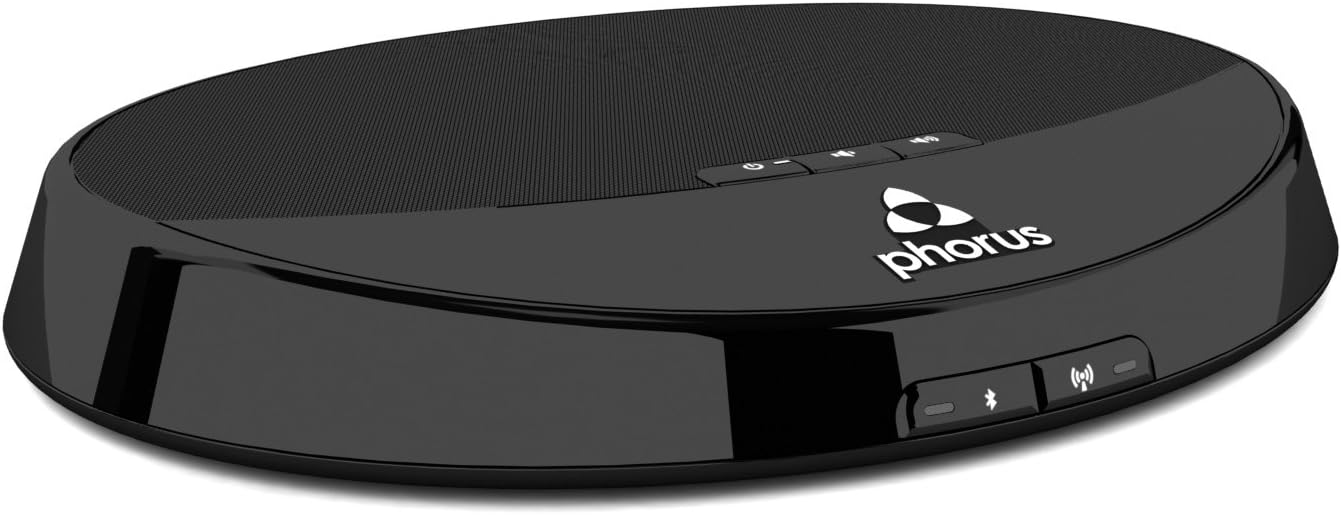
I've been looking for a streaming alternative to the Squeezebox and Sonos units. Those units cost hundreds of dollars... and that was a deal-breaker for me. I'd heard good things about the Sonos and Squeezebox audio streamers, but I couldn't justify the expense. I tried streaming Pandora One through my Sony blu-ray player,... but I had to leave the TV on all the time for it to work. The audio quality was very good, but in the evenings I like low-level lighting and the TV, even on the screensaver, still lit up my living area. I also tried audio streaming using "network" receivers... receivers that have an RJ45 jack (a.k.a. a network port). The audio quality was good, but those modern receivers just couldn't match the sound my vintage quadraphonic receiver put out. Matrix synthesized 4-channel sound just "blows my skirt up" more than the sound of the modern receivers... 2-channel or home theater. While the modern receivers have modern connectivity and the network function built right in and remote controls for convenience, I missed the "sound" my vintage unit cranked out. Other solutions I tried was a Grace Digital audio streamer, and also a Chromecast. While others have had the success with those solutions, they didn't work out well for me. Whew... long intro, I know. But thought I'd give a synopsis of what I'd tried up to now. The Phorus PR1 (www.phorus.com) (no affiliation) costs about $65 new from amazon... but there may be something of a shortage of PR1s since a newer model, the PR5, has been released. PR1s are available from other sites, ... auction sites, too. The newer PR5 costs about $180... which is still a lot less than either a Squeezebox or Sonos costs new... though Squeezebox has been discontinued. Both those still cost a pretty penny when sold used. The Phorus PR1 is billed as an audio receiver. There is "hifi wifi" connectivity. This unit has a Wolfson DAC allowing for streaming of "hi-res" files.. from one's own personal library/NAS. There are new streaming options being developed. Plus, depending on which app one uses... mobile app for iPhone/Android/tablets, or the PC app. The PC app lets you stream any streaming service. The mobile app currently has support for Pandora, Spotify, Deezer, Songza, and more. I use the mobile app on my Android phone. I manually have to turn on the vintage receiver (duh), but after that I can stream Pandora One & Spotify Connect. I don't quite understand "app development" but to use Pandora, the Phorus PR1 has its own Pandora app built in and it gives me pretty much the same as the native Pandora mobile app. When it comes to Spotify Connect, the PR1 uses the native mobile Spotify Connect app which is really, really nice. This unit also has and allows Bluetooth streaming... and through that one can stream anything they want. I've not used (and probably will not use) the Bluetooth feature... but it does provide for streaming pretty much any thing one wants. But of course, the compromise is in the audio quality of Bluetooth. But one can use all the native mobile apps through the Bluetooth feature. The Phorus PR1 uses Play-Fi technology developed by DTS. Play-Fi is pretty new but is growing in usage and more and more. Play-Fi allows for multi-room streaming/whole house streaming. The PR1 has a volume control which I use thru the mobile app. Typically, I've read that it is advised to turn up the phone's volume all the way, then control the volume on the receiver. At least with my vintage receiver, having the Phorus PR1 turned all the way up distorts the sound. For my setup, I turn down the PR1 volume using my phone to about 70-75% of full volume, adjust the receiver volume... and then the audio quality is fine and I can adjust the volume upward or downward a bit using the app. The newer model PR5, has dual band 2.4 and 5 GHz wifi. The PR1 has just 2.4 GHz. The company says that the 2.4 will work fine if there's not lots of other in-home wifi traffic, or if you live in an apartment building and there's lots of other wifi signals all around you. Using a Wifi Analyzer app, I get a little wifi signal overlap from either neighbor (I live in a single family dwelling with houses on both sides of me), but there hasn't been any issues with any of the above using the PR1. And since the only wifi traffic in my house is just mine, the PR1 works very well. As is said often, your mileage may vary. There is a USB port which can be used to charge up one's phone,... but it also can be used with a "USB to ethernet" adapter and hardwire the PR1 to your internet router... though I've not done this, I could.. since the PR1 is about one foot from my internet router/modem. I've had the PR1 for nearly 3 weeks now, and it appears that this is finally the solution I've been looking for. I use it daily (& nightly) and it has solved what was a big need for me. It's great that there are so many different solutions to the audio needs. This one just took me longer to find. Hopefully, support for other streaming services will be developed so more people can enjoy this unit. EDIT June 14, 2015: This unit is performing even better now. I think that the developers of the software for this product have continued to refine it and it is performing very well. There were several times where the app would not detect the device... I had to unplug the Phorus, or unplug my router, or both... to get everything to see each other. But I've not had to do this for several weeks now... so I'm thinking that Phorus has solved that issue. This is really a great device and hundreds of dollars less than Sonos. Still giving the Phorus PR1 5 Stars ! ! ! EDIT Sept 25, 2015: I am still using this unit, and as mentioned before, it is performing even better now. The Phorus developers are continuing to improve the software for this product. Once in a great while now will it go MIA ("missing in action"), and I have to unplug it... but not nearly as frequently as before... and then it reconnects immediately. Compared to the Sonos, this unit works great and is priced right!!!! Hundreds less than Sonos. This PR1 unit is currently priced about $100 below the PR5 receiver.