


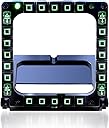
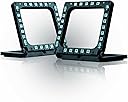



Thrustmaster MFD Cougar Pack (Compatible with PC)
Product ID: 1097007
💡48 programmable controls total
🟢2 programmable LEDs per MFD
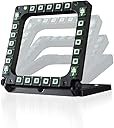
⚖️weighted, non-slip detachable base
Buy anything from 5,000+ international stores. One checkout price. No surprise fees. Join 2M+ shoppers on Desertcart.
Desertcart purchases this item on your behalf and handles shipping, customs, and support to Israel.
🛩️ Elevate your cockpit game — command like a pro, fly like a legend!
The Thrustmaster MFD Cougar Pack offers two USB multifunction cockpit panels modeled after the F-16 MFD, featuring 48 programmable controls, dual green LEDs for easy identification, and a weighted, non-slip base. Designed for seamless plug-and-play compatibility with major flight simulators like DCS and Microsoft Flight Simulator, it enhances immersion and control precision, freeing up your HOTAS for critical commands and delivering a competitive edge in any simulation.


| ASIN | B002HH9TRY |
| Best Sellers Rank | #9,782 in Video Games ( See Top 100 in Video Games ) #33 in PC Game Flight Controls |
| Customer Reviews | 4.4 4.4 out of 5 stars (1,044) |
| Date First Available | September 1, 2004 |
| Department | Electronics |
| Is Discontinued By Manufacturer | No |
| Item Weight | 0.041 ounces |
| Item model number | 2960708 |
| Language | English, French |
| Manufacturer | Thrustmaster VG |
| Product Dimensions | 12.99 x 2.56 x 5.91 inches; 0.04 ounces |
| Release date | June 3, 2020 |
| Type of item | Video Game |
C**H
ADDS GREAT IMMERSION IN AN AFFORDABLE WAY!
These MFD's (comes with two) Add quite a bit of Immersion to my games and simulators! But, the best part is that it does it in a very subtle way! Better still:, Is that it free's up a few buttons on my Warthog H.O.T.A.S. as well(my flight stick and throttle), Which allows me to map more important things onto my HOTAS. Which allows me to say: Enter a dogfight in my F/A-18C in DCS-World by hitting a single button to drop my fuel tank(s) without having to "look down" at ym keyboard and put my fingers on the specific keyboard controls and then push them! The 2.5 seconds or so it takes to press those keyboard commands is ALL another player needs to lock his radar and fire a missile my way, thus putting myself at a SEVERE DISADVANTAGE by forcing me to fly evasively and defensively when everyone knows in a combat mission, you need to be able to keep your eyes out of the cockpit and looking around the sky for threats just as much as you search with your radar! And I use my Cougar-MFD's when flying ANY Aircraft that has Multi-Function (Color) Displays and it's especially helpful for navigating quickly to the proper display page in Simulators like the D.C.S. A-10C "Warthog" or their KA-50 "Black-Shark" helicopter which has it's own version of an MFD with it's "ABRIS SYSTEM" Which consists of it's Target Data Display and Navigational screens and/or Map Display System. I even find myself using these MFD's in other games as well!, like when Flying an F-16 in "Falcon BMS 4.33" Or Even when using the MFD buttons for the Remote-weapon controls for the armored vehicles in "Arma-3" with it's new "TANKS" DLC. I've even found it helpful for hotkeys in other games that recognize it. i use the bottom Row of one MFD to select ammo-types in Warthunder for it's "Tanks" gameplay. As well as others like Euro-Truck Simulator and American-Truck Simulator, as easily accessible buttons to quickly get me to specific pages on my "Dashboard Mounted GPS." In Short, the sheer Competitive edge and/or Potential that these MFD's offer the average gamer or simulated racing or Flight simulator enthusiast is only limited by their ability to visualize or imagine uses for it within their Simulators and Games! Better still, is that they're a steal for amount of immersion that they add! As an example of that point: I spent over $130 dollars on the "Track I.R.-5" Infrared Head-Tracking System, (Allowing me to move my head in real life which serves to control my Simulated pilot's ability to look around within the cockpit or simulation.) And it helps to mimic that feeling of actually being in the cockpit or behind the wheel! A little tip: Thrustmaster, If you read these reviews, you should seriously get into the market of manufacturing these with real color displays before someone else corner's that market and makes something with less plastic at only slightly higher price point!,SO MANY Flight simulator pilots as well as Racing enthusiasts would JUMP AT THE CHANCE to get their hands on a set of fully functional MFCD's that only costs them a little bit more than having to foot the bill of making a set for themselves!the cost of soldering equipment and connectors and wires and things from Amazon. Already simulations like "Falcon BMS 4.33" has a simple and easy way to extract the images from the MFD images eithin their simulator! And that allows savvy Sim pilots to display their combat-Radar as well as their waypoints and whatnot ONTO an external 4-inch by 4-inch screen which allows the enthusiast to see much more clearly whats going on inside their cockpit without having to squint or look down for an unnecessary length of time in order to find and lock targets or input targeting data and take their eyes off the sky in front of them! It could honestly be as popular as the Warthog stick! And offering these one's without the MFD's would allow Sim enthusiasts to experience them for a decent price-range which would (at least for me) allow them to ineract with the MFD's without display, which would allow them to use the MFD's while enticing them to upgrade or purchase the full or expanded edition of these MFD's. In Closing these are a great product and they have way more functionality than you would originally think they do! And equally exciting is you can make them into FULLY FUNCTIONING DISPLAYS with a little bit of elbow-grease and some parts you can buy right here on Amazon!
T**R
Avid Flight Simmers - buy it!
IN PACKAGE: -2 MFD USB Controllers with approx. 81 inches of USB cable from base to plug-in per MFD -2 Base sets with parts for adjusting the degrees at which they sit -Instruction manual -CD Software -Multiple back plate images (some which are blank so you can write what you want) -2 clear front plates to protect the back plate images or LED/LCD screens (Not included - but if you wanted to add them) PROS: +Good solid build and feels durable +Plug-n-play +Very long USB cord +Simple/easy software +Adjustable back-lit green light that can get VERY bright +Heavy base if you intend to use them standing up +Parts included to adjustable the degrees at which they stand +Price is very reasonable for what you get CON - The buttons feel "squishy" instead of feeling like solid clicks when pressed. It takes away from the aesthetic feel a bit, but I easily get over this given the immersion these give. Although, I am a bit concerned given how soft they feel if they might get stuck or sticky later on down the road, I've had them for about 2 months now and no issues - so I can't ditch a star for that...yet. But if it does happen, I'll update my review so potential future purchasers will know. ------NOTE: -These DO NOT come with LCD/LED screens. It is not advertised and at their price point, I don't expect them to be included either; thus, expect to spend extra to buy LCD/LED screens if you want to put them behind these. It just amazes me at some of the reviews/comments I see of people upset as they don't come with screens included. If they did, these things would be in the $300-$700 range. I appreciate the fact they do not come with it so average working Joe's like me can buy them :) Later down the road if you want to buy and add screens, you can. GAMES: -DCS A-10 - If you are buying them for this, it's simply plug-n-play. DCS World recognizes these and automatically sets ALL buttons for you. Even the brightness, contrast, and gain buttons in the corner work! -FALCON BMS - Falcon recognizes these as gaming controllers but, you'll have to manually set each OSB in Falcon's button settings to the corresponding button on the controller OSB 1-5: Top row buttons (from left to right) OSB 6-10: Right row buttons (top to bottom) OSB 11-15: Bottom row buttons (from right to left) OSB 16-20: Left row buttons (from bottom to top) You can also assign the brightness up/down function in the settings menu to Brightness button as well. This just took all but 5 mins. and everything worked great! OVERALL AND FINAL THOUGHTS: While I definitely do not think you should get these before you have a good solid HOTAS system and IR Tracker, it comes in solid 3rd for me - even before rudder pedals - which are stupidly expensive :) If you or your friends are asking "What's the point if there's no screen behind it?" It's an easy answer...it keeps your hands off the mouse! You can change your MFD screens in game with the click of a button and faster than you can with your mouse, especially if you mount them. Again, not to mention the immersion that you're sitting in the cockpit. So far I love them. Definitely a must if you enjoy flight sims.
M**K
Awesome gear!!!
I am an avid flight sim builder...I have several sim "pits" some simple and some very high fidelity. Probably one of the hardest things to integrate is the functionality of the Multi Function Display. These were only available in Europe for a long time. The average price I paid from simw was about $130.00 USD, you can get 2 sets and then some here now. They come 2 MFD's per box/set, are heavy weighted, and have a good kinesthetic feel when actuating the buttons. Plug and Play compatible with all modern operating systems. The brightness of the backlighting on the buttons and controls is user selectable based on how dark the room is/personal preference. CD drivers were included or you can download at parent site. Sturdy construction and tons of configuration options for tyour desk or whatever angles your situation presents. Well thought out design. Integrates flawlessly with Microsft FSX and X-Plane9. Very Durable, I have 5 sets of these in use in my store and the customers can get real "touchy feely" with the gear. I haven't had any problems yet, the first pair has several hundred hours of use. Don't feel constrained by the F-16 label...they simulate any modern fighter MFD quite well. Very low cost is the strongest selling point. If a fully functional HUD is the Holy Grail, these certainly are the Excalibers of flight simulation. The cardboard and plastic screen inserts they provide are good so you can do just about any level of realism you choose. I spray painted one set of the plastic inserts gloss black and when inserted backwards can fool active duty military pilots with their realistic appearance. I have dual Doublesight 7" monitors behind 1 set and Falcon MFD extracts perfectly to them...I would probably go with 8" monitors next time to lose a very small gap. Bottom line is these are dirt cheap, work seamlessly right out of the box, and integrate easily with FSX and X-Plane. My strongest personal recommendation for value and function. M.E. "Butch" Kissick LCDR USN (Ret) F-14 RIO [...].
B**S
Could use a modern generation refresh.
Let me start by saying this, I LOVE these peripherals for my combat flight simulators. DCS and Falcon BMS 4.34 have really come ALIVE. MFD's were super easy to set up and of course, if you use the T.A.R.G.E.T. software, you can REALLY add a massive number of button combos,etc. The base of the MFD's have tightening knobs for angle adjustment, but if you're like me and don't trust things that are reliant on a set screw, fear not, there are some support frames supplied to fix the MFD's in 3 (or maybe 4) various preset angles. Unfortunately the mounting bases on the bottom aren't the most diverse for mounting to certain frames. I wanted to mount my MFD's to my Next Level Racing/Flight stand but unfortunately there didn't seem to be a solid spot to mount to, or the cut out channels of the baseplates themselves didn't provide a sturdy base. I just used a couple of zip ties on each one and they haven't really budged since. Also, my only other real complain other than the upgrade that I will talk about in a second, is the buttons don't really have any tactile feedback. I also use this product in VR simming, and while I don't find it hard to find my buttons, as that's mostly about muscle memory and other various tricks, but not knowing whether I actuated that button is the kicker. So about those modern gen updates. Honestly, I have two fairly small things to make these even more necessary. 1: ADD REAL SCREENS TO THEM!! I knew going in these didn't have screens, but man there is a whole community modding these to work with exported screens, and it looks fantastic, so why not just add them from the factory? Not only do your customers get even more YAS for their money, but you can raise the price and I can say, I'd definitely have paid a bit extra for some basic screens for screen export of gagues, MFDs. etc. 2: Just add a little tactile feedback to the buttons. A small click, anything. I just wanna KNOW I pushed it, even when I can't "see" it. Great product and worth the buy!
K**N
Plug and play for DCS. No set up or key mapping needed.
I've got these mounted each to two pieces of wood which I painted black to match and screwed to my desk in the exact spot they are on my VR googles in the A-10C module for DCS. I can just reach put and touch them fairly easily, and it works pretty damn good. Better than any other method I've tried. They also look cool with the little carboard inserts. Each one has two lights on the top on the outside of the OSB buttons. Those indicate left or right MFD. Now, for me. I plugged them in and they where already in the correct spot. I probably just got lucky but It seemed like the strangely knew because I moved them around a lot while getting them mounted and never had to switch them around. IDK, probably just luck. My only complaint about them at all is the little kick-stand like things don't click in very well, and after a while they need to be reset because they just fall out and over time the entire MFD starts to lean. It's every like 15 times I play DCS, so it's not a big deal at all. I just wish they where like 25% better. They're totally plug and play for DCS, at least the official modules. Like I said, my favorite module is the A-10C II, and I've go these mounted specifically for that. For me anyway, no key mapping was required for any of the ED mods. They just plug in and work. I've also used these with the official F-16 module and the same was true. Worked without any set up or tweaking. Now, with 3rd party mods, they don't always just work automatically. You will have to set each button manually, or maybe find a downloadable key map online. Because the buttons have become muscle memory, I like to use them for other things in 3rd party mods like the F-22 or VSN F-4. But for those, each button has to be mapped manually. I was also really happy that they have green LEDs. My entire workstation is green LEDs. including the LEDs on my HOTAS, inside my PC, under my desk, and my Razer Chroma is set to the same shade of green. So they match my set-up perfectly. From what I can tell, they're only green and the only way to shut them off is to unplug them. This is my second complaint. Though, I might just be missing something too.
D**Y
expensive junk
I could not get the buttons to work even after downloading all drivers .also bought monitors and can not get pop outs from plane to monitors . I bought these because other Thrust master device always served me outstanding.
C**S
Great mfd for flight sim
Looks great 👍. And works well with dcs and msfs. Couldn't be more happy with it
A**N
MUST buy!
This is the second time in the last decade that I have purchased these, and it’s not because they broke. These are absolutely fantastic addition to any flight simulator cockpit, and are an extremely versatile addition! These are clearly modeled after the F-16, that can be used with other aircraft as well. You simply can’t beat these for the price.
C**E
Excelente produto! Muito útil para usuários de simuladores!
O Thrustmaster MFD completou meu setup de cockpit. Como já tinha o hotas, pedais e quadrante da CH Products, acabei ficando no total com 104 botões únicos para configurar os simuladores (IL2-BOX e DCS). Só os MFDs acrescentaram 56 botões. São muito bonitos com a iluminação, que pode ser controlada, e com uma facilidade única que são os painéis impressos com a função de cada botão. E precisa, porque não dá para memorizar todos. No site da Thrusmaster há um aplicativo para isto. Está na foto. Mesmo que você tenha um joystick básico, vale muito a pena ter os MDFs e deixar de utilizar o teclado!
S**H
حلو المنتج
جميل جميل وجوده حلوه انصح فيه للي يبني محاكي
G**R
Kompakt und frei konfigurierbar
Ich habe die MFD's als Zubehörteil für technischer (ja, nicht absolut realistischer) Simulatoren zugelegt, einfach weil ich die Dinger cool finde. Die Konfiguration ist auch unter Windows 10 kein Problem, die Knöpfe lassen sich intuitiv belegen. Wichtig ist hier nur, dass man im Vorfeld klärt, ob das Spiel oder Programm die Controller korrekt ansteuern kann. Wenn es denn irgendwann geht (Das Hinterlegen von Funktionen ist nicht schwer, aber zeitintensiv), sind die MFD's eine wirklich ein interessantes Zubehörteil - man kann wirklich alles damit spielen. Wer die original Pappscheiben beschriftet, sollte einen wegwischbaren Stift oder Papierdublikate verwenden, da nur jeweils eine vorhanden ist und bei der Ergonomiefrage habe ich festgestellt, dass Änderungen häufiger passieren als man denkt. Wenn man dann irgendwann weiß, was man für Funktionen haben möchte, kann man immer noch die richtigen Schablonen drucken. Vielleicht noch ganz gut zu wissen: Die Displays sind Pappscheiben ohne Beleuchtung. Im Dunkeln ist die Beschriftung daher nicht lesbar. Die muss man sich selber bauen. Wer LCD - Displays dahinter haben: Ja, das geht auch, es sind 2 durchsichtige Plastikscheiben, zwischen die eine Schablone gelegt werden kann. Damit kann man ganz einfach ein echtes Display verwenden.
S**N
Un buen complemento para tu simulador de vuelo
Comprado por 74,99€ Un buen complemento para tu simulador de vuelo El pack Thrustmaster MFD Cougar es una solución de alta calidad para mejorar la experiencia de simulación de vuelo en juegos y aplicaciones de simulación. El pack incluye dos paneles multifunción (MFD) que replican los controles utilizados en aviones de combate reales, lo que te permite tener un control más preciso y una experiencia más inmersiva. Cada panel MFD cuenta con una pantalla LCD retroiluminada y 20 botones programables más cuatro interruptores, lo que te permite asignar funciones específicas a cada botón según tus necesidades y preferencias. Esto te permite acceder rápidamente a funciones importantes durante el vuelo sin tener que recurrir al teclado o al ratón. El diseño compacto y ergonómico de los paneles MFD los hace fáciles de instalar en tu escritorio o en tu setup de simulación de vuelo. Puedes colocarlos a ambos lados de tu joystick o en cualquier otro lugar que te resulte cómodo, lo que te permite personalizar tu configuración de vuelo según tus preferencias. Es compatible con el resto de tus periféricos de vuelo, lo que te permite integrarlo fácilmente en tu setup existente. Es compatible con los principales juegos de simulación de vuelo como Microsoft Flight Simulator, X-Plane o DCS World. Aunque lo puedes usar en cualquier modelo de avión, en mi opinión donde es más recomendable (por su realismo) es usarlo junto con modelos de helicópteros o cazas de combate, pero tampoco viene mal en aviones de aviación General para tener unos cuantos botones extras. Puedes descargarte un par de programas específicos desde la página oficial de Thrusmaster si quieres sacarle todo el “jugo” al dispositivo, aunque honestamente, no hay necesidad si no te quieres complicar, ya que tanto desde el propio simulador o, con programas tan recomendados como Spad.next, puedes hacerlo perfectamente. Los leds son configurables en intensidad y si quieres colocarlo con cierta inclinación trae unas varillas que junto con una ruedecillas laterales bloqueables, te permiten darle el angulo deseado. Trae también unos cartones que simulan las pantallas. Puedes usar estas o diseñar las tuyas. Y si quieres llevarlo a un nivel superior, puedes comprar pantallas táctiles de 7 pulgadas e incorporarlas al marco (ver vídeos en youtube). En este último caso le daría un realismo total. Compra recomendada.
S**L
ürün birkaç ay içerisinde çalışmamaya başladı
ürünün bir tanesi düzgün çalışmıyordu birkaç ay sonra ikinciside bozuldu
Trustpilot
1 day ago
2 weeks ago